VectorStyler
    • Categories
    • Unread
    • Recent
    • Tags
    • Popular
    • Register
    • Login

    Panel numerical slider does not show if panel is too close to screen edge

    Scheduled Pinned Locked Moved Bugs in VectorStyler
    7 Posts 5 Posters 5.7k Views 4 Watching
    Loading More Posts
    • Oldest to Newest
    • Newest to Oldest
    • Most Votes
    Reply
    • Reply as topic
    Log in to reply
    This topic has been deleted. Only users with topic management privileges can see it.
    • BoldlineB Offline
      Boldline
      last edited by

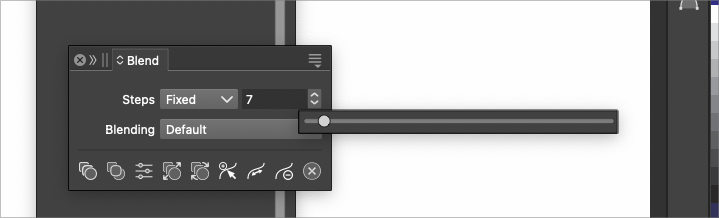
      This is not so much a 'bug" as a UI user experience issue. If the blend panel (could be applicable to other panels as well with the slider option) is too close to the right side of the screen, the slider will not show at all when the user attempts to adjust the number of steps. It took me a couple minutes to realize that the panel needed to be moved inward a little bit to allow for the slider to show
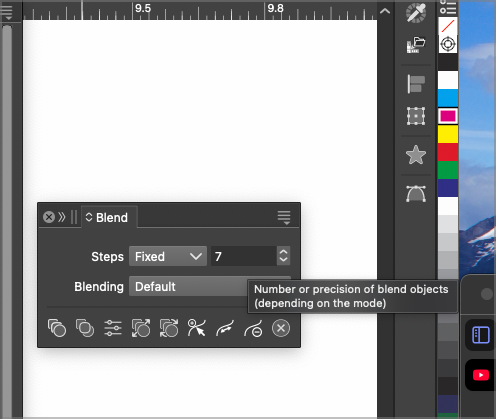
      0_1733767448904_550df4cc-6db7-4048-9994-300e2fc5fc8f-BLD 2024-12-09 at 13.02.46@2x.png

      0_1733767554615_9d5771d0-1e66-4d6d-b0b0-695e2931fe0d-BLD 2024-12-09 at 13.02.59.png

      🍎 macOS Tahoe 26.2, Mac mini (M1, 2020), Chip Apple M1, Memory 16 GB
      Cintiq 27QHD Display and LG Ultra HD Display

      VectorStylerV 1 Reply Last reply Reply Quote 2
      • VectorStylerV Offline
        VectorStyler @Boldline
        last edited by

        @Boldline yes, I think the new "slider alignment" feature made this worse.

        I will fix it ASAP.

        BoldlineB debraspicherD 2 Replies Last reply Reply Quote 1
        • BoldlineB Offline
          Boldline @VectorStyler
          last edited by Boldline

          @VectorStyler Thinking more on it, the slider concept I showed you a couple months back would work for this because it adjusts the amount with incremental stages instead of showing one large bar. once you drag the slider to the end of the current bar, the numbers increase/decrease and you can continue sliding to a higher or lower number without the smaller bar being affected

          🍎 macOS Tahoe 26.2, Mac mini (M1, 2020), Chip Apple M1, Memory 16 GB
          Cintiq 27QHD Display and LG Ultra HD Display

          1 Reply Last reply Reply Quote 2
          • S Offline
            Subpath
            last edited by

            @Boldline , @VectorStyler

            Paragraphic have such sliders, here the video

            Win 11
            CPU: AMD Ryzen 5 9600X, 6-core.
            GPU: Nvidia Geforce RTX 5070.

            1 Reply Last reply Reply Quote 2
            • M Offline
              monsterfox
              last edited by

              @VectorStyler https://youtu.be/XuQo0i2oJFQ?si=tAx5kMCdKev427yZ
              Can a slider be added to the blending effect to control the number of objects, similar to the demonstration in the opening clip of the video? Such an operation would be much more convenient.
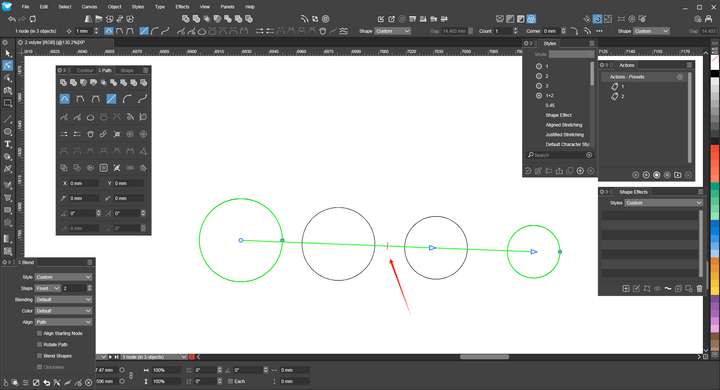
              0_1733844544416_mmexport1733842585936.png

              VectorStylerV 1 Reply Last reply Reply Quote 1
              • VectorStylerV Offline
                VectorStyler @monsterfox
                last edited by

                @monsterfox There are no plans for now to change the style of the slider. Only the reported bugs.
                I will check if the blending steps slider has suitable intervals.

                1 Reply Last reply Reply Quote 0
                • debraspicherD Offline
                  debraspicher @VectorStyler
                  last edited by debraspicher

                  @VectorStyler said in Panel numerical slider does not show if panel is too close to screen edge:

                  @Boldline yes, I think the new "slider alignment" feature made this worse.

                  I will fix it ASAP.

                  Sorry about that

                  Windows 11 Build 26200.7171 (25H2)
                  AMD Ryzen 7 9700X with Gigabyte X870E Aorus Pro Ice
                  32GB RAM @ 6000MHz
                  PNY NVIDIA RTX 5070 Ti 16GB; Display 1: 4K @150%; Display 2: 4K @200%
                  Wacom Intuos Pro L (2025); Wacom Intuos Pro M; Epson ET-8550; Siser Romeo

                  1 Reply Last reply Reply Quote 0
                  • First post
                    Last post
