VectorStyler
    • Categories
    • Unread
    • Recent
    • Tags
    • Popular
    • Register
    • Login

    Panel showing behind tabbed Palette Panel

    Scheduled Pinned Locked Moved Bugs in VectorStyler
    5 Posts 2 Posters 4.4k Views 2 Watching
    Loading More Posts
    • Oldest to Newest
    • Newest to Oldest
    • Most Votes
    Reply
    • Reply as topic
    Log in to reply
    This topic has been deleted. Only users with topic management privileges can see it.
    • debraspicherD Offline
      debraspicher
      last edited by

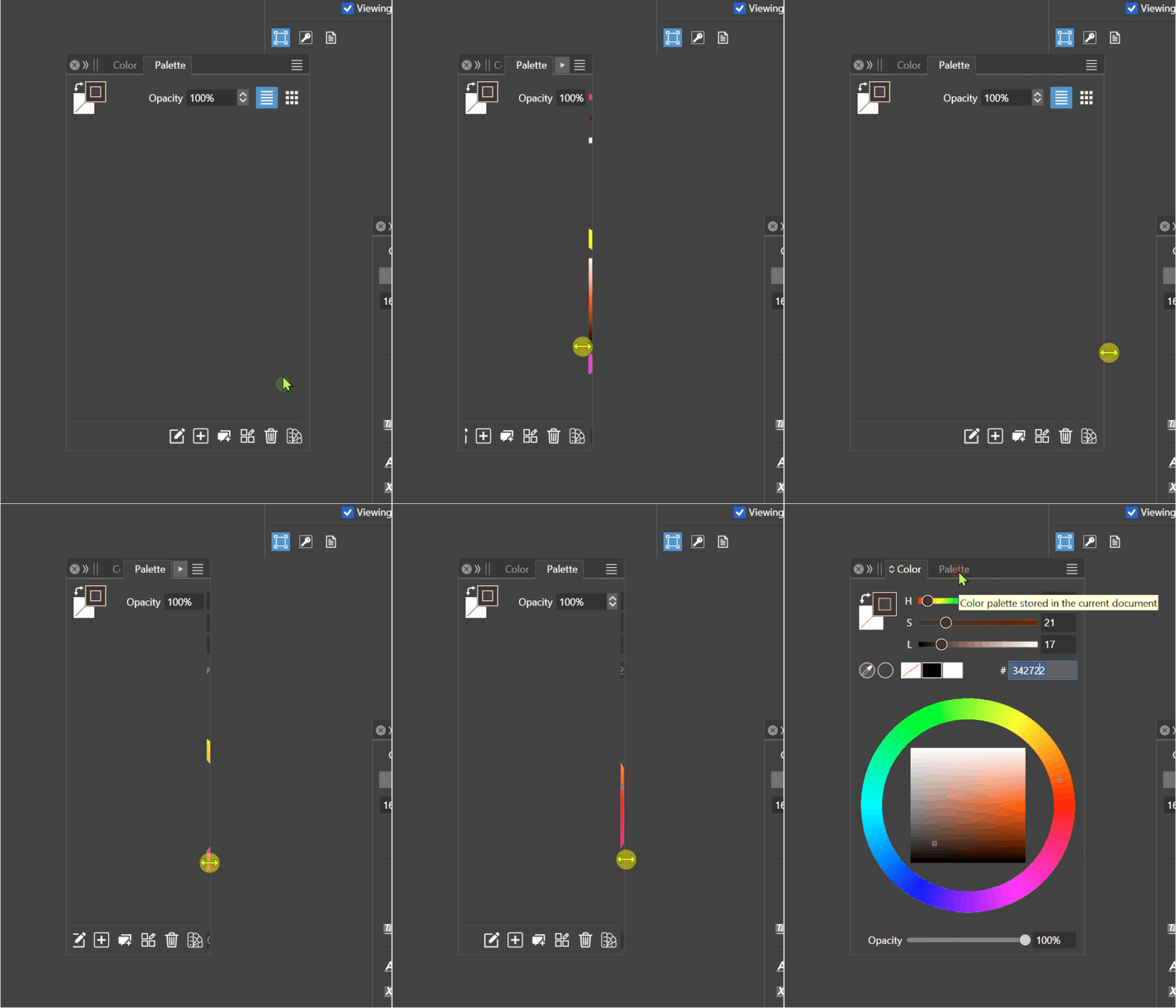
      You can see here in this instance, the Color Panel is bleeding into the Palette one when resizing:
      alt text

      Windows 11 Build 26200.7171 (25H2)
      AMD Ryzen 7 9700X with Gigabyte X870E Aorus Pro Ice
      32GB RAM @ 6000MHz
      PNY NVIDIA RTX 5070 Ti 16GB; Display 1: 4K @150%; Display 2: 4K @200%
      Wacom Intuos Pro L (2025); Wacom Intuos Pro M; Epson ET-8550; Siser Romeo

      VectorStylerV 1 Reply Last reply Reply Quote 0
      • VectorStylerV Offline
        VectorStyler @debraspicher
        last edited by

        @debraspicher I tested this on Windows, also with 150% display scaling, but could not replicate it.
        Could be something broken with the workspace, please try resetting all (settings and workspace).

        debraspicherD 1 Reply Last reply Reply Quote 0
        • debraspicherD Offline
          debraspicher @VectorStyler
          last edited by

          @VectorStyler I did a reset, but it's hard to know if it was rebooting the program that helped or this specifically. The palette panel still wasn't showing or loading/saving swatches. I did manage to get it work by loading a different palette up in another tab, and then retrying. I'm not seeing the color panel behind in that side anymore.. plus it's not doing the weird move when resizing thing anymore. Sorry, this is referring also to the other bug I just posted...

          Windows 11 Build 26200.7171 (25H2)
          AMD Ryzen 7 9700X with Gigabyte X870E Aorus Pro Ice
          32GB RAM @ 6000MHz
          PNY NVIDIA RTX 5070 Ti 16GB; Display 1: 4K @150%; Display 2: 4K @200%
          Wacom Intuos Pro L (2025); Wacom Intuos Pro M; Epson ET-8550; Siser Romeo

          VectorStylerV 1 Reply Last reply Reply Quote 1
          • VectorStylerV Offline
            VectorStyler @debraspicher
            last edited by

            @debraspicher There is still a bug somewhere, just have to find the settings or workspace state that causes this.

            debraspicherD 1 Reply Last reply Reply Quote 0
            • debraspicherD Offline
              debraspicher @VectorStyler
              last edited by

              @VectorStyler I'm sure you received it, but when I did the reset, the program reopened with a Crash report, so maybe that is a help.


              Windows 11 Build 26200.7171 (25H2)
              AMD Ryzen 7 9700X with Gigabyte X870E Aorus Pro Ice
              32GB RAM @ 6000MHz
              PNY NVIDIA RTX 5070 Ti 16GB; Display 1: 4K @150%; Display 2: 4K @200%
              Wacom Intuos Pro L (2025); Wacom Intuos Pro M; Epson ET-8550; Siser Romeo

              1 Reply Last reply Reply Quote 1
              • First post
                Last post