VectorStyler
    • Categories
    • Unread
    • Recent
    • Tags
    • Popular
    • Register
    • Login

    Working with Minified Panels, unintended behavior?

    Scheduled Pinned Locked Moved Bugs in VectorStyler
    4 Posts 2 Posters 3.1k Views 2 Watching
    Loading More Posts
    • Oldest to Newest
    • Newest to Oldest
    • Most Votes
    Reply
    • Reply as topic
    Log in to reply
    This topic has been deleted. Only users with topic management privileges can see it.
    • debraspicherD Offline
      debraspicher
      last edited by

      When trying to make panels less intrusive, I tried "minifying" the Panels for the first time, but it's very difficult to access the unlock/expand icon... it's also very close to 'X':
      https://1drv.ms/i/s!AuWHX0h5bAoRisczMn-yYhHCIbYQJQ?e=v9vIil

      Also when attempting the minification just now when "docked", this is what I got. Not sure this is how it is meant to look, but it appeared this way when setting that to the defaulted state. I can still pull it out and then it's fine, but noticed I can't just make them icons.
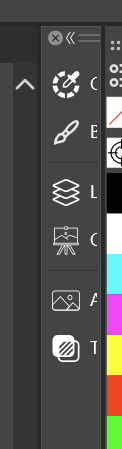
      0_1739770101592_096c4ed6-5546-41ad-922a-cbaa222ab96b-image.png

      Windows 11 Build 26200.7171 (25H2)
      AMD Ryzen 7 9700X with Gigabyte X870E Aorus Pro Ice
      32GB RAM @ 6000MHz
      PNY NVIDIA RTX 5070 Ti 16GB; Display 1: 4K @150%; Display 2: 4K @200%
      Wacom Intuos Pro L (2025); Wacom Intuos Pro M; Epson ET-8550; Siser Romeo

      VectorStylerV 1 Reply Last reply Reply Quote 1
      • VectorStylerV Offline
        VectorStyler @debraspicher
        last edited by

        @debraspicher The minified panels can be resized horizontally, to show the panel title. In this case it seems that the default size after minification is too large and the title becomes visible. I will try to find a solution for this.

        debraspicherD 1 Reply Last reply Reply Quote 1
        • debraspicherD Offline
          debraspicher @VectorStyler
          last edited by debraspicher

          @VectorStyler I emailed you video showing some other major glitches with it I just found, so that could help to resolve it. Thanks again!

          Windows 11 Build 26200.7171 (25H2)
          AMD Ryzen 7 9700X with Gigabyte X870E Aorus Pro Ice
          32GB RAM @ 6000MHz
          PNY NVIDIA RTX 5070 Ti 16GB; Display 1: 4K @150%; Display 2: 4K @200%
          Wacom Intuos Pro L (2025); Wacom Intuos Pro M; Epson ET-8550; Siser Romeo

          VectorStylerV 1 Reply Last reply Reply Quote 1
          • VectorStylerV Offline
            VectorStyler @debraspicher
            last edited by

            @debraspicher This should be fixed in the 1.2.061 build

            1 Reply Last reply Reply Quote 1
            • First post
              Last post
