VectorStyler
    • Categories
    • Unread
    • Recent
    • Tags
    • Popular
    • Register
    • Login

    "Replace Colors" is not making the changes requested after clicking "ok"
    Scheduled Pinned Locked Moved Bugs in VectorStyler
    4 Posts 2 Posters 3.2k Views 1 Watching
    Loading More Posts
    • Oldest to Newest
    • Newest to Oldest
    • Most Votes
    Reply
    • Reply as topic
    Log in to reply
    This topic has been deleted. Only users with topic management privileges can see it.
    • BoldlineB Online
      Boldline
      last edited by

      When I am using the "Replace colors" panel, after I make edits to the colors, it is not making the changes in the design after I click "ok" to confirm.

      Here is a video of this happening

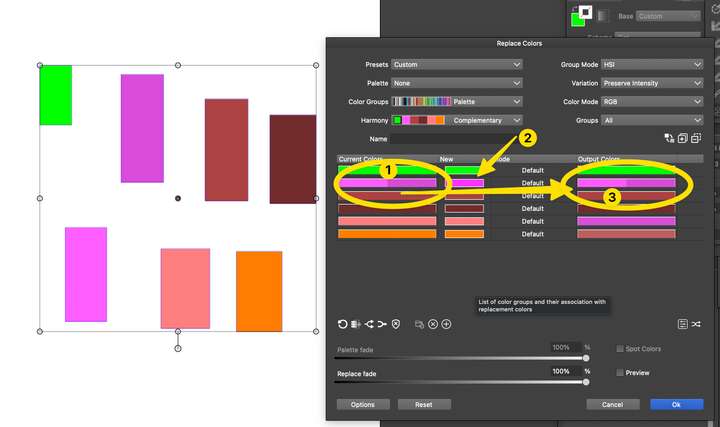
      In the example screenshot below, I'm also a little confused because I merged two different pinks (1) but the output color shows the two different pink colors (3) even though I merged them and chose a new color to make them both (2).Why does it still show as two colors in the output section and not as one color based on the new color shown (2)?
      0_1743519232785_facd3c69-7c85-470b-8661-8606765e0295-CleanShot 2025-04-01 at 10.51.15.png

      Also, why in the example image above, are colors like the orange on the bottom of the row of colors showing an output new color much darker in shade than the original color or the "new" color (I did not change this color at all)

      🍎 macOS Tahoe 26.2, Mac mini (M1, 2020), Chip Apple M1, Memory 16 GB
      Cintiq 27QHD Display and LG Ultra HD Display

      BoldlineB VectorStylerV 3 Replies Last reply Reply Quote 1
      • BoldlineB Online
        Boldline @Boldline
        last edited by

        It did confirm the color changes on a test example but its not working in the initial design. I will send you that file

        🍎 macOS Tahoe 26.2, Mac mini (M1, 2020), Chip Apple M1, Memory 16 GB
        Cintiq 27QHD Display and LG Ultra HD Display

        1 Reply Last reply Reply Quote 1
        • VectorStylerV Offline
          VectorStyler @Boldline
          last edited by

          @Boldline I opened a bug on this and will try to replicate.

          1 Reply Last reply Reply Quote 0
          • VectorStylerV Offline
            VectorStyler @Boldline
            last edited by

            @Boldline In the 3rd column select a replacement mode: in this case try "Exact".

            1 Reply Last reply Reply Quote 0
            • First post
              Last post
