VectorStyler
    • Categories
    • Unread
    • Recent
    • Tags
    • Popular
    • Register
    • Login

    Appearance panel - colour symbol

    Scheduled Pinned Locked Moved Bugs in VectorStyler
    6 Posts 2 Posters 3.8k Views 2 Watching
    Loading More Posts
    • Oldest to Newest
    • Newest to Oldest
    • Most Votes
    Reply
    • Reply as topic
    Log in to reply
    This topic has been deleted. Only users with topic management privileges can see it.
    • B Offline
      B-Vs-V
      last edited by B-Vs-V

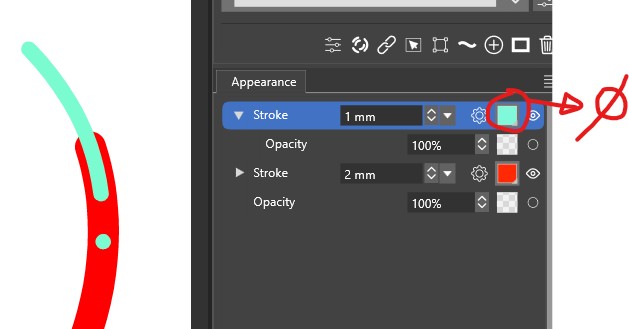
      Is it a bug or one of my user errors?... I test VS and create two strokes of a few letters, and when I click on the little symbol to change the colour… no more stroke ☺

      0_1744698526899_b1.jpg

      W11 Pro 25H2 - 12th Gen Intel(R) i7-12700K 3.61 GHz - RAM 64 Go - NVIDIA GF GTX 4070 Ti - Intuos - Dell UP3216Q / Eizo ColorEdge
      W11 Pro 25H2 - 12th Gen Intel(R) i7-12700KF 3.60 GHz -RAM 64 Go - NVIDIA GF GTX 3080 - IntuosPro- ProArt PA329C

      VectorStylerV 1 Reply Last reply Reply Quote 0
      • VectorStylerV Offline
        VectorStyler @B-Vs-V
        last edited by

        @B-Vs-V I cannot replicate this. Send me your settings / workspace files.

        B 1 Reply Last reply Reply Quote 0
        • B Offline
          B-Vs-V @VectorStyler
          last edited by

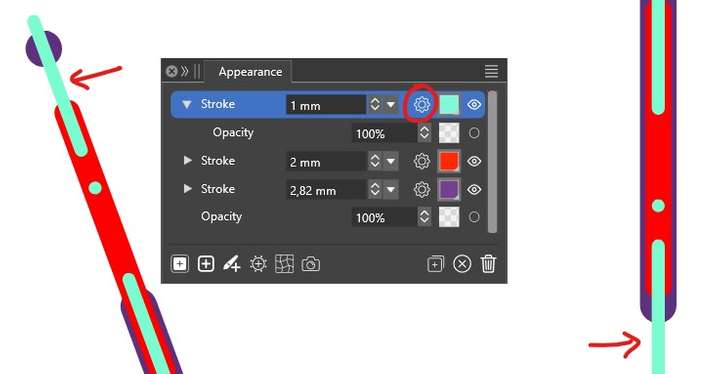
          @VectorStyler reproducible:

          before (marks are wrong):
          0_1744726249746_q1.jpg

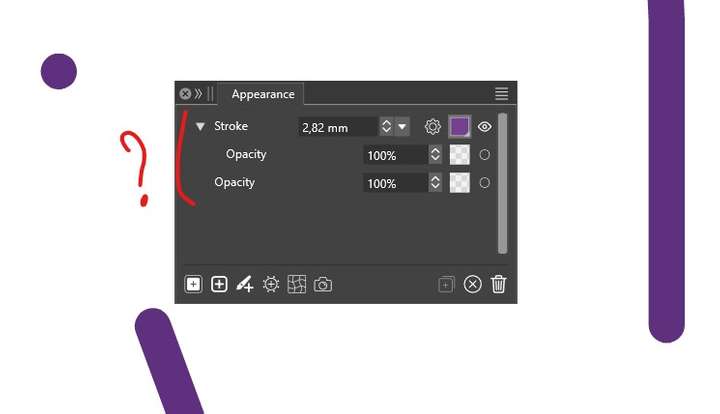
          then, I click on the colour symbol, and:

          0_1744726280850_q2.jpg

          W11 Pro 25H2 - 12th Gen Intel(R) i7-12700K 3.61 GHz - RAM 64 Go - NVIDIA GF GTX 4070 Ti - Intuos - Dell UP3216Q / Eizo ColorEdge
          W11 Pro 25H2 - 12th Gen Intel(R) i7-12700KF 3.60 GHz -RAM 64 Go - NVIDIA GF GTX 3080 - IntuosPro- ProArt PA329C

          VectorStylerV 1 Reply Last reply Reply Quote 0
          • VectorStylerV Offline
            VectorStyler @B-Vs-V
            last edited by

            @B-Vs-V I also need the settings/workspace files, as this is possibly some kind of workspace issue

            B 1 Reply Last reply Reply Quote 0
            • B Offline
              B-Vs-V @VectorStyler
              last edited by

              @VectorStyler which file(s) precisely and where do I get these again ?

              W11 Pro 25H2 - 12th Gen Intel(R) i7-12700K 3.61 GHz - RAM 64 Go - NVIDIA GF GTX 4070 Ti - Intuos - Dell UP3216Q / Eizo ColorEdge
              W11 Pro 25H2 - 12th Gen Intel(R) i7-12700KF 3.60 GHz -RAM 64 Go - NVIDIA GF GTX 3080 - IntuosPro- ProArt PA329C

              VectorStylerV 1 Reply Last reply Reply Quote 0
              • VectorStylerV Offline
                VectorStyler @B-Vs-V
                last edited by

                @B-Vs-V These should be in c:\Users<user name>\AppData\Roaming\NumericPath\VectorStyler1.2\vector\data\resources\

                (the "Roaming" folder can also be "Local")

                1 Reply Last reply Reply Quote 0
                • First post
                  Last post