Colorize possibilities you may not know
-
Colorize possibilities you may not know
While experimenting with palettes in Colorize, I accidentally
discovered a pretty nice feature.It seems obvious that you can use your own color palette with Colorize.
But did you know that you can also select specific colors from your
palette and Colorize will only use those then?
.
.
Here's how it works:
Create a few shapes, select them, and call the Colorize function.
Select Palette from the "Mode" dropdown menu and for
demonstration purpose use the VS Document color palette.
( the first icon above the color window ) But this work with
any color Palette.
( the Colorize Feature is in Effects > Replace Colors > Colorize )
.
.
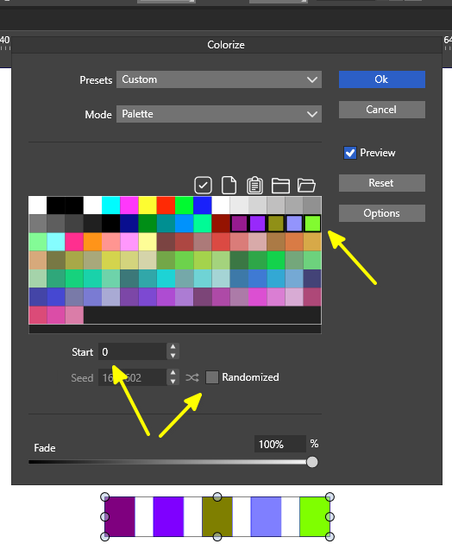
First option, work with the Shift key.
Select a color with the mouse, hold down the Shift key and select
another color. All colors between that two colors will be selected.
.
.
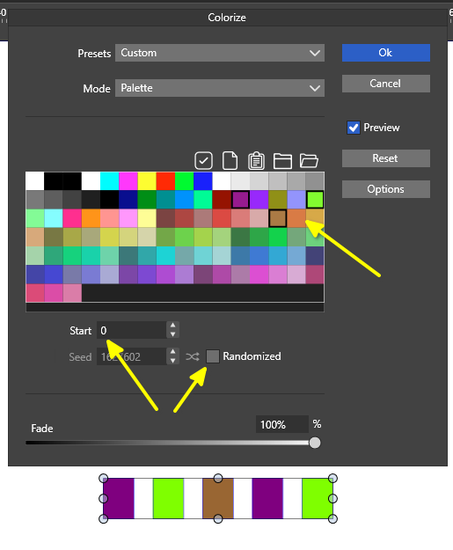
Second option, work with the CTRL key.
Hold down the CTRL key while selecting a few colors from the color palette.
.
.
In both cases, the colorization function will then uses only the selected colors.
Additional to this the Randomized function use also only the selected colors then.
Btw. try a different Start Value too.
.
.
Here a Shift Key Screenshot
.
.and here a CTRL Key Screenshot
-
@Subpath great tip ! I was wondering if it was possible to select colors but did not try multi-select.
thanks -
Thanks, I'm glad it's helpful.
Yes, I was surprised and very pleased too.Its also great and fantastic that the randomize function
will use the selected colors only then. Love that Feature.