VectorStyler
    • Categories
    • Unread
    • Recent
    • Tags
    • Popular
    • Register
    • Login

    Bug

    Scheduled Pinned Locked Moved Bugs in VectorStyler
    7 Posts 3 Posters 4.8k Views 3 Watching
    Loading More Posts
    • Oldest to Newest
    • Newest to Oldest
    • Most Votes
    Reply
    • Reply as topic
    Log in to reply
    This topic has been deleted. Only users with topic management privileges can see it.
    • M Online
      monsterfox
      last edited by

      0_1745850409895_mmexport1745850383472.png

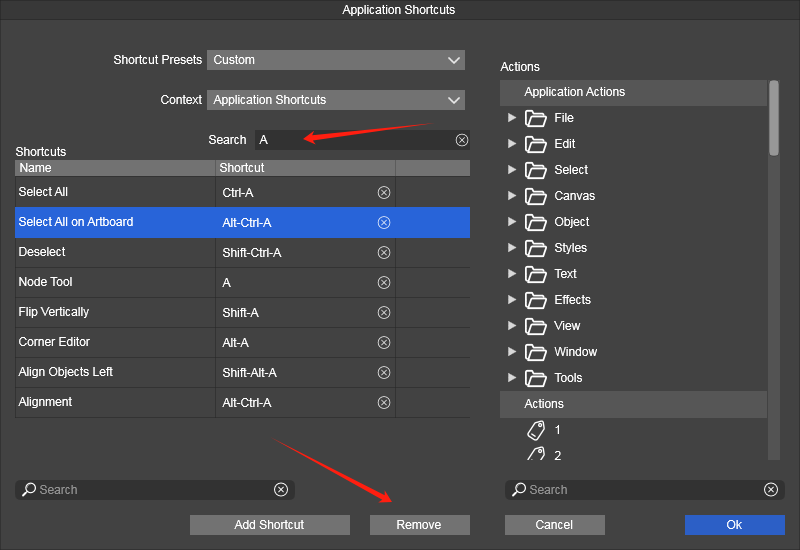
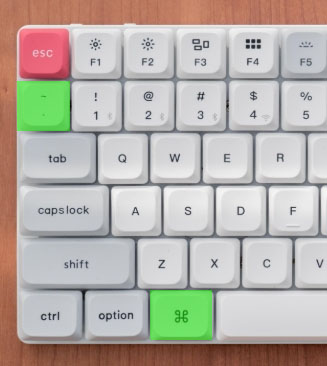
      Unable to move content out in this search state. Additionally, the shortcut Alt+~ is currently unavailable—please add it. The green shortcut key 。
      0_1745937990252_mmexport1745937199946.jpg

      VectorStylerV 1 Reply Last reply Reply Quote 0
      • VectorStylerV Offline
        VectorStyler @monsterfox
        last edited by

        @monsterfox said in Bug:

        Unable to move content out in this search state

        Click on the (x) button at the end of the Search field.

        Additionally, the shortcut Alt+~ is currently unavailable—please add it

        I opened a bug on this.

        VectorStylerV 1 Reply Last reply Reply Quote 0
        • VectorStylerV Offline
          VectorStyler @VectorStyler
          last edited by

          @VectorStyler said in Bug:

          Additionally, the shortcut Alt+~ is currently unavailable—please add it

          On MacOS this is working (I see that the keyboard is a mac one).
          But on Windows I cannot access this key.

          M 1 Reply Last reply Reply Quote 0
          • M Online
            monsterfox @VectorStyler
            last edited by

            @VectorStyler Alt+~ ,This is a Win keyboard, but the image might be incorrect.

            VectorStylerV 1 Reply Last reply Reply Quote 1
            • S Offline
              Subpath
              last edited by Subpath

              @VectorStyler

              It seems to be a Mac Keyboard

              0_1745988550710_Mac Keyboard.png

              I know Windows Keyboards only with a "Win Key"
              this is a Win Keyboard with US Layout, German Layout
              would look different. But both have the Win key.
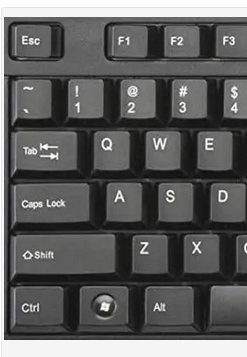
              0_1745988461298_Win Keyboard US Layout.png

              Win 11
              CPU: AMD Ryzen 5 9600X, 6-core.
              GPU: Nvidia Geforce RTX 5070.

              1 Reply Last reply Reply Quote 0
              • VectorStylerV Offline
                VectorStyler @monsterfox
                last edited by

                @monsterfox said in Bug:

                Alt+~ ,This is a Win keyboard, but the image might be incorrect.

                What is the Windows Keyboard layout settings. I can try selecting that to replicate this issue.

                M 1 Reply Last reply Reply Quote 0
                • M Online
                  monsterfox @VectorStyler
                  last edited by

                  @VectorStyler I don't remember the exact name, but it's an option in the selection menu that's the opposite of "Select Parent." It's definitely not called "Child."
                  👽

                  1 Reply Last reply Reply Quote 1
                  • First post
                    Last post