VectorStyler
    • Categories
    • Unread
    • Recent
    • Tags
    • Popular
    • Register
    • Login

    The cloned object causes incorrect positioning when placed on the path.

    Scheduled Pinned Locked Moved Bugs in VectorStyler
    7 Posts 2 Posters 5.0k Views 2 Watching
    Loading More Posts
    • Oldest to Newest
    • Newest to Oldest
    • Most Votes
    Reply
    • Reply as topic
    Log in to reply
    This topic has been deleted. Only users with topic management privileges can see it.
    • encartE Offline
      encart
      last edited by

      https://somup.com/cTfUDpsWJ6
      When I try to place the cloned objects on the path along with the original object then they place themselves strangely. The problem does not occur when I use only clones.

      MacBook Air M4 24Gb, Tahoe 26.2

      VectorStylerV 1 Reply Last reply Reply Quote 1
      • VectorStylerV Offline
        VectorStyler @encart
        last edited by

        @encart I will try to find a solution for this.

        encartE 1 Reply Last reply Reply Quote 0
        • encartE Offline
          encart @VectorStyler
          last edited by

          @VectorStyler Thank you. IMHO it should be resolved because it is confusing when it occurs.

          MacBook Air M4 24Gb, Tahoe 26.2

          VectorStylerV 1 Reply Last reply Reply Quote 1
          • VectorStylerV Offline
            VectorStyler @encart
            last edited by

            @encart said in The cloned object causes incorrect positioning when placed on the path.:

            IMHO it should be resolved because it is confusing when it occurs.

            I replicated the issue here also. The next build should have a fix for this.

            1 Reply Last reply Reply Quote 1
            • encartE Offline
              encart
              last edited by

              Works well now, thank you!
              There is one small issue. The center point of original object is not attached to path when scaling. Clones behave properly. My solution for now is to use Scale Tool, but maybe you'll see some chances for improvements.
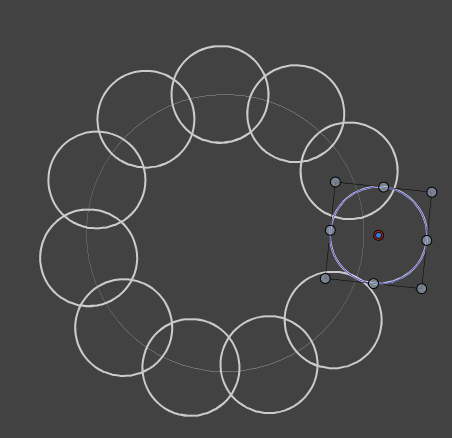
              0_1746290628981_Screenshot 2025-05-03 183504.png

              MacBook Air M4 24Gb, Tahoe 26.2

              VectorStylerV 1 Reply Last reply Reply Quote 1
              • VectorStylerV Offline
                VectorStyler @encart
                last edited by

                @encart said in The cloned object causes incorrect positioning when placed on the path.:

                There is one small issue. The center point of original object is not attached to path when scaling.

                This is not possible with the current version as there is no link between the objects and the path (to keep positions).

                But this will be available in 1.3

                encartE 1 Reply Last reply Reply Quote 1
                • encartE Offline
                  encart @VectorStyler
                  last edited by

                  @VectorStyler
                  Thank you.

                  MacBook Air M4 24Gb, Tahoe 26.2

                  1 Reply Last reply Reply Quote 0
                  • First post
                    Last post
