Detail optimization and function enhancement
-
@VectorStyler https://youtu.be/7E2P-kcTbtw?feature=shared
In VS pen drawing tool, the brush stroke is displayed in advance during the drawing process, which does not happen in Adobe Illustrator. This pre-displayed stroke affects drawing accuracy. It should work like Illustrator—first showing the (path skeleton) and only displaying the brush stroke once the operation is completed. We hope this issue can be resolved. -
@monsterfox There should be a Direct Preview option for this in the Settings.
-
@VectorStyler There are still some issues with the Recent panel. The "Repeat" function should duplicate the previous step, which is supposed to be: 1. Combine; 2. Close Path; 3. Combine. However, the third operation (Combine) does not appear in the panel—only the second one (Close Path) is displayed. As a result, pressing the shortcut key for repeating operations will only execute the second step. This issue needs to be improved.
https://youtu.be/fyvRIXjREHI?feature=shared
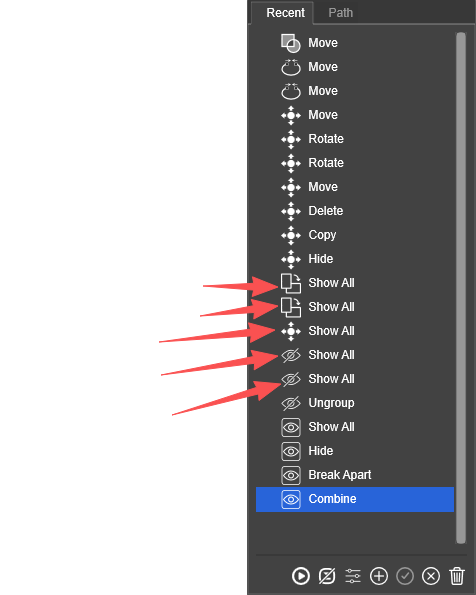
"Show All" should not appear in the list, as it is only a one-time operation. Additionally, I’m curious why the icons preceding it are different?
https://youtu.be/SaW9sW7uqSE?feature=shared
I grouped two steps into a repeat set and disabled the repeat logging function. However, after performing the operations shown in the video, the logging automatically turned on—this is also an issue that needs to be addressed. Please fix the aforementioned problems. -
@monsterfox I added this to the backlog.
-
@monsterfox said in Detail optimization and function enhancement:
However, the third operation (Combine) does not appear in the panel
An operation will show up only once in the list.
-
@VectorStyler However, selecting "Show All" results in the same entry appearing five consecutive times — is this a bug? If only one instance should be displayed, users would have to repeatedly delete entries from the panel or manually drag specific operations to the recent list, which severely undermines usability.
-
@monsterfox said in Detail optimization and function enhancement:
However, selecting "Show All" results in the same entry appearing five consecutive times — is this a bug?
Yes, this is a bug.
