VectorStyler
    • Categories
    • Unread
    • Recent
    • Tags
    • Popular
    • Register
    • Login

    Technical consultation
    Scheduled Pinned Locked Moved General Discussion
    8 Posts 3 Posters 5.2k Views 3 Watching
    Loading More Posts
    • Oldest to Newest
    • Newest to Oldest
    • Most Votes
    Reply
    • Reply as topic
    Log in to reply
    This topic has been deleted. Only users with topic management privileges can see it.
    • M Offline
      monsterfox
      last edited by

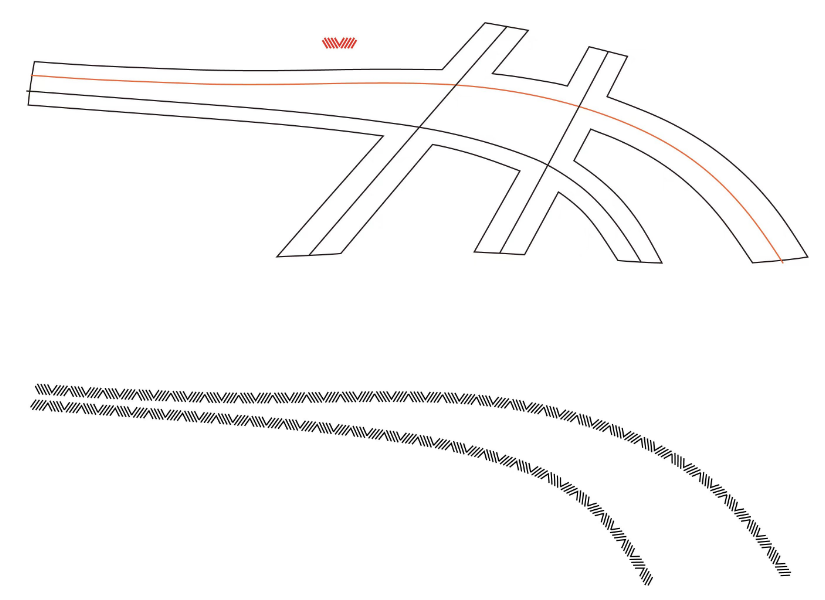
      0_1746975322857_mmexport1746975274093.png
      The small red graphic above is the sample, which needs to be distributed along the entire path. The effect is shown in the following figure. How can I operate in VS to make it convenient and quick? Thank you.

      1 Reply Last reply Reply Quote 0
      • S Offline
        Subpath
        last edited by Subpath

        Create a Pattern Brush Preset ?

        I created a stylized version of the red graphic. Since your
        pattern consists of strokes, you may need to combine them.
        The height of the pattern corresponds to the stroke width.

        Here a pic
        0_1746979139840_Path Pattern.png

        0_1746979058943_Pattern along a path.png

        Win 11
        CPU: AMD Ryzen 5 9600X, 6-core.
        GPU: Nvidia Geforce RTX 5070.

        M 2 Replies Last reply Reply Quote 2
        • M Offline
          monsterfox @Subpath
          last edited by

          @Subpath Thank you. I'll try out this function later.

          1 Reply Last reply Reply Quote 1
          • M Offline
            monsterfox @Subpath
            last edited by

            @Subpath Actually, I still haven't fully mastered this method. If convenient, could you record a video? Thank you. By the way, can this method make the brush preset the same size as the sample?

            S 1 Reply Last reply Reply Quote 0
            • S Offline
              Subpath @monsterfox
              last edited by

              @monsterfox

              It would be nice if you had made a video showing
              what you failed at.

              Regarding the question about the size, I don't have
              any other example than the picture you posted. So I
              don't know what your point is with this.

              Here a Video how i made the Pattern Brush

              and here an additional video how to flip that pattern brush

              Win 11
              CPU: AMD Ryzen 5 9600X, 6-core.
              GPU: Nvidia Geforce RTX 5070.

              M 2 Replies Last reply Reply Quote 0
              • M Offline
                monsterfox @Subpath
                last edited by

                @Subpath Thanks, your video cleared up my confusion. This isn't as simple to operate as Inkscape—my image was completed using it. There's a "pattern along path" effect that makes things quicker.

                1 Reply Last reply Reply Quote 1
                • M Offline
                  monsterfox @Subpath
                  last edited by

                  @Subpath But VS seems to have more settings options. I haven't experienced it deeply yet, but it should be able to handle some more complex graphic scenarios.

                  S 1 Reply Last reply Reply Quote 1
                  • S Offline
                    SaskiaHong @monsterfox
                    last edited by

                    Technical issues in VectorStyler can sometimes be hard to reproduce, so having the reasoning behind the fix instead of just the final answer makes this way more useful.

                    1 Reply Last reply Reply Quote 1
                    • First post
                      Last post