VectorStyler
    • Categories
    • Unread
    • Recent
    • Tags
    • Popular
    • Register
    • Login

    Shape effects are lost on copy/paste
    Scheduled Pinned Locked Moved Bugs in VectorStyler
    5 Posts 3 Posters 1.9k Views 3 Watching
    Loading More Posts
    • Oldest to Newest
    • Newest to Oldest
    • Most Votes
    Reply
    • Reply as topic
    Log in to reply
    This topic has been deleted. Only users with topic management privileges can see it.
    • RaaskotR Offline
      Raaskot
      last edited by Raaskot

      Nondestructive shape effects are lost when pasting an object from an open VS document to another.

      0_1759322396910_bough-02.vstyler
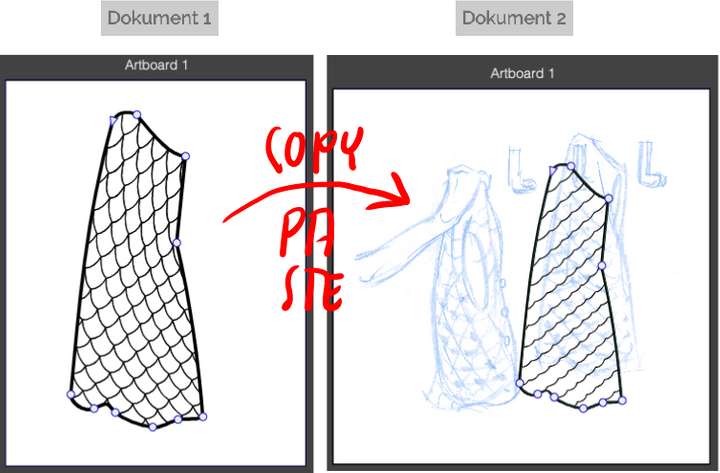
      0_1759322123365_ac929680-f0eb-4f2a-a521-1086b45ab13c-image.png

      VectorStylerV 1 Reply Last reply Reply Quote 1
      • VectorStylerV Offline
        VectorStyler @Raaskot
        last edited by

        @Raaskot Yes, this can be replicated here and it is a bug.

        One end of the Blend effect is a "reference" object (a symbol) and that cause the issue.

        M 1 Reply Last reply Reply Quote 1
        • M Offline
          monsterfox @VectorStyler
          last edited by

          @VectorStyler By the way, there also seems to be an issue with copying and pasting shapes.

          VectorStylerV 1 Reply Last reply Reply Quote 0
          • VectorStylerV Offline
            VectorStyler @monsterfox
            last edited by

            @monsterfox said in Shape effects are lost on copy/paste:

            @VectorStyler By the way, there also seems to be an issue with copying and pasting shapes.

            Send me an example file.

            M 1 Reply Last reply Reply Quote 0
            • M Offline
              monsterfox @VectorStyler
              last edited by

              @VectorStyler https://youtu.be/7PFPP9QXqNA?feature=shared
              0_1759503919233_556.vstyler

              1 Reply Last reply Reply Quote 1
              • First post
                Last post
