VectorStyler
    • Categories
    • Unread
    • Recent
    • Tags
    • Popular
    • Register
    • Login

    Unusually large contextual menu
    Scheduled Pinned Locked Moved Bugs in VectorStyler
    7 Posts 2 Posters 1.4k Views 2 Watching
    Loading More Posts
    • Oldest to Newest
    • Newest to Oldest
    • Most Votes
    Reply
    • Reply as topic
    Log in to reply
    This topic has been deleted. Only users with topic management privileges can see it.
    • DanielD Offline
      Daniel
      last edited by

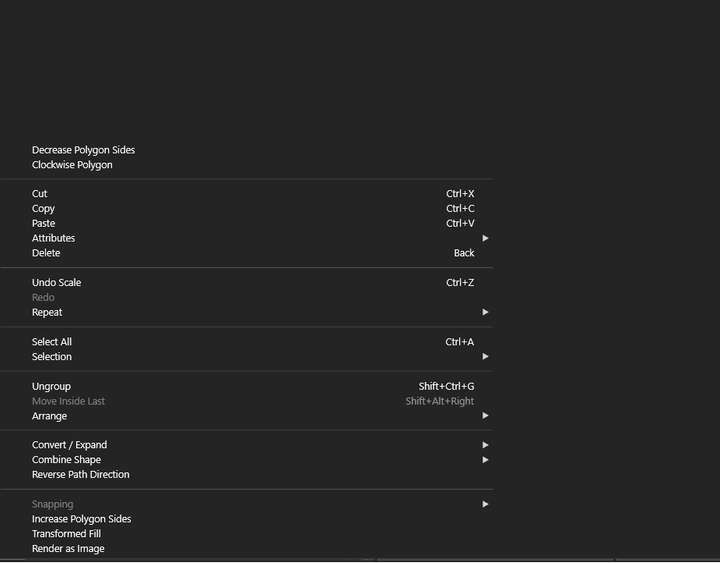
      0_1764171092370_342b478e-4290-4f2a-8b4e-b271a81bb0b7-image.png

      Unusually large contextual menu when I right click. It happens when I have the symbols panel open. A symbol on the canvas and right click it.

      Work: Windows 11 | Intel i9 14900HS (24 Cores/32 Threads) | GeForce RTX 4070 | 64 GB RAM
      Personal: Windows 11 | Amd Ryzen 9 7950X (16 Core, 32 Threads) | GeForce RTX 3060 | 32 GB RAM

      VectorStylerV 1 Reply Last reply Reply Quote 1
      • VectorStylerV Offline
        VectorStyler @Daniel
        last edited by

        @Daniel This problem keeps coming back. I assume this is Windows. is there any Display scaling in the Windows settings?

        1 Reply Last reply Reply Quote 1
        • DanielD Offline
          Daniel
          last edited by Daniel

          As a matter of fact my screen resolution is scaled up by a factor of 108%. Yes, it is Windows. And weirdly, it only occurs when I click on a single object. That bright orange one.
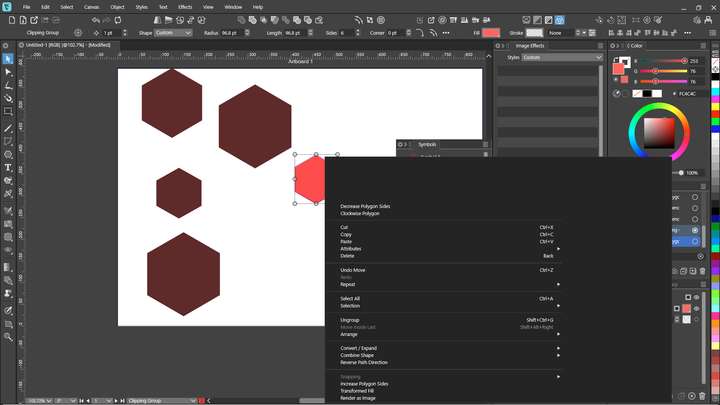
          0_1764171500022_cb47601b-2b5b-41e7-a58d-f3df46bf3f1e-image.png

          Work: Windows 11 | Intel i9 14900HS (24 Cores/32 Threads) | GeForce RTX 4070 | 64 GB RAM
          Personal: Windows 11 | Amd Ryzen 9 7950X (16 Core, 32 Threads) | GeForce RTX 3060 | 32 GB RAM

          VectorStylerV 1 Reply Last reply Reply Quote 0
          • VectorStylerV Offline
            VectorStyler @Daniel
            last edited by

            @Daniel said in Unusually large contextual menu:

            As a matter of fact my screen resolution is scaled up by a factor of 108%.

            Is the scaling set in the VectorStyler Settings, or in the Windows settings?

            DanielD 1 Reply Last reply Reply Quote 0
            • DanielD Offline
              Daniel @VectorStyler
              last edited by

              @VectorStyler: It is set on Windows. Not in VS.

              Work: Windows 11 | Intel i9 14900HS (24 Cores/32 Threads) | GeForce RTX 4070 | 64 GB RAM
              Personal: Windows 11 | Amd Ryzen 9 7950X (16 Core, 32 Threads) | GeForce RTX 3060 | 32 GB RAM

              VectorStylerV 1 Reply Last reply Reply Quote 1
              • VectorStylerV Offline
                VectorStyler @Daniel
                last edited by

                @Daniel How can I set it to 108% (only some discrete choices in a dropdown) ?

                DanielD 1 Reply Last reply Reply Quote 0
                • DanielD Offline
                  Daniel @VectorStyler
                  last edited by

                  @VectorStyler 0_1764172924812_56eb2449-a259-4dcf-b617-3edd58e583a1-image.png

                  Click the arrow next to the drop down and you'll be taken to:

                  0_1764172950396_8fc53b36-998d-4417-9f3e-45388dcc7e17-image.png

                  Work: Windows 11 | Intel i9 14900HS (24 Cores/32 Threads) | GeForce RTX 4070 | 64 GB RAM
                  Personal: Windows 11 | Amd Ryzen 9 7950X (16 Core, 32 Threads) | GeForce RTX 3060 | 32 GB RAM

                  1 Reply Last reply Reply Quote 1
                  • First post
                    Last post