Font Preview Size
-
Hi! New user here, just bought it. Great! First steps here.
Is there some way to increase the Fonts Preview, or have some dedicated panel for Font selection, instead of a drop menu? In some works, font selecting is used a lot, and to select fonts is time consuming. With some programs that dont have a good font preview, i usually use some dedicated font manager, like High-Logic one, but when you can work inside, is better.
-
@marce No such option.
What would be the best font selection UI, for this kind of workflow?
-
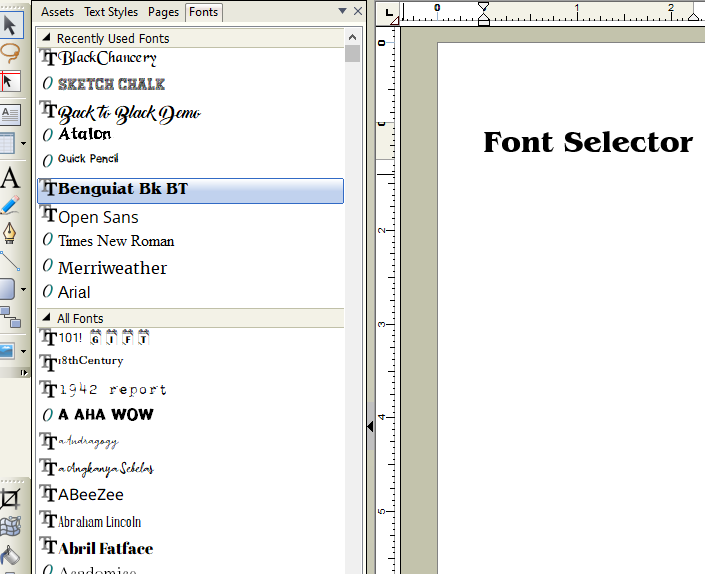
@VectorStyler Hi! Thanks your quick answer. Well, im not a ui designer, but for me it just work a dedicated panel, with some BIG previews, or at least, previews you can make bigger or smaller.
The drop menu of Vectorstyler in a tab at side, with the ability to increase font previews size and type if you wish, a text as sample would be great. Here is an screenshot of the old pageplus. It was easy to choose fonts there. Even you were able to choose to hover and shown on the artboard applied.
-
@marce I will add this to the backlog.
-
@marce @VectorStyler I could see as a pop-out viewer option. I like the quick list as well and wouldn't want to go away from that. Could be handy with the built-in font manager as well
-
Check out Freehand excellent font preview where the selected word is used for preview within a small preview window.
-
Just as another Example for Inspiration purpose.
CorelDraw has also a separate Fontmanager. But the intern
one is also pretty fine.