VectorStyler
    • Categories
    • Unread
    • Recent
    • Tags
    • Popular
    • Register
    • Login

    Merge Boolean does not create clean edge

    Scheduled Pinned Locked Moved Bugs in VectorStyler
    2 Posts 2 Posters 450 Views 2 Watching
    Loading More Posts
    • Oldest to Newest
    • Newest to Oldest
    • Most Votes
    Reply
    • Reply as topic
    Log in to reply
    This topic has been deleted. Only users with topic management privileges can see it.
    • RidgehammerR Offline
      Ridgehammer
      last edited by

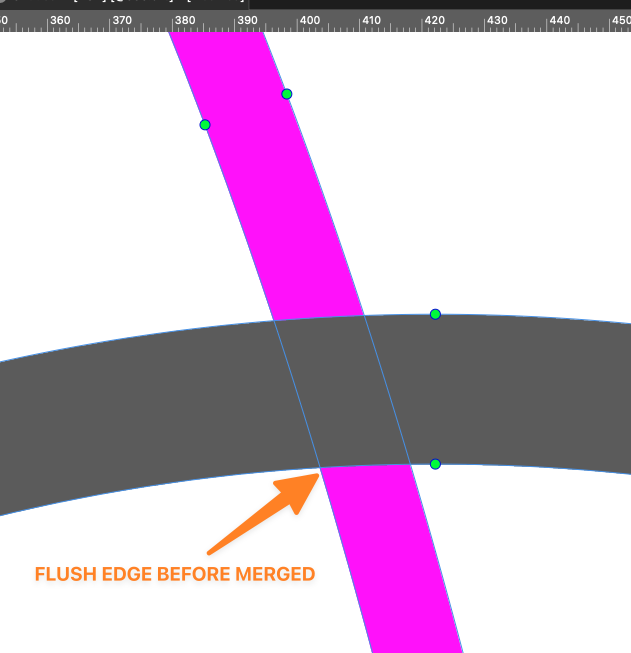
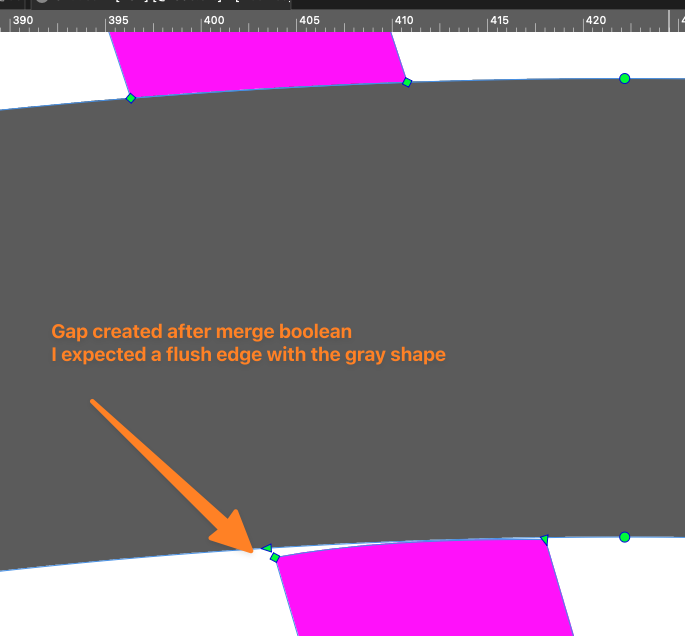
      I'm having an issue merging two overlapping fills. When I select both fills and use the merge boolean operation, the edge does not cut cleanly or flush and instead leaves a gap.
      Here is how it looks prior to using the boolean merge:
      0_1765764369504_2fc154a9-27dc-475f-9193-cf3b25d880bb-CleanShot 2025-12-14 at 21.03.34.png

      Here is the result after I merged the gray and pink shapes using the merge boolean. It left the strange gap
      0_1765764617403_187c40c6-5797-43cb-8c86-c35b273c6804-CleanShot 2025-12-14 at 21.08.13.png

      Here is the VS source file :
      0_1765764671449_merge boolean issue.vstyler

      VectorStylerV 1 Reply Last reply Reply Quote 1
      • VectorStylerV Offline
        VectorStyler @Ridgehammer
        last edited by

        @Ridgehammer I opened a bug on this and will try to find a solution

        1 Reply Last reply Reply Quote 1
        • First post
          Last post
