VectorStyler
    • Categories
    • Unread
    • Recent
    • Tags
    • Popular
    • Register
    • Login

    All objects are gone. You can undo, but objects don't come back

    Scheduled Pinned Locked Moved Resolved Issues
    13 Posts 3 Posters 12.0k Views 1 Watching
    Loading More Posts
    • Oldest to Newest
    • Newest to Oldest
    • Most Votes
    Reply
    • Reply as topic
    Log in to reply
    This topic has been deleted. Only users with topic management privileges can see it.
    • encartE Offline
      encart @b77
      last edited by

      @b77 I tried, but without effect.
      @vectoradmin I will send it next time.
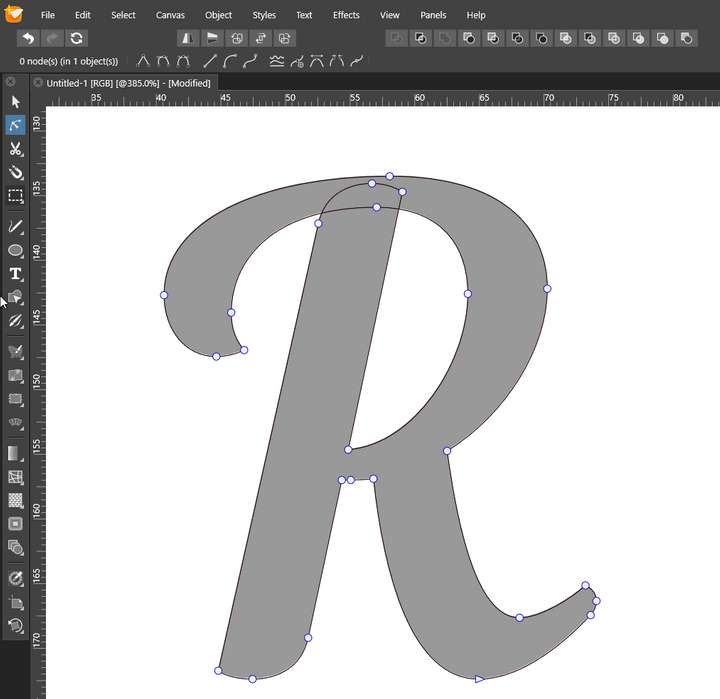
      I forgot to add photos to the first post. How would you get rid of the overlapping parts? Shapebuider does not work properly, bolaean operations also. . I mean a method of solving this type of situation, because I have to edit characters this way quite often.
      0_1623838217346_screenshot_20210616_105737.png

      MacBook Air M4 24Gb, Tahoe 26.2

      VectorStylerV 1 Reply Last reply Reply Quote 0
      • VectorStylerV Offline
        VectorStyler @encart
        last edited by

        @encart Is that glyph from a variable font? Typically, those have such overlaps.

        Try the Normalize Glyph option (before converting to curves) on the text.

        If already converted to curves, try the Object -> Shape -> Normalize Winding command.

        encartE 1 Reply Last reply Reply Quote 0
        • encartE Offline
          encart @VectorStyler
          last edited by

          @vectoradmin These overlays are made by me on purpose. I want the shape to stay but the overlays are gone, otherwise the laser will cut the path and that little piece will fall out.
          VS: https://recordit.co/B7QhqIHojz
          AD : https://recordit.co/IfDVJwC4xi
          AI: single slide in Shapebuilder

          MacBook Air M4 24Gb, Tahoe 26.2

          VectorStylerV 2 Replies Last reply Reply Quote 0
          • VectorStylerV Offline
            VectorStyler @encart
            last edited by

            @encart It looks like shape builder and normalization gave an issue with this shape. I will open a bug on this one.

            1 Reply Last reply Reply Quote 0
            • VectorStylerV Offline
              VectorStyler @encart
              last edited by

              @encart Found a workaround (until these issues are fixed):
              Select the shape and select the Pencil tool. Check both the Eraser and Merging check boxes in the context panel.
              Hold Shift and paint over the two segments that should be erased. The curve will be broken apart by this, so a Object -> Combine -> Combine will be needed.

              encartE 1 Reply Last reply Reply Quote 0
              • encartE Offline
                encart @VectorStyler
                last edited by

                @vectoradmin I tried trick with pencil before, and It doesn't work.

                1. I can cut only path created by pencil.
                2. Combine option isn't active
                  I tried once again, and these are results: https://recordit.co/0KF9w2j0vD

                MacBook Air M4 24Gb, Tahoe 26.2

                VectorStylerV 1 Reply Last reply Reply Quote 0
                • VectorStylerV Offline
                  VectorStyler @encart
                  last edited by

                  @encart After convert to curve, you need to ungroup the object. When converting to curve a text shape, a group is created with one object per character inside the group. The Pencil tool cannot operate inside the group.

                  1 Reply Last reply Reply Quote 0
                  • encartE Offline
                    encart
                    last edited by

                    IMO VS doesn't recognize places where path intersect itsself

                    MacBook Air M4 24Gb, Tahoe 26.2

                    VectorStylerV 1 Reply Last reply Reply Quote 0
                    • VectorStylerV Offline
                      VectorStyler @encart
                      last edited by

                      @encart
                      I did this: https://recordit.co/yqX5vwMATq
                      Could be because of editing in filled mode (this should not be an issue, will be fixed).

                      encartE 1 Reply Last reply Reply Quote 0
                      • encartE Offline
                        encart @VectorStyler
                        last edited by encart

                        @vectoradmin https://recordit.co/DSeG4Aw3oE
                        https://recordit.co/OEJzdFQRt1

                        MacBook Air M4 24Gb, Tahoe 26.2

                        1 Reply Last reply Reply Quote 0
                        • First post
                          Last post
