VectorStyler
    • Categories
    • Unread
    • Recent
    • Tags
    • Popular
    • Register
    • Login

    Flip Horizontally shortcut tool creates copy when copy modifier is not used

    Scheduled Pinned Locked Moved Bugs in VectorStyler
    3 Posts 2 Posters 19 Views 1 Watching
    Loading More Posts
    • Oldest to Newest
    • Newest to Oldest
    • Most Votes
    Reply
    • Reply as topic
    Log in to reply
    This topic has been deleted. Only users with topic management privileges can see it.
    • BoldlineB Offline
      Boldline
      last edited by Boldline

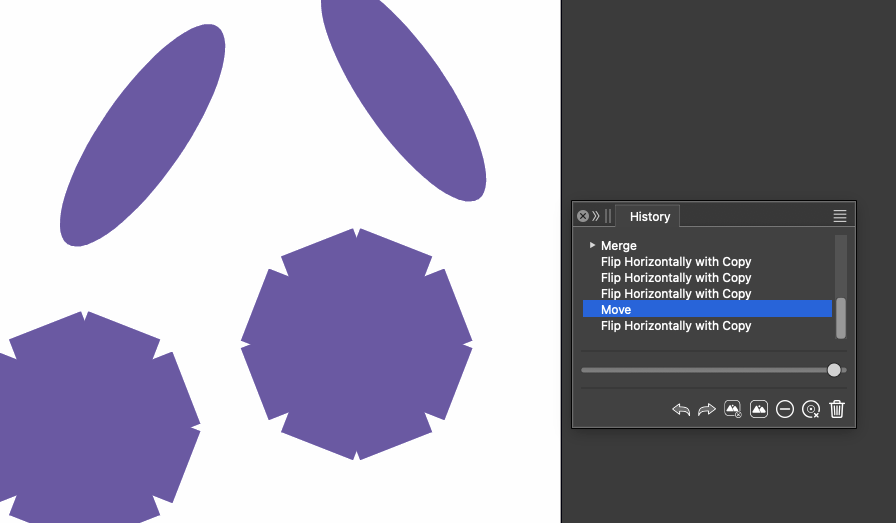
      Here is a link to an example of where using the horizontal reflect tool creates a duplicate instead of just flipping the object itself.

      I think this is related to my settings files, because when I switched back to default settings, the issue disappeared. I switched back to my custom settings and the issue is not happening there either. I wonder if there is a setting that was adjusted but not saved to the custom file that caused the issue?

      I added the VS file to this post - at the bottom

      The history is recording it as a "Flip Horizontally with Copy", even though I am not using the alt/option modifier at all.
      d34c3194-8a4b-41f8-ab0d-ead7d836974b-CleanShot 2026-09-29 at 6.11.06 PM.png

      Horizontal flip with copy issue.vstyler

      🍎 macOS Tahoe 26.2, Mac mini (M1, 2020), Chip Apple M1, Memory 16 GB
      Cintiq 27QHD Display and LG Ultra HD Display

      VectorStylerV 1 Reply Last reply Reply Quote 1
      • VectorStylerV Offline
        VectorStyler @Boldline
        last edited by

        @Boldline Do you still have the settings / workspace where this occurs?

        BoldlineB 1 Reply Last reply Reply Quote 0
        • BoldlineB Offline
          Boldline @VectorStyler
          last edited by

          @VectorStyler I just emailed you the settings files. Since switching to the default settings and then reloading my saved custom settings, I haven’t been able to reproduce the issue. It’s possible I had made an unsaved change to the custom settings, which was lost when I switched presets.


          🍎 macOS Tahoe 26.2, Mac mini (M1, 2020), Chip Apple M1, Memory 16 GB
          Cintiq 27QHD Display and LG Ultra HD Display

          1 Reply Last reply Reply Quote 1
          • First post
            Last post