VectorStyler
    • Categories
    • Unread
    • Recent
    • Tags
    • Popular
    • Register
    • Login

    Cannot activate rotate option when hovering

    Scheduled Pinned Locked Moved Bugs in VectorStyler
    12 Posts 4 Posters 45 Views 3 Watching
    Loading More Posts
    • Oldest to Newest
    • Newest to Oldest
    • Most Votes
    Reply
    • Reply as topic
    Log in to reply
    This topic has been deleted. Only users with topic management privileges can see it.
    • RaaskotR Offline
      Raaskot @VectorStyler
      last edited by

      @VectorStyler
      dont-activate-rotate.vstyler

      VectorStylerV 1 Reply Last reply Reply Quote 1
      • VectorStylerV Offline
        VectorStyler @Raaskot
        last edited by

        @Raaskot Seems to be working here: https://cleanshot.com/share/wVfRBhQ5

        Could be a settings / workspace issue (I always test with the defaults).

        1 Reply Last reply Reply Quote 1
        • BoldlineB Offline
          Boldline @Raaskot
          last edited by Boldline

          @Raaskot works over here for me (I'm using a custom settings file). Sometimes it helps to save and close out the file and try again, and then try restarting VS completely if reopening the file itself does not fix it. Then checking if it works with default settings. If it works with default settings, send the developer your custom setting file because the issue is probably in there.

          🍎 macOS Tahoe 26.2, Mac mini (M1, 2020), Chip Apple M1, Memory 16 GB
          Cintiq 27QHD Display and LG Ultra HD Display

          RaaskotR 1 Reply Last reply Reply Quote 1
          • RaaskotR Offline
            Raaskot @Boldline
            last edited by

            @Boldline
            @VectorStyler

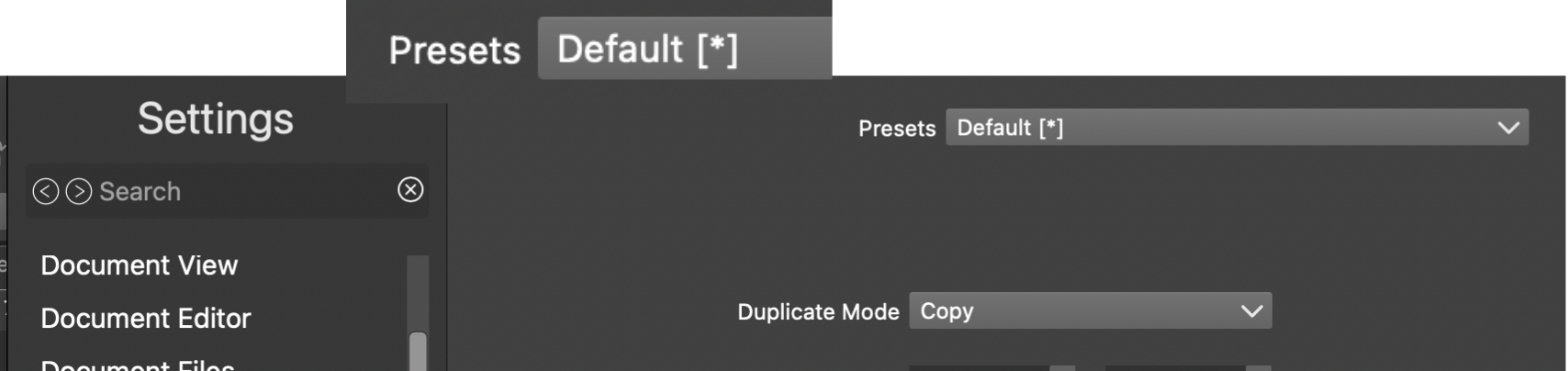
            No, no rotate-option available upon Presets Default restore (image) and VS restart. I wonder what the asterisk (x) tell?
            70cd9481-1756-4cd9-8caa-8524ed2f0b56-image.png

            VectorStylerV 1 Reply Last reply Reply Quote 1
            • VectorStylerV Offline
              VectorStyler @Raaskot
              last edited by

              @Raaskot Then [*] means that something is changed in the settings from the defaults

              RaaskotR 1 Reply Last reply Reply Quote 1
              • RaaskotR Offline
                Raaskot @VectorStyler
                last edited by

                @VectorStyler
                Is it releated to issue?
                Rotate handles is still missing after restart/reset.

                M 1 Reply Last reply Reply Quote 0
                • M Online
                  monsterfox @Raaskot
                  last edited by

                  @Raaskot The asterisk * indicates that a parameter has been modified and no longer matches the default value. My workflow is to configure all parameters, save them as a file to disk, and load the file when needed.

                  RaaskotR 1 Reply Last reply Reply Quote 0
                  • RaaskotR Offline
                    Raaskot @monsterfox
                    last edited by Raaskot

                    @monsterfox
                    I understand ...

                    "My workflow is to configure all parameters, save them 
                    as a file to disk, and load the file when needed".
                    

                    ... but that doesn't solve the issue with the missing rotate handle in UI since last update, am I right?

                    M 1 Reply Last reply Reply Quote 1
                    • M Online
                      monsterfox @Raaskot
                      last edited by

                      @Raaskot I have tested your file, and the rotation handles work fine on my end. The issue is likely with your workspace file. Send your workspace file and settings configuration file to the developer, and they will fix the problem based on your case.

                      RaaskotR 1 Reply Last reply Reply Quote 1
                      • RaaskotR Offline
                        Raaskot @monsterfox
                        last edited by

                        @monsterfox
                        Done

                        1 Reply Last reply Reply Quote 1
                        • First post
                          Last post
