Text Rendering Problem/Glitch

-
@vectoradmin,
Bug:
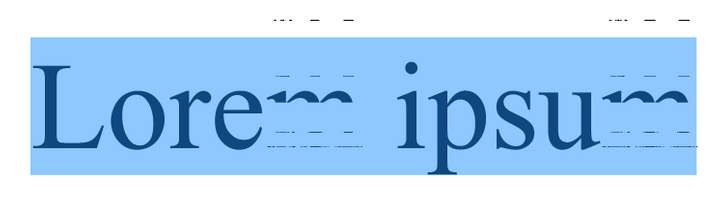
Text Rendering Problem.
This happened when I was “around the time” I had messing with fill and stroke color changes in the panel with the Color Wheel. Not saying that specifically caused it to happen, but telling you in case this gives a clue of what to look for.
The text was in 12 pt, and when I used the Stroke drop-down list, as I scrolled to other sizes on the list, and it showed the preview on the screen, any other sized rendered properly, but as I scrolled back to the 12 pt size, it only partially rendered again. I don’t think it is related to the the 12 pt size; more likely, it just “happened” to be the size that was current at the time the rendering glitch first appeared.
When I zoomed in on the screen, it somehow rendered properly.
It may not be relevant, but in case it matters, there also is an imported PNG file iin the document.
Luckily I took a screen shot of the glitched rendering and also saved the VectorStyler file.
This glitched rendering is NOT new. I had this happen many times before (it goes back many many previous builds), but I just didn’t screen shoot or save the VectorStyler file and didn’t report it.
I am emailing the files to you for examination.
Example:
-
@Vector-Rock Got the file and tested it, but so far I could not replicate. I will open a bug on this issue, I have some idea about the possible root cause.
This happens at large font sizes or zooms? -
@vectoradmin said in Text Rendering Problem/Glitch:
@Vector-Rock Got the file and tested it, but so far I could not replicate. I will open a bug on this issue, I have some idea about the possible root cause.
This happens at large font sizes or zooms?@vectoradmin,
No, I don't think zoom level has been related to this; other than when the glitch was present, and I zoomed in (possibly out as well), it instantly renders properly.
When it happened today, I don't recall for sure, but I do not think this was with a large font size. As stated in my first post, it was at 12 pt, and any other stroke value it previewed properly, and to my surprise, it showed the glitch when I went scrolled back to 12 pt. again.
-
@Vector-Rock said in Text Rendering Problem/Glitch:
No, I don't think zoom level has been related to this; other than when the glitch was present, and I zoomed in (possibly out as well), it instantly renders properly.
but was the text large on the screen (as in the above screenshot)? this is important, because the glyph rendering mode depends on the actual pixel size on the screen.
-
@vectoradmin said in Text Rendering Problem/Glitch:
@Vector-Rock said in Text Rendering Problem/Glitch:
No, I don't think zoom level has been related to this; other than when the glitch was present, and I zoomed in (possibly out as well), it instantly renders properly.
but was the text large on the screen (as in the above screenshot)? this is important, because the glyph rendering mode depends on the actual pixel size on the screen.
@vectoradmin,
I can't say with 100% certainty. I don't want to unintentionally mislead you.
If I were to guess, I probably was zoomed in already, since I may not have wanted to do anything else before I took the screen shot for fear the rendering glitch might disappear before I could capture an image of what it looked like.
I'll try to note the zoom situation more specifically when it happens again, now knowing that is a critical factor to know.
-
@Vector-Rock The text rendering issue should be fixed now.
