VectorStyler
    • Categories
    • Unread
    • Recent
    • Tags
    • Popular
    • Register
    • Login

    Swapping line and fill style (Mac, v1.0.045)
    Scheduled Pinned Locked Moved Resolved Issues
    3 Posts 2 Posters 4.0k Views
    Loading More Posts
    • Oldest to Newest
    • Newest to Oldest
    • Most Votes
    Reply
    • Reply as topic
    Log in to reply
    This topic has been deleted. Only users with topic management privileges can see it.
    • J Offline
      Jono
      last edited by

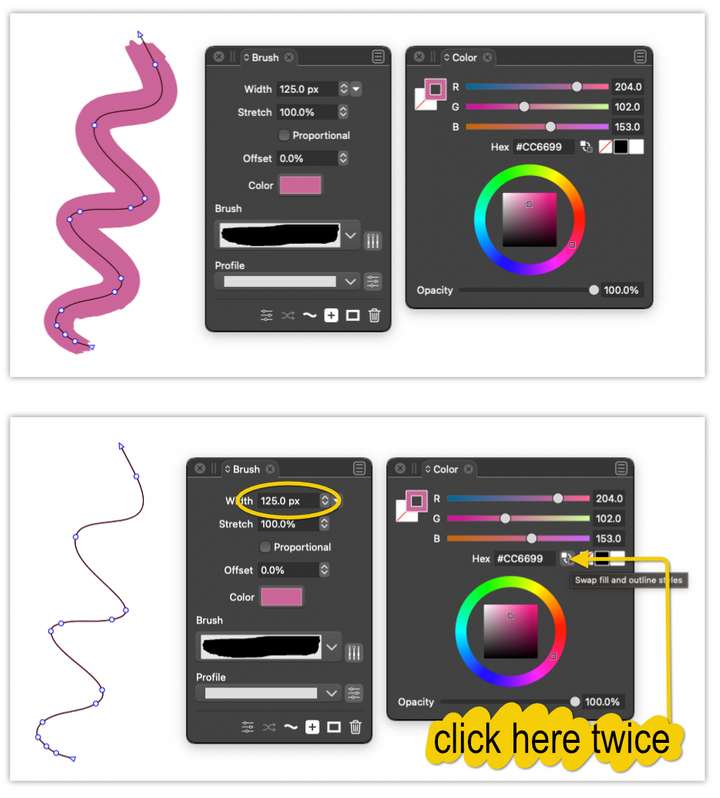
      It could be a misunderstanding on my part but the line style appears to be displayed incorrectly when line and fill colours are swapped twice.

      For example:

      1. Draw a line using the brush tool
      2. Apply a Pattern or Scatter brush style / change colours etc
      3. Click ‘swap fill and outline style’ in the colour panel twice
      4. The line displayed has now changed to a thin line but the width stills shows the original width (in the screenshot it's 125px)0_1629710826422_line-displayed-wrong-size.png

      Mac mini (M1, 2020) | Tahoe 26.1 | Wacom Cintiq 16 (1920 x 1080 px)

      VectorStylerV 2 Replies Last reply Reply Quote 0
      • VectorStylerV Offline
        VectorStyler @Jono
        last edited by

        @Jono Got it replicated. Will be fixed!

        1 Reply Last reply Reply Quote 0
        • VectorStylerV Offline
          VectorStyler @Jono
          last edited by

          @Jono Fixed in build 1.0.046

          1 Reply Last reply Reply Quote 0
          • First post
            Last post