VectorStyler
    • Categories
    • Unread
    • Recent
    • Tags
    • Popular
    • Register
    • Login

    Offset Path shrinks some parts of selection while other parts increase

    Scheduled Pinned Locked Moved VectorStyler 1.1 Bugs
    13 Posts 3 Posters 14.4k Views 1 Watching
    Loading More Posts
    • Oldest to Newest
    • Newest to Oldest
    • Most Votes
    Reply
    • Reply as topic
    Log in to reply
    This topic has been deleted. Only users with topic management privileges can see it.
    • b77B Offline
      b77 @Boldline
      last edited by

      @Boldline Not sure, as I only saw the video, but maybe two of the paths need their direction reversed?

      MacBook Pro (Intel) running Monterey 12.6.4

      BoldlineB 1 Reply Last reply Reply Quote 1
      • BoldlineB Offline
        Boldline @b77
        last edited by

        @b77 hmmm interesting. Would that be more likely the case if I made a duplicate of the original side and flipped it and then copied that set again to make the second set?

        🍎 macOS Sequoia 15.3, Mac mini (M1, 2020), Chip Apple M1, Memory 16 GB
        Cintiq 27QHD Display and LG Ultra HD Display

        b77B 1 Reply Last reply Reply Quote 0
        • b77B Offline
          b77 @Boldline
          last edited by

          Yep, flipping does that. Problem solved with 'Reverse Path Direction'?

          MacBook Pro (Intel) running Monterey 12.6.4

          BoldlineB 1 Reply Last reply Reply Quote 0
          • BoldlineB Offline
            Boldline @b77
            last edited by

            @b77 yes just got the chance to go back and test it and switch path direction for those to I flipped prior, it now works properly - thank you for helping with that.
            I'm always impressed with how much you already know about the ins and outs of VS

            🍎 macOS Sequoia 15.3, Mac mini (M1, 2020), Chip Apple M1, Memory 16 GB
            Cintiq 27QHD Display and LG Ultra HD Display

            b77B 1 Reply Last reply Reply Quote 0
            • b77B Offline
              b77 @Boldline
              last edited by

              Great! I'm thinking maybe the app shouldn't reverse the direction when flipping a path?

              MacBook Pro (Intel) running Monterey 12.6.4

              BoldlineB 1 Reply Last reply Reply Quote 0
              • BoldlineB Offline
                Boldline @b77
                last edited by

                @b77 Yeah I'm torn on that in a way - it makes sense that it would flip direction when I flip the design element to the other side like I did... , but then again it's annoying that I'd have to potentially reset the direction each time I did more with it after flipping

                🍎 macOS Sequoia 15.3, Mac mini (M1, 2020), Chip Apple M1, Memory 16 GB
                Cintiq 27QHD Display and LG Ultra HD Display

                b77B 1 Reply Last reply Reply Quote 0
                • b77B Offline
                  b77 @Boldline
                  last edited by b77

                  @vectoradmin @Boldline

                  I think the flipping and path direction combination needs to be improved also because when the stroke is not aligned to the center of the path, flipping it will make the object look very different:
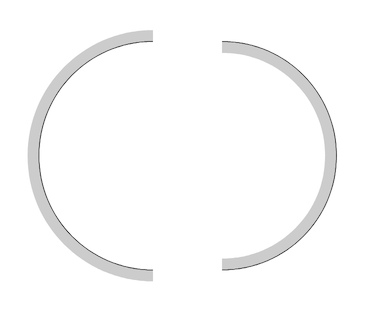
                  0_1631133397055_flipping_issue.png

                  MacBook Pro (Intel) running Monterey 12.6.4

                  BoldlineB VectorStylerV 2 Replies Last reply Reply Quote 2
                  • BoldlineB Offline
                    Boldline @b77
                    last edited by

                    @b77 wow good observation

                    🍎 macOS Sequoia 15.3, Mac mini (M1, 2020), Chip Apple M1, Memory 16 GB
                    Cintiq 27QHD Display and LG Ultra HD Display

                    1 Reply Last reply Reply Quote 0
                    • VectorStylerV Offline
                      VectorStyler @b77
                      last edited by

                      @b77 @Boldline this is a bit difficult issue, as it would be hard to determine which side the stroke should be, based on the location of those open paths.
                      Currently the offset (and stroke) are using the direction of the path to determine the left (negative) and right (positive) sides.
                      If we have a combination of open paths with different directions then it can be hard to tell which side the offset should be.

                      b77B 1 Reply Last reply Reply Quote 0
                      • b77B Offline
                        b77 @VectorStyler
                        last edited by b77

                        @vectoradmin OK, but all those (open or closed) paths started with the correct direction initially when they were created, whether the user knows it or not.

                        If the direction reversal is not(?*) applied on each flip of an individual object, flipping multiple objects should just result in the correct direction for each one.

                        * Or is it? Then do the opposite.

                        MacBook Pro (Intel) running Monterey 12.6.4

                        VectorStylerV 1 Reply Last reply Reply Quote 0
                        • VectorStylerV Offline
                          VectorStyler @b77
                          last edited by

                          @b77 Well, the problem is that when flipping (I assume horizontally, in the above case), the path direction will not change.

                          So in the above case, if the path on the left side goes in up-down direction, then its flipped copy on the right side will go in an up-down direction as well. And the offset (or stroke) will be on the right hand side for each path, which gives the result in the example.

                          b77B 1 Reply Last reply Reply Quote 0
                          • b77B Offline
                            b77 @VectorStyler
                            last edited by b77

                            @vectoradmin I think that if the app would revert the path direction after each flipping of an open path (or not do it if it already does), the stroke of the object would be placed on the same side after successive flips — in the case of this semicircle the stroke should still be on the "outside" of the curvature.

                            At least this is what happens if I revert the path direction after each (horizontal or vertical) flip: https://recordit.co/ksAYvaxEUu

                            MacBook Pro (Intel) running Monterey 12.6.4

                            1 Reply Last reply Reply Quote 0
                            • First post
                              Last post
