VectorStyler
    • Categories
    • Unread
    • Recent
    • Tags
    • Popular
    • Register
    • Login

    Mirroring / Flip does not work as expected

    Scheduled Pinned Locked Moved Resolved Issues
    10 Posts 2 Posters 10.0k Views
    Loading More Posts
    • Oldest to Newest
    • Newest to Oldest
    • Most Votes
    Reply
    • Reply as topic
    Log in to reply
    This topic has been deleted. Only users with topic management privileges can see it.
    • S Offline
      Subpath
      last edited by

      Hi

      Don't know if this is really a bug.
      But Mirror/Flip does not work as expected in VS.

      If i mirror/flip an Artistic Stroke in VS
      the shape is not mirrored.
      Only the direction of the stroke.

      I sketch a line with an Artistic Stroke
      then copied as reference
      and mirror/flip one of the strokes
      and the result is like on the picture.

      But I would like the shape is also mirrored.
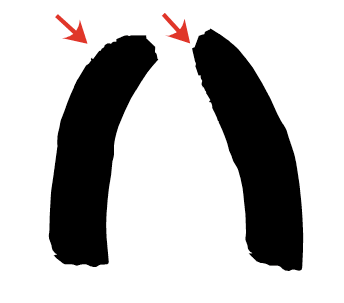
      0_1632823311991_Mirror-Flip.png

      Win 11
      CPU: AMD Ryzen 5 9600X, 6-core.
      GPU: Nvidia Geforce RTX 5070.

      VectorStylerV 2 Replies Last reply Reply Quote 1
      • VectorStylerV Offline
        VectorStyler @Subpath
        last edited by

        @Subpath2 Added to the backlog. This is caused by the shape being transformed, while the brush is not transformed, just applied on the new shape.

        S 1 Reply Last reply Reply Quote 0
        • S Offline
          Subpath @VectorStyler
          last edited by

          @vectoradmin said in Mirroring / Flip does not work as expected:

          @Subpath2 .... This is caused by the shape being transformed, while the brush is not transformed, just applied on the new shape.

          That was also what I had suspected.
          Thank you for taking note.

          Win 11
          CPU: AMD Ryzen 5 9600X, 6-core.
          GPU: Nvidia Geforce RTX 5070.

          1 Reply Last reply Reply Quote 0
          • VectorStylerV Offline
            VectorStyler @Subpath
            last edited by VectorStyler

            @Subpath This issue is actually a feature (applying the brush on the transformed shape).
            But there was a missing feature related to this.
            In Appearance panel, when the Brush style is selected on a brush object, the panel menu will have a Transform Content item enabled.
            This can be used now to apply the brush on the transformed shape (unchecked), or first apply the brush on the non-transformed shape and then transform the whole brush (checked).
            This should work in build 1.0.055

            S 1 Reply Last reply Reply Quote 1
            • S Offline
              Subpath @VectorStyler
              last edited by Subpath

              @vectoradmin

              If i understand you right. You wrote that this was originally
              intended as a feature, but I don't really see the benefit of it.

              Found it. But it does not work properly.

              Here are my steps:

              • I made a short artistic brush stroke
              • and made copy of it as a reference.
              • and flip the reference copy horizontally

              But every time I edit this reference copy
              e.g. with the Shape Editor Tool or when I move the
              the original brush, the reference brush goes
              goes back to its original state.

              As it looks by now, it doesn't work properly with reference
              and clone yet.

              Win 11
              CPU: AMD Ryzen 5 9600X, 6-core.
              GPU: Nvidia Geforce RTX 5070.

              VectorStylerV 1 Reply Last reply Reply Quote 0
              • VectorStylerV Offline
                VectorStyler @Subpath
                last edited by

                @Subpath I will try to replicate this issue. An example file could help.

                S 1 Reply Last reply Reply Quote 0
                • S Offline
                  Subpath @VectorStyler
                  last edited by Subpath

                  @vectoradmin

                  I have an example file, but how could i send you this ?

                  Win 11
                  CPU: AMD Ryzen 5 9600X, 6-core.
                  GPU: Nvidia Geforce RTX 5070.

                  VectorStylerV 1 Reply Last reply Reply Quote 0
                  • VectorStylerV Offline
                    VectorStyler @Subpath
                    last edited by

                    @Subpath send it to csraba at vectorstyler.com

                    S 1 Reply Last reply Reply Quote 0
                    • S Offline
                      Subpath @VectorStyler
                      last edited by

                      @vectoradmin #

                      The file has been sent

                      Win 11
                      CPU: AMD Ryzen 5 9600X, 6-core.
                      GPU: Nvidia Geforce RTX 5070.

                      1 Reply Last reply Reply Quote 0
                      • S Offline
                        Subpath
                        last edited by

                        @vectoradmin

                        Hi

                        Just like to say, that with the latest Update 1.0.057
                        everthing works fine now.

                        Win 11
                        CPU: AMD Ryzen 5 9600X, 6-core.
                        GPU: Nvidia Geforce RTX 5070.

                        1 Reply Last reply Reply Quote 0
                        • First post
                          Last post