Mac version gets wonky after a period of time
-
It's not visible in the video - but the entire time I'm moving the text shape around the screen, it's rapidly flashing white and red all over the art board. All the erratic screen movement is being done by VS.
If I save the file and restart VS, it's fixed again for a short timeOther issues happen when I go to another open and file and come back - everything is white - and I have to click a few times around the outside of the art board to get it to return to dark gray and show the existing vectors.
This is not a new issue - It's been there for a long time - I'm just bringing it up again in hopes it can be a priority fix.🍎 macOS Tahoe 26.2, Mac mini (M1, 2020), Chip Apple M1, Memory 16 GB
Cintiq 27QHD Display and LG Ultra HD Display -
@Boldline Yes, I have this issue still open in the backlog. Could not replicate it so far. I also tried on El Capitan.
After how long time of use it gets to this? -
Don't know if this is related but I also have an intermittent Mac screen display issue (see screenshots). The panels can be made visible again (in the middle screenshot) by clicking where the should be. The panels (in the third screenshot) can be made to disappear by clicking anywhere on the desktop.
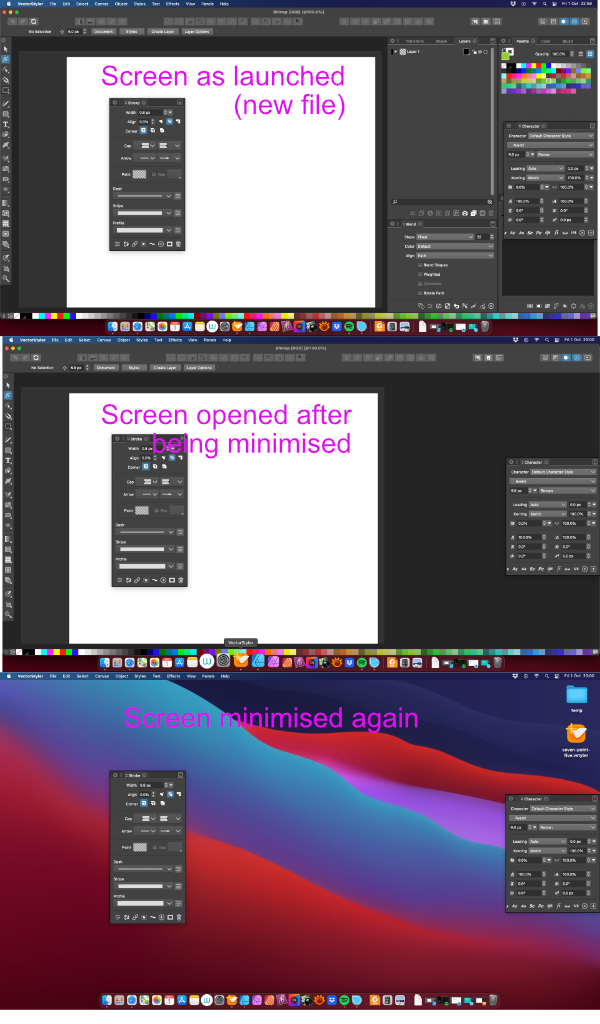
Mac mini (M1, 2020) | Tahoe 26.4.1 | Wacom Cintiq 16 (1920 x 1080 px)
-
@Jono From your screenshots it looks like the panels and the toolbox are not docked — they are floating over the main window.
If you grab the top panel by the ||| area after the ⨂ close button and drag them all the way to the right side to dock them, this should solve it.
Or you can start the app while holding Cmd-Option-Shift, which will reset the UI to default, with the toolbox and the panels docked.
-
@Jono Panels stay on when the app is in focus (menu bar shown) but the window is minimized. There can be multiple separate windows (with drawings) opened in VS.
Panels are hidden only of the app is hidden, or goes to background.
-
Thanks guys, I’m new to Macs and still learning!

-
@Boldline said in Mac version gets wonky after a period of time:
It's not visible in the video - but the entire time I'm moving the text shape around the screen, it's rapidly flashing white and red all over the art board. All the erratic screen movement is being done by VS.
Is this issue still occurring?


