VectorStyler
    • Categories
    • Unread
    • Recent
    • Tags
    • Popular
    • Register
    • Login

    Option to evenly auto-divide a shape vertically or horizontally

    Scheduled Pinned Locked Moved Questions and Support
    9 Posts 3 Posters 10.4k Views 1 Watching
    Loading More Posts
    • Oldest to Newest
    • Newest to Oldest
    • Most Votes
    Reply
    • Reply as topic
    Log in to reply
    This topic has been deleted. Only users with topic management privileges can see it.
    • BoldlineB Offline
      Boldline
      last edited by

      I think it would be really helpful to be able to auto-divide a shape vertically or horizontally. You would select a shape and hit an option to "auto-divide" and then type in how many segments you want and whether it's a vertical or horizontal divide.
      maybe a better option to of offer both the vertical and divide at the same time - if you only want one kind of divide, leave the other at none.
      Once it's divided, you would just ungroup it to access each individual segment

      🍎 macOS Tahoe 26.2, Mac mini (M1, 2020), Chip Apple M1, Memory 16 GB
      Cintiq 27QHD Display and LG Ultra HD Display

      VectorStylerV 1 Reply Last reply Reply Quote 0
      • VectorStylerV Offline
        VectorStyler @Boldline
        last edited by

        @Boldline Would this divide by some sort of grid?

        BoldlineB 1 Reply Last reply Reply Quote 0
        • BoldlineB Offline
          Boldline @VectorStyler
          last edited by

          @vectoradmin yes - it would take the width of the shape and divide it evenly based on how many sections you wanted. So if the shape was an even 10 units wide and you typed five into the sections tab - each one would be 2 units wide. Nothing would happen to the vertical aspect unless you also typed in you wanted a certain number of vertically spaced divisions.
          So you could end up with a grid of shapes if you told it to divide by width and by height - or long strips if you only did vertical or only did horizontal divides. but it would just divide the shape evenly based on the overall width or height and the number you told it to divide by

          🍎 macOS Tahoe 26.2, Mac mini (M1, 2020), Chip Apple M1, Memory 16 GB
          Cintiq 27QHD Display and LG Ultra HD Display

          BoldlineB VectorStylerV 2 Replies Last reply Reply Quote 1
          • BoldlineB Offline
            Boldline @Boldline
            last edited by

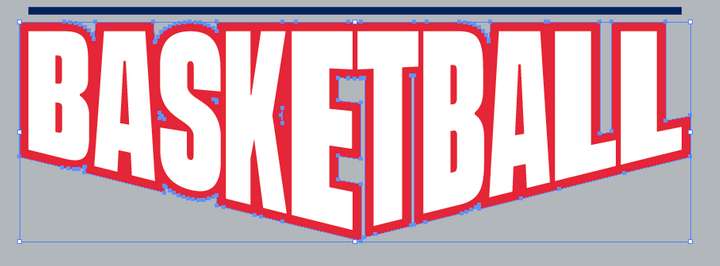
            This would be one great purpose for that tool idea. I
            Ideally I'd love to see editable live options for doing things like this - where you can pick a shape and tell it how many divisions - control the width of each and it affects the other shapes
            This "could" be done with the shape being one large shape - but it's harder to have control over each letter shape within it
            0_1633486139262_18c7b297-ef96-4508-be7f-36d9e220bb9f-image.png

            🍎 macOS Tahoe 26.2, Mac mini (M1, 2020), Chip Apple M1, Memory 16 GB
            Cintiq 27QHD Display and LG Ultra HD Display

            b77B 1 Reply Last reply Reply Quote 1
            • b77B Offline
              b77 @Boldline
              last edited by

              @vectoradmin This would be a nice way to split a shape, similar to adding a table: https://recordit.co/aytubFTkyO

              MacBook Pro (Intel) running Monterey 12.6.4

              1 Reply Last reply Reply Quote 0
              • VectorStylerV Offline
                VectorStyler @Boldline
                last edited by

                @Boldline With some bugs fixed in build 1.0.055, this feature can be achieved by drawing a grid shape, setting the grid shape options and then excluding the grid shape from the other object.

                BoldlineB 1 Reply Last reply Reply Quote 0
                • BoldlineB Offline
                  Boldline @VectorStyler
                  last edited by

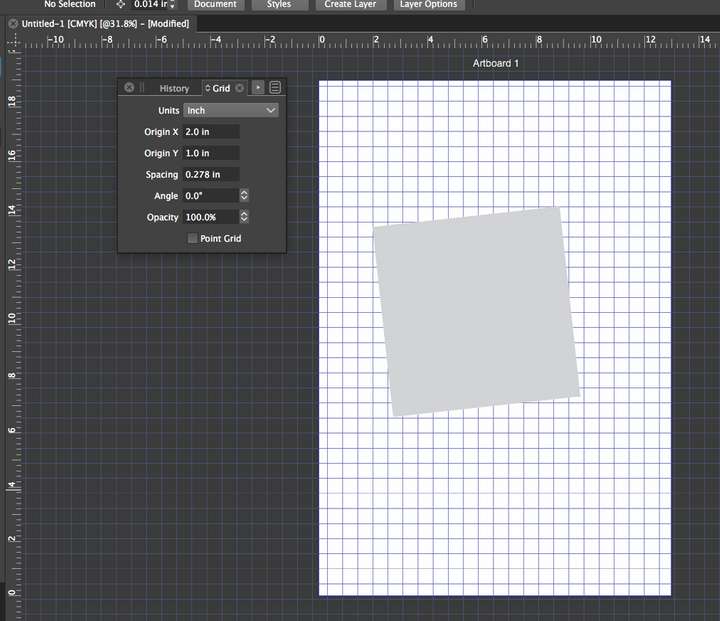
                  @vectoradmin Would you be willing to elaborate a little more on the specifics? I see the grid option for the document but I don't see how to apply that to a shape.

                  on a side note - i assume we can change the color of document grid lines. Is that in preferences? Or could that be added to the grid panel?
                  0_1633977762274_55cb0459-cb46-4f57-a6f8-889cc28dd680-image.png

                  🍎 macOS Tahoe 26.2, Mac mini (M1, 2020), Chip Apple M1, Memory 16 GB
                  Cintiq 27QHD Display and LG Ultra HD Display

                  VectorStylerV 1 Reply Last reply Reply Quote 0
                  • VectorStylerV Offline
                    VectorStyler @Boldline
                    last edited by

                    @Boldline The grid shape can be drawn using this tool. This is a shape, not the Grid.

                    0_1633978154741_gridtool.png

                    And it should be on top of the other (cut) shape.

                    BoldlineB 1 Reply Last reply Reply Quote 0
                    • BoldlineB Offline
                      Boldline @VectorStyler
                      last edited by

                      @vectoradmin oh ok that makes sense. So many potential options to customize like that

                      🍎 macOS Tahoe 26.2, Mac mini (M1, 2020), Chip Apple M1, Memory 16 GB
                      Cintiq 27QHD Display and LG Ultra HD Display

                      1 Reply Last reply Reply Quote 0
                      • First post
                        Last post
