VectorStyler
    • Categories
    • Unread
    • Recent
    • Tags
    • Popular
    • Register
    • Login

    How do I reset panel default shape?

    Scheduled Pinned Locked Moved Questions and Support
    3 Posts 3 Posters 4.3k Views 1 Watching
    Loading More Posts
    • Oldest to Newest
    • Newest to Oldest
    • Most Votes
    Reply
    • Reply as topic
    Log in to reply
    This topic has been deleted. Only users with topic management privileges can see it.
    • BoldlineB Online
      Boldline
      last edited by

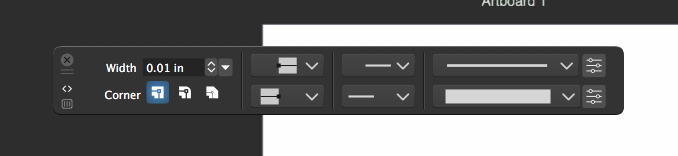
      How do I reset a panel's default shape (for lack of a better term)? I accidentally moved the strokes panel into the top section of VS and it conformed to that space and became wide. When I pulled it out of the top section, it retained that extreme width. Just closing it out and reopening the panel does not fix it.
      0_1634920514933_5ca58067-4a13-4374-8428-0cd4d73eede0-image.png

      🍎 macOS Tahoe 26.2, Mac mini (M1, 2020), Chip Apple M1, Memory 16 GB
      Cintiq 27QHD Display and LG Ultra HD Display

      b77B VectorStylerV 2 Replies Last reply Reply Quote 0
      • b77B Offline
        b77 @Boldline
        last edited by

        @Boldline If you dock it vertically it should revert to vertical layout. Then you can just undock it if you want it floating.

        MacBook Pro (Intel) running Monterey 12.6.4

        1 Reply Last reply Reply Quote 1
        • VectorStylerV Offline
          VectorStyler @Boldline
          last edited by

          @Boldline Drag the panel from the title area (that double horizontal line under the close button) to the right (or left) margin, where the blue highlight indicates docking.

          1 Reply Last reply Reply Quote 1
          • First post
            Last post
