VectorStyler
    • Categories
    • Unread
    • Recent
    • Tags
    • Popular
    • Register
    • Login

    Text disappearing at some zoom levels

    Scheduled Pinned Locked Moved Resolved Issues
    5 Posts 2 Posters 5.7k Views
    Loading More Posts
    • Oldest to Newest
    • Newest to Oldest
    • Most Votes
    Reply
    • Reply as topic
    Log in to reply
    This topic has been deleted. Only users with topic management privileges can see it.
    • J Offline
      Jono
      last edited by

      From a design point of view I'm not a fan of stretched text but thought I'd point out this issue out as it might be a problem for some.

      When text is stretched vertically and page is zoomed out, all or parts of the text can disappear from view. It can also happen whilst in the process of stretching the text down. It’s ok so far then at a certain point some of the letters disappear. The text is still editable in outline view.

      The font used in the screenshots is 'Impact' but it can occur with most fonts.
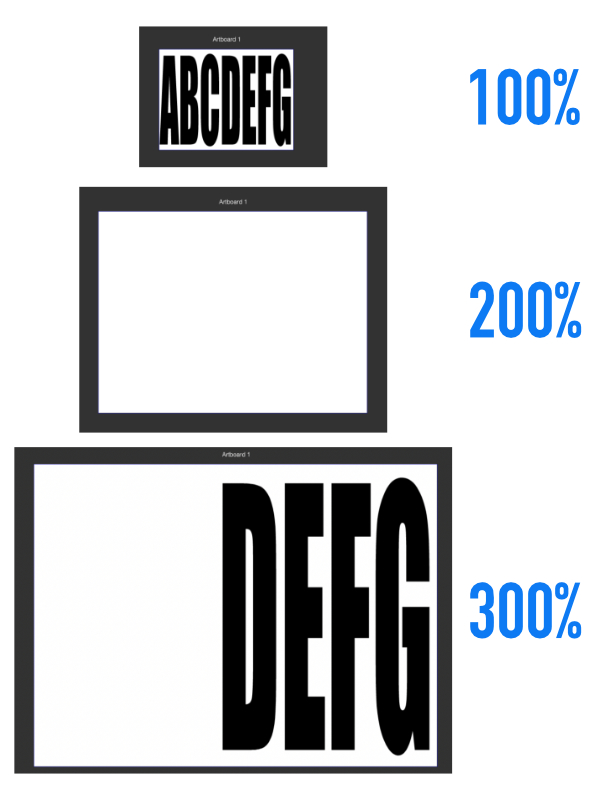
      0_1635673844225_text not showing.jpg

      Mac mini (M1, 2020) | Tahoe 26.1 | Wacom Cintiq 16 (1920 x 1080 px)

      VectorStylerV 3 Replies Last reply Reply Quote 0
      • VectorStylerV Offline
        VectorStyler @Jono
        last edited by

        @Jono What font is that? I will try to replicate.

        1 Reply Last reply Reply Quote 0
        • VectorStylerV Offline
          VectorStyler @Jono
          last edited by

          @Jono This issue is replicated. Thanks @b77

          1 Reply Last reply Reply Quote 0
          • VectorStylerV Offline
            VectorStyler @Jono
            last edited by

            @Jono This issue is fixed in build 1.0.062

            1 Reply Last reply Reply Quote 0
            • J Offline
              Jono
              last edited by

              Wow that was quick. Just tried it, perfect thanks

              Mac mini (M1, 2020) | Tahoe 26.1 | Wacom Cintiq 16 (1920 x 1080 px)

              1 Reply Last reply Reply Quote 1
              • First post
                Last post