VectorStyler
    • Categories
    • Unread
    • Recent
    • Tags
    • Popular
    • Register
    • Login

    Isometric Drawing Tutorial

    Scheduled Pinned Locked Moved Tutorials
    45 Posts 9 Posters 125.0k Views 9 Watching
    Loading More Posts
    • Oldest to Newest
    • Newest to Oldest
    • Most Votes
    Reply
    • Reply as topic
    Log in to reply
    This topic has been deleted. Only users with topic management privileges can see it.
    • J Offline
      Jono @Devil Dinosaur
      last edited by

      @Devil-Dinosaur

      Tutorial is great, thank you 😀

      Mac mini (M1, 2020) | Tahoe 26.1 | Wacom Cintiq 16 (1920 x 1080 px)

      1 Reply Last reply Reply Quote 1
      • Devil DinosaurD Offline
        Devil Dinosaur
        last edited by

        Thank you. ☺

        Fred.
        MacBook Pro (M1) - MacOs Sonoma 14

        1 Reply Last reply Reply Quote 0
        • Devil DinosaurD Offline
          Devil Dinosaur
          last edited by Devil Dinosaur

          My Ice Cream Truck Isometric drawing tutorial is online here. Play it, at least, 1.25 faster if you find it boring. 😉

          Fred.
          MacBook Pro (M1) - MacOs Sonoma 14

          S 1 Reply Last reply Reply Quote 3
          • S Offline
            Subpath @Devil Dinosaur
            last edited by Subpath

            @Devil-Dinosaur

            coooooooooooool 🙂

            um, 2 balls in a cup lemon and strawberry

            Win 11
            CPU: AMD Ryzen 5 9600X, 6-core.
            GPU: Nvidia Geforce RTX 5070.

            1 Reply Last reply Reply Quote 1
            • Devil DinosaurD Offline
              Devil Dinosaur
              last edited by

              Don't be too greedy ! 😁 🍦 🍧

              Fred.
              MacBook Pro (M1) - MacOs Sonoma 14

              S 1 Reply Last reply Reply Quote 1
              • S Offline
                Subpath @Devil Dinosaur
                last edited by Subpath

                @Devil-Dinosaur

                ok I will temper myself 🙂
                but is hard

                btw back when i worked in digital printing there was an ice cream truck
                that drove by in the summer from time to time. And every now and then
                our boss spent an ice cream for all employees (40 people).

                Win 11
                CPU: AMD Ryzen 5 9600X, 6-core.
                GPU: Nvidia Geforce RTX 5070.

                Devil DinosaurD 1 Reply Last reply Reply Quote 1
                • Devil DinosaurD Offline
                  Devil Dinosaur @Subpath
                  last edited by

                  @Subpath Cool Boss indeed !

                  Fred.
                  MacBook Pro (M1) - MacOs Sonoma 14

                  1 Reply Last reply Reply Quote 1
                  • ? Offline
                    A Former User
                    last edited by

                    Nice, but comments are off.

                    1 Reply Last reply Reply Quote 1
                    • encartE Offline
                      encart
                      last edited by

                      @Devil-Dinosaur Great tutorial, thanks!
                      @VectorStyler Watching people use the tools you created yourself must be rewarding💪 😎

                      MacBook Air M4 24Gb, Tahoe 26.2

                      VectorStylerV 1 Reply Last reply Reply Quote 2
                      • VectorStylerV Offline
                        VectorStyler @encart
                        last edited by

                        @encart said in Isometric Drawing Tutorial:

                        @VectorStyler Watching people use the tools you created yourself must be rewarding.

                        It is!

                        1 Reply Last reply Reply Quote 3
                        • Devil DinosaurD Offline
                          Devil Dinosaur
                          last edited by

                          @plrang Thank you ! 🙂

                          Comments are off because my faith in human behavior on social media is quite low. 😁

                          I know there are small mistakes, hesitations and a too slow pace in what I show. It's definitely not professional standards. Anyway, I just try to help and I still believe that some of the information I give are worthy, despite the way I communicate it. And I don't need to be judged by people whose only effort was to press "play" on their device.

                          I also think that people can come to chat on this forum if they have questions or they need clarification. 😉

                          @encart Thank you ! 🙂

                          Fred.
                          MacBook Pro (M1) - MacOs Sonoma 14

                          ? Victor VectorV 2 Replies Last reply Reply Quote 2
                          • ? Offline
                            A Former User @Devil Dinosaur
                            last edited by

                            @Devil-Dinosaur Who cares;) You won't know until you try, but you'd gain the knowledge of what to improve, also some people could tell you a better way to do something, I would open that.
                            Also 99% of users won't come here from YT.

                            1 Reply Last reply Reply Quote 0
                            • Victor VectorV Offline
                              Victor Vector @Devil Dinosaur
                              last edited by Victor Vector

                              @Devil-Dinosaur Thank you for part 4! You are very thorough and a good teacher.

                              I understand why you have the comments off. I would do the same to avoid the weirdness. People who have appropriate questions and comments will find the forum and do it here. If you wish to facilitate that, I would suggest adding a link to the forum in the description section on YouTube.

                              Devil DinosaurD 1 Reply Last reply Reply Quote 2
                              • Devil DinosaurD Offline
                                Devil Dinosaur @Victor Vector
                                last edited by

                                Thank you 🙂

                                @Victor-Vector said in Isometric Drawing Tutorial:

                                @Devil-Dinosaur
                                If you wish to facilitate that, I would suggest adding a link to the forum in the description section on YouTube.

                                Good idea, I did it on all the videos. 😉

                                Fred.
                                MacBook Pro (M1) - MacOs Sonoma 14

                                b77B B 2 Replies Last reply Reply Quote 2
                                • b77B Offline
                                  b77 @Devil Dinosaur
                                  last edited by

                                  Anybody who's interested in creating editorial infographics should watch these tutorials.

                                  MacBook Pro (Intel) running Monterey 12.6.4

                                  1 Reply Last reply Reply Quote 2
                                  • B Offline
                                    B-Vs-V @Devil Dinosaur
                                    last edited by

                                    @Devil-Dinosaur Hi Fred, I hope I'm not bothering you with my question ☺
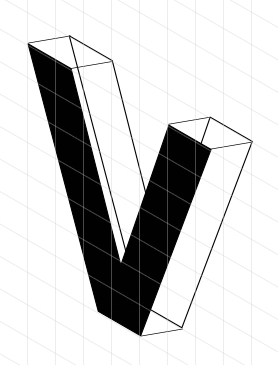
                                    I'm trying isometric and I thought I'd try to make a diagram with the letters VS.
                                    I already have a problem with the letter V: it looks totally distorted. I've tried placing the V shape in a square, which I've distorted, but the top of the V also looks odd. Is this the right way to go about letters? Should I create another grid to avoid these optical oddities? Thanks for your time ☺
                                    0_1687965137741_VSiso.jpg

                                    W11 Pro 25H2 - 12th Gen Intel(R) i7-12700K 3.61 GHz - RAM 64 Go - NVIDIA GF GTX 4070 Ti - Intuos - Dell UP3216Q / Eizo ColorEdge
                                    W11 Pro 25H2 - 12th Gen Intel(R) i7-12700KF 3.60 GHz -RAM 64 Go - NVIDIA GF GTX 3080 - IntuosPro- ProArt PA329C

                                    S 1 Reply Last reply Reply Quote 0
                                    • S Offline
                                      Subpath @B-Vs-V
                                      last edited by Subpath

                                      @Pat

                                      quit a while ago i made a video for another post
                                      about isometric drawing

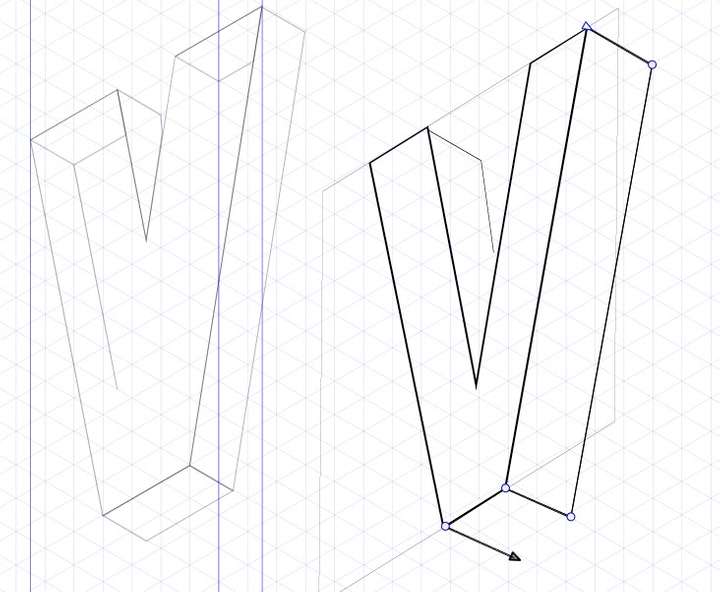
                                      where i use a clone trick that may be helpful

                                      keep your original plane while put a clone
                                      of it in isometric so every change you made
                                      on the original will be transferred to isometric

                                      this could be helpful for complicated designs
                                      or by using text

                                      here the video

                                      you could create planes for each side of your design

                                      to use more then one shape create a group
                                      and clone that group, you could use then "draw inside"
                                      to put shapes and strokes in that group

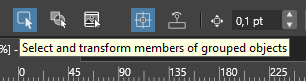
                                      and the "select members of a group.." Tool to
                                      move shapes inside of the group

                                      0_1687971453030_draw inside.png

                                      0_1687971461675_member of a group.png

                                      Win 11
                                      CPU: AMD Ryzen 5 9600X, 6-core.
                                      GPU: Nvidia Geforce RTX 5070.

                                      1 Reply Last reply Reply Quote 2
                                      • S Offline
                                        Subpath
                                        last edited by

                                        also made a quick isometric version
                                        in affinity designers isometric studio

                                        maybe this helps for comparison

                                        0_1687972063341_quick Isometric.png

                                        Win 11
                                        CPU: AMD Ryzen 5 9600X, 6-core.
                                        GPU: Nvidia Geforce RTX 5070.

                                        B 1 Reply Last reply Reply Quote 3
                                        • Devil DinosaurD Offline
                                          Devil Dinosaur
                                          last edited by

                                          Hi everyone,

                                          @Pat For drawing letters I have 2 ways :

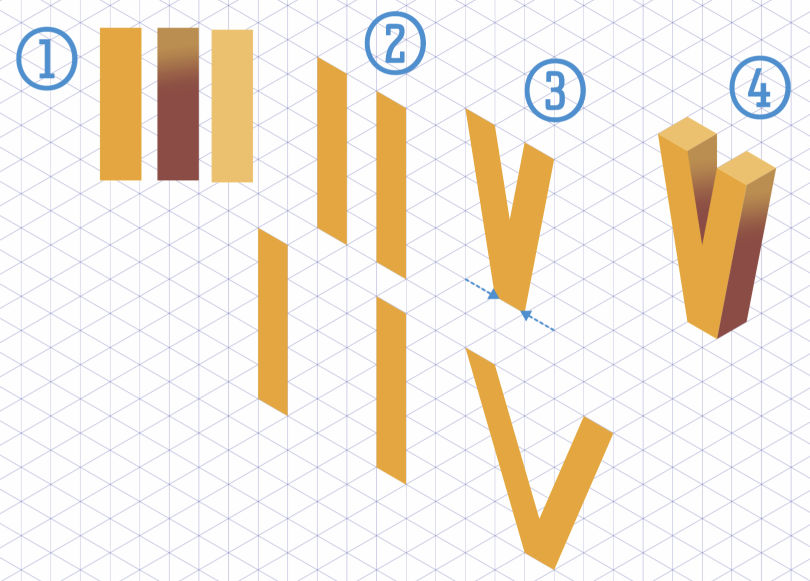
                                          For a modern (sans serif) letter, I would create rectangles and align them according to the isometric grid (with snapping on). I choose the space between the rectangle according to symmetry if needed, for a "V" 3 squares may be good, while "5" will bring weirder look (see image here). Stick to the grid, it's easier (in your case I see the surrounding square off the grid). Keep in mind that you can make your artworks big, using a lot of square count and snapping accuracy and then just shrink them later.

                                          If you have serif letters or complex curvy shape ("S") I suggest that you type your text then use the iso settings in the transform panel (rotate, skew, scale). I have done actions to make things automatic. The preset and some experiments are in this folder.
                                          For volume you may duplicate the result and use the shape builder in order to create the thickness part.

                                          I hope I'm clear enough. (I may need my second coffee 😁 )

                                          Fred.
                                          MacBook Pro (M1) - MacOs Sonoma 14

                                          1 Reply Last reply Reply Quote 3
                                          • B Offline
                                            B-Vs-V @Subpath
                                            last edited by B-Vs-V

                                            @Subpath @Devil-Dinosaur Thank you both for your feedback ☺ it must also have something to do with the way I perceive isometric shapes and the way they're constructed (direction of false depth). Anyway, I'm going to continue decorating the letters ☺

                                            W11 Pro 25H2 - 12th Gen Intel(R) i7-12700K 3.61 GHz - RAM 64 Go - NVIDIA GF GTX 4070 Ti - Intuos - Dell UP3216Q / Eizo ColorEdge
                                            W11 Pro 25H2 - 12th Gen Intel(R) i7-12700KF 3.60 GHz -RAM 64 Go - NVIDIA GF GTX 3080 - IntuosPro- ProArt PA329C

                                            Devil DinosaurD 1 Reply Last reply Reply Quote 1
                                            • First post
                                              Last post