VectorStyler
    • Categories
    • Unread
    • Recent
    • Tags
    • Popular
    • Register
    • Login

    Quick question about grids

    Scheduled Pinned Locked Moved Questions and Support
    7 Posts 4 Posters 5.4k Views 4 Watching
    Loading More Posts
    • Oldest to Newest
    • Newest to Oldest
    • Most Votes
    Reply
    • Reply as topic
    Log in to reply
    This topic has been deleted. Only users with topic management privileges can see it.
    • K Offline
      KT
      last edited by KT

      I looked at the manual quick and didn't see the answer so just posting here. Is there a show/hide grid shortcut?
      Or maybe I can make one, I haven't tested that feature (making my own shortcuts) out yet so not sure.

      ETA: I just figured out how to make my own. πŸ™‚

      S VectorStylerV 2 Replies Last reply Reply Quote 0
      • S Offline
        Subpath @KT
        last edited by Subpath

        @KT

        I myself do not configure shortcuts in VS
        but I'm sure you can give it a shortcut πŸ™‚
        (you found it Menu > View > Customize > Shortcuts)
        (there is also a Grid Panel in Menu > Panels > Editing > Grid
        you find some settings from this panel also in "Artboard Options" > Grid)

        I can only provide two links that might be helpful.

        the first link is a sortable shortcut list made from @b77
        here the Link

        Shortcut List for Mac and PC

        the second is a tutorial from @Devil-Dinosaur
        where he use the Grid Editor for Isometric Design that might also be useful

        Grid Editor - Isometric Drawing

        and this Link also

        Win 11
        CPU: AMD Ryzen 5 9600X, 6-core.
        GPU: Nvidia Geforce RTX 5070.

        1 Reply Last reply Reply Quote 1
        • K Offline
          KT
          last edited by

          Wowβ€”thanks! Much appreciated. πŸ™‚

          1 Reply Last reply Reply Quote 0
          • IngolfI Offline
            Ingolf
            last edited by

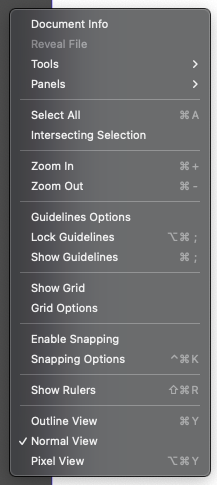
            I customized the no selection menu to look like this:
            0_1662240820776_d48e7125-2294-479a-90c0-17f9bb102a82-image.png

            alt text

            🍏 macOS Sequoia Apple Silicon

            K 1 Reply Last reply Reply Quote 2
            • K Offline
              KT @Ingolf
              last edited by

              @Ingolf
              Thanks! I haven't tried to customize menus yet but that opens up new possibilities. πŸ™‚ Thanks for the video to show how to use them. That's now on my list to try out!

              1 Reply Last reply Reply Quote 1
              • VectorStylerV Offline
                VectorStyler @KT
                last edited by

                @KT No shortcut in the default configuration.
                It is quite easy to add one with the app menu -> Keyboard Shortcuts command

                (on Windows this can be found in View menu).

                K 1 Reply Last reply Reply Quote 1
                • K Offline
                  KT @VectorStyler
                  last edited by

                  @VectorStyler
                  Thanks!

                  1 Reply Last reply Reply Quote 0
                  • First post
                    Last post
