VectorStyler
    • Categories
    • Unread
    • Recent
    • Tags
    • Popular
    • Register
    • Login

    Corner rounding algorithm

    Scheduled Pinned Locked Moved Features and Ideas
    28 Posts 7 Posters 40.2k Views 6 Watching
    Loading More Posts
    • Oldest to Newest
    • Newest to Oldest
    • Most Votes
    Reply
    • Reply as topic
    Log in to reply
    This topic has been deleted. Only users with topic management privileges can see it.
    • BoldlineB Online
      Boldline @b77
      last edited by

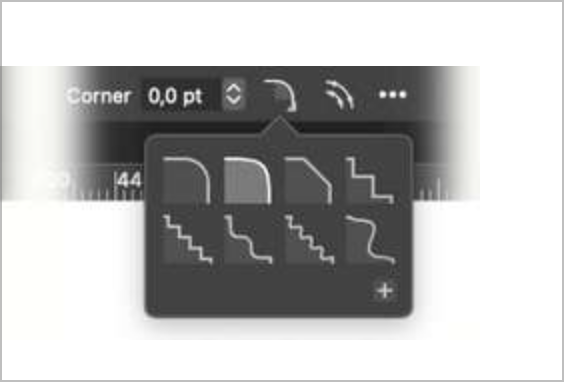
      @b77 Awesome job mocking those up. I also really like #3 the most and option 1 as my second choice. I like the subtly of the 3rd option but can also understand why it looks like a fill.
      I also agree the blue should be desaturated as well
      0_1667951779510_bbce2061-1f94-4323-af66-dc4b9a98643e-BLD 2022-11-08 at 18.54.39@2x.png

      🍎 macOS Sequoia 15.3, Mac mini (M1, 2020), Chip Apple M1, Memory 16 GB
      Cintiq 27QHD Display and LG Ultra HD Display

      1 Reply Last reply Reply Quote 1
      • encartE Offline
        encart
        last edited by

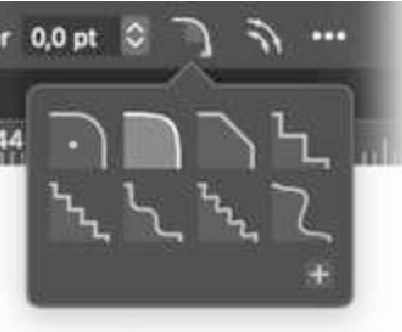
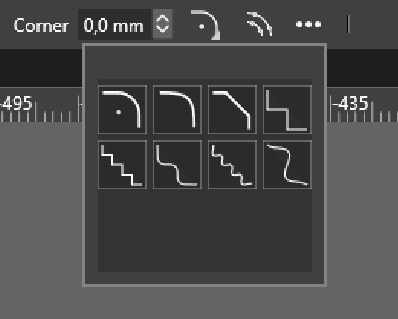
        The first thing that popped into my head to make it easier to distinguish between the first two modes was the placement of the centre of the circle.
        I just want to make sure that you also considered this option, but rejected it and nobody mentioned it.
        0_1667958717667_screenshot_20221109_025144.png
        0_1667958319926_screenshot_20221109_024437.png

        Windows 11 Home 10.0.22621

        S b77B 2 Replies Last reply Reply Quote 2
        • S Offline
          Subpath @encart
          last edited by

          @encart

          also a good Idea

          Win 11
          CPU: AMD Ryzen 5 9600X, 6-core.
          GPU: Nvidia Geforce RTX 5070.

          1 Reply Last reply Reply Quote 0
          • b77B Offline
            b77 @encart
            last edited by b77

            @encart To me (and at least on a Retina screen) the difference between the first
            two corner types is visible without a dot.

            @Subpath You mentioned somewhere that you use a non-Retina display, IIRC.
            Is there no discernible difference between the first two corner types there?

            MacBook Pro (Intel) running Monterey 12.6.4

            S 1 Reply Last reply Reply Quote 0
            • IngolfI Offline
              Ingolf @b77
              last edited by

              @b77 said in Corner rounding algorithm:

              @Ingolf OK, but in case one of the first two versions is used, I hope the developer changes it to a
              desaturated blue, like the blue used elsewhere in the UI… the current blue is straight outta BSOD-land. 😖🙂

              Agreed 🙂

              🍏 macOS Sequoia Apple Silicon

              1 Reply Last reply Reply Quote 1
              • S Offline
                Subpath @b77
                last edited by Subpath

                @b77 said in Corner rounding algorithm:

                You mentioned somewhere that you use a non-Retina display, IIRC.
                Is there no discernible difference between the first two corner types there?

                On my Monitor, I can see there is a difference.
                Small, but noticeable to me.

                But I must say that I have a trained eye, since I been
                working with vector graphics a long time.

                Win 11
                CPU: AMD Ryzen 5 9600X, 6-core.
                GPU: Nvidia Geforce RTX 5070.

                1 Reply Last reply Reply Quote 2
                • b77B Offline
                  b77
                  last edited by b77

                  @VectorStyler An idea:

                  Option-clicking any of the corner types could invert the corner (make it concave) and revert it to convex when you Option-click again.

                  (I know there is a special button for that in the Corner panel, but it would be faster this way).

                  MacBook Pro (Intel) running Monterey 12.6.4

                  1 Reply Last reply Reply Quote 0
                  • S Offline
                    Subpath
                    last edited by

                    forgot to mention that the screen resolution I use is 1440x900 pixels

                    Win 11
                    CPU: AMD Ryzen 5 9600X, 6-core.
                    GPU: Nvidia Geforce RTX 5070.

                    1 Reply Last reply Reply Quote 1
                    • IgullI Offline
                      Igull @Ingolf
                      last edited by

                      @Ingolf said in Corner rounding algorithm:

                      (not another choice in preferences, please).

                      Arghhh, I just want a proper and real radiused corner, never a smooth corner - to the value I set in the panel, to the node that I selected and not to all the corners of the object.
                      VS occasionally drives me nuts with corners, it randomly seems to deploy odd-shaped radii to perfectly 90deg corners - even after selecting the radiused option - I must revisit this issue again with some accurate examples - maybe even a video 🙂
                      I DO want proper radiused corners, to be sticky and to be the permanent default corner - get rid of all these other silly mis-shapen corners, they're just for those arty types that seem to linger on this forum LOL 🙂

                      I'm eminently happy to have a preference for this - if nothing else than to ensure those arty types don't get their evil way 🙂

                      /RANT 🙂

                      Neil

                      iMac 27" 2015 Catalina 32Gb, MacBook Pro 13" 2016 Monterey 8Gb, Mac Mini M2 2023 8Gb

                      b77B VectorStylerV 2 Replies Last reply Reply Quote 0
                      • b77B Offline
                        b77 @Igull
                        last edited by

                        @Igull If you selected any of the corner types and it would stick even between sessions
                        (what @Ingolf suggested), isn't that OK?

                        I see no inconvenience here, and no need for a Prefs entry — you keep the corner type set
                        to the first one, others to the second one, and the app doesn't change it to something
                        else between sessions.

                        …………………………………

                        If you want corner rounding applied to a selection of corners (not to all of them),
                        you need to first click the rounding handle of that corner (or Shift-click multiple
                        corner handles), then dragging should round only those.

                        …………………………………

                        Make a video with the issue you mention (if you can replicate it) and send it
                        directly to the developer.

                        MacBook Pro (Intel) running Monterey 12.6.4

                        IngolfI IgullI 2 Replies Last reply Reply Quote 2
                        • IngolfI Offline
                          Ingolf @b77
                          last edited by

                          @b77 said in Corner rounding algorithm:

                          @Igull If you selected any of the corner types and it would stick even between sessions
                          (what @Ingolf suggested), isn't that OK?
                          I see no inconvenience here, and no need for a Prefs entry — you keep the corner type set
                          to the first one, others to the second one, and the app doesn't change it to something
                          else between sessions.

                          Agreed.

                          🍏 macOS Sequoia Apple Silicon

                          1 Reply Last reply Reply Quote 0
                          • VectorStylerV Offline
                            VectorStyler @Igull
                            last edited by

                            @Igull said in Corner rounding algorithm:

                            randomly seems to deploy odd-shaped radii to perfectly 90deg corners

                            Is there a file with an example of this. I would like to replicate this issue.

                            IgullI 2 Replies Last reply Reply Quote 0
                            • IgullI Offline
                              Igull @VectorStyler
                              last edited by

                              @VectorStyler
                              Here's a video of a very simple file with two rectangles drawn using the pen tool. Selecting any point on the rectangle then creating a value for a corner - invariably, it doesn't create a corner.
                              Selecting the complete rectangle then entering a value for the corner gives weird results, the bottom two corners have different types of corners and different values ???
                              Of course, there's no guarantee that I am not doing something completely wrong 🙂
                              I've attached a link to the vid ... https://recordit.co/fpRENkANQL
                              TIA
                              Neil

                              iMac 27" 2015 Catalina 32Gb, MacBook Pro 13" 2016 Monterey 8Gb, Mac Mini M2 2023 8Gb

                              VectorStylerV 1 Reply Last reply Reply Quote 0
                              • VectorStylerV Offline
                                VectorStyler @Igull
                                last edited by

                                @Igull When using the Node tool, the corner field will not work with the selected node. This works only for the Corner tool (third group of tools).

                                As for the second part, it is not clear yet why only the bottom corners are rounded. I will try to replicate this.

                                1 Reply Last reply Reply Quote 0
                                • IgullI Offline
                                  Igull @VectorStyler
                                  last edited by

                                  @VectorStyler
                                  More...

                                  I've just been looking at this in more detail, I created the rectangles (closed) using the pen tool - the corner doesn't seem to work properly on that.
                                  If I create a rectangle using the rectangle tool, it's fine. If I duplicate that rectangle and convert it to curves then create corners, it still works fine.
                                  There seems to be a difference between manually created rectangles and those created and converted using the rectangle tool. ?

                                  Neil

                                  iMac 27" 2015 Catalina 32Gb, MacBook Pro 13" 2016 Monterey 8Gb, Mac Mini M2 2023 8Gb

                                  VectorStylerV 1 Reply Last reply Reply Quote 0
                                  • VectorStylerV Offline
                                    VectorStyler @Igull
                                    last edited by

                                    @Igull Can you send me the file with those rectangles that have problems with the corner.

                                    IgullI 1 Reply Last reply Reply Quote 0
                                    • IgullI Offline
                                      Igull @VectorStyler
                                      last edited by

                                      @VectorStyler

                                      Just sent.

                                      Neil

                                      iMac 27" 2015 Catalina 32Gb, MacBook Pro 13" 2016 Monterey 8Gb, Mac Mini M2 2023 8Gb

                                      1 Reply Last reply Reply Quote 0
                                      • IgullI Offline
                                        Igull @b77
                                        last edited by

                                        @b77 said in Corner rounding algorithm:

                                        @Igull If you selected any of the corner types and it would stick even between sessions
                                        (what @Ingolf suggested), isn't that OK?

                                        Yes, that would work fine for me.

                                        I see no inconvenience here, and no need for a Prefs entry — you keep the corner type set
                                        to the first one, others to the second one, and the app doesn't change it to something
                                        else between sessions.

                                        OK, no probs with that as I would never use the other types anyway (not sure that this isn't actually an indirect preference 'tho 🙂 )

                                        If you want corner rounding applied to a selection of corners (not to all of them),
                                        you need to first click the rounding handle of that corner (or Shift-click multiple
                                        corner handles), then dragging should round only those.

                                        Yes, but I don't want to pick a specific corner tool, I just want to select the corner(s) using shape editor tool and then enter the required value in the corner box - a value of zero is no corner obviously - not moving a slider, that's too inaccurate for me - OK for all you arty types that are looking for an effect, not a specific value 🙂

                                        Make a video with the issue you mention (if you can replicate it) and send it
                                        directly to the developer.

                                        Yes, he has the file now.

                                        Neil

                                        iMac 27" 2015 Catalina 32Gb, MacBook Pro 13" 2016 Monterey 8Gb, Mac Mini M2 2023 8Gb

                                        VectorStylerV 1 Reply Last reply Reply Quote 0
                                        • VectorStylerV Offline
                                          VectorStyler @Igull
                                          last edited by

                                          @Igull The problem in this example with the corner is the retracted handles. If the control point overlaps the node, than the corner at that node cannot be edited.
                                          I will try to fix this ASAP.

                                          IgullI 1 Reply Last reply Reply Quote 1
                                          • IgullI Offline
                                            Igull @VectorStyler
                                            last edited by

                                            @VectorStyler said in Corner rounding algorithm:

                                            @Igull The problem in this example with the corner is the retracted handles. If the control point overlaps the node, then the corner at that node cannot be edited.
                                            I will try to fix this ASAP.

                                            👍 👍

                                            Didn't we have an issue with something similar earlier this year - bounding box showing when editing using the shape editor ?

                                            Neil

                                            iMac 27" 2015 Catalina 32Gb, MacBook Pro 13" 2016 Monterey 8Gb, Mac Mini M2 2023 8Gb

                                            1 Reply Last reply Reply Quote 1
                                            • First post
                                              Last post
