Corner Fulcrum Bug ?
-
A alternative way to resize a "dumb" Shape
and keep round Corners intact, is to do this
with the "Shape Editor Tool"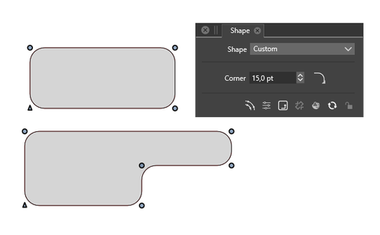
Win 11
CPU: AMD Ryzen 5 9600X, 6-core.
GPU: Nvidia Geforce RTX 5070. -
@b77 said in Corner Fulcrum Bug ?:
If I apply rounded corners to it then decide that I need to resize the rectangle non-proportionally,
bring the rounded corners back to zero (no roundness), then pressing 'Convert to Curves' resets
the rounded corner handles to equal distance from the corners:Not here it doesn't
 There must be some difference in preference set between us that I don't know about ?
Forget actually adding corners for now, if you create a rectangle, convert shape to curves then resize the rectangle non-proportionately - say just pulling one edge, you can see that the corner radius centres are miles off being symmetrical ?? Doing another convert shape to curves does nothing ?TIA
Neil
-
Ahhhhhhhhhhhhhh, I see the issue !!!!!!!!
You are using the pulldown from the shape palette, I'm using the menuitem convert shapes to curves which I have permanently on my right-click contextual menu !!!
When I use the one on the shape palette, it actually works.
I now see why, there are two Object menuitems, one is convert shapes to curves the other is convert to curves (Shift+Opt+O) - maybe just a tad confusing ????
The shape palette actually says "Convert the select object shapes to curves (Shift+Opt+O)" whereas the object menuitem says convert to curves (Shift+Opt+O) !!
Perhaps this all needs rewording :-))
I'm quite happy to just reset the corner centres for now, but this is all a bit confusing for the over sixties
Thanks
Neil
-
-
If you look at the Corner Panel > Panels > Corner
down below at the right side the X in circle
will delete all rounded corners from a selected shapebtw you can create a Action for the needed Steps
see pic below
( unwanted recorded Steps can be deleted in the Action Panel)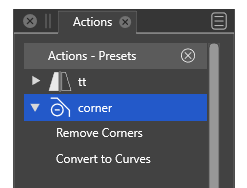
-
@Igull said in Corner Fulcrum Bug ?:
Resize the rectangle using the width and height boxes
Question regarding the original post:
Do you have the "Direct Shape Transformation" option enabled in Preferences -> Editing Options 2 (bottom right checkbox) ? -
@VectorStyler said in Corner Fulcrum Bug ?:
Question regarding the original post:
Do you have the "Direct Shape Transformation" option enabled in Preferences -> Editing Options 2 (bottom right checkbox) ?No, I don't
I've set that now and the issue has gone !!!! I've tried with various shapes and none are an issue when resized now - just perfect, thank you !!!!!!!!!!
Neil
-
@Igull said in Corner Fulcrum Bug ?:
tried with various shapes and none are an issue when resized now - just perfect
Not yet! I think paths should also support this direct shape transform and I added it now.
-
@VectorStyler If the next build will have changes related to all this, please explain the changes here when it's released.
-
@b77 said in Corner Fulcrum Bug ?:
@VectorStyler If the next build will have changes related to all this, please explain the changes here when it's released.
Before I forget:
The only change that will be in the next build is that when a free path (not parametric shape) is scaled or rotated and the "Direct Shape Transformation" is enabled (already exists), then instead of adding a "nondestructive" transform to the object, it will just scale the path, leaving the corners "rounded".



