VectorStyler
    • Categories
    • Unread
    • Recent
    • Tags
    • Popular
    • Register
    • Login

    Making a symbol, unexpected results

    Scheduled Pinned Locked Moved VectorStyler 1.1 Bugs
    6 Posts 3 Posters 6.1k Views 3 Watching
    Loading More Posts
    • Oldest to Newest
    • Newest to Oldest
    • Most Votes
    Reply
    • Reply as topic
    Log in to reply
    This topic has been deleted. Only users with topic management privileges can see it.
    • B Offline
      B-Vs-V
      last edited by B-Vs-V

      I did group the part of the object & I wanted to define it as a symbol (Object-> Object role). I've got different objects in the symbol panel:
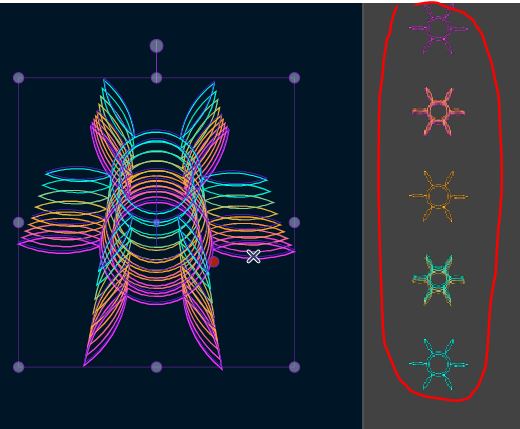
      0_1677786361659_Capture.JPG

      W11 Pro 25H2 - 12th Gen Intel(R) i7-12700K 3.61 GHz - RAM 64 Go - NVIDIA GF GTX 4070 Ti - Intuos - Dell UP3216Q / Eizo ColorEdge
      W11 Pro 25H2 - 12th Gen Intel(R) i7-12700KF 3.60 GHz -RAM 64 Go - NVIDIA GF GTX 3080 - IntuosPro- ProArt PA329C

      b77B 1 Reply Last reply Reply Quote 0
      • B Offline
        B-Vs-V
        last edited by

        @VectorStyler Another bug ? I wanted to change the overall shape through the Shape editor and I got this:
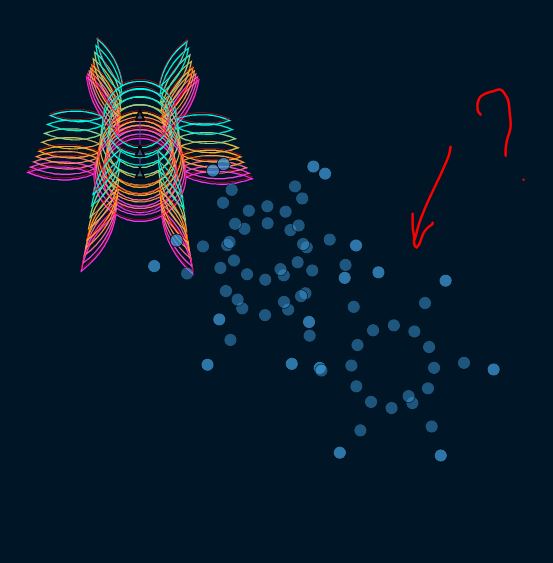
        0_1677786898771_Capture.JPG

        W11 Pro 25H2 - 12th Gen Intel(R) i7-12700K 3.61 GHz - RAM 64 Go - NVIDIA GF GTX 4070 Ti - Intuos - Dell UP3216Q / Eizo ColorEdge
        W11 Pro 25H2 - 12th Gen Intel(R) i7-12700KF 3.60 GHz -RAM 64 Go - NVIDIA GF GTX 3080 - IntuosPro- ProArt PA329C

        1 Reply Last reply Reply Quote 0
        • B Offline
          B-Vs-V
          last edited by

          & when I want to apply Transform:

          0_1677787095199_1627d1d6-5adc-46a1-8726-8f531be19a5d-image.png

          W11 Pro 25H2 - 12th Gen Intel(R) i7-12700K 3.61 GHz - RAM 64 Go - NVIDIA GF GTX 4070 Ti - Intuos - Dell UP3216Q / Eizo ColorEdge
          W11 Pro 25H2 - 12th Gen Intel(R) i7-12700KF 3.60 GHz -RAM 64 Go - NVIDIA GF GTX 3080 - IntuosPro- ProArt PA329C

          VectorStylerV 1 Reply Last reply Reply Quote 0
          • b77B Offline
            b77 @B-Vs-V
            last edited by b77

            @Pat Regarding the first issue:

            Did you drag-to-select over all three objects and their interpolated parts, to make sure all are selected before grouping?

            If I do that, here it works: https://recordit.co/3k4RoPy3bZ

            MacBook Pro (Intel) running Monterey 12.6.4

            B 1 Reply Last reply Reply Quote 1
            • VectorStylerV Offline
              VectorStyler @B-Vs-V
              last edited by

              @Pat Tried all these with the test file I have and cannot replicate here.

              Getting the 5 objects does look like the role was applied separately to those 5 objects, maybe there was some problem with the grouping?

              1 Reply Last reply Reply Quote 1
              • B Offline
                B-Vs-V @b77
                last edited by

                @b77 @VectorStyler Thanks.
                I've always selected the whole object with the select&move tool and it worked so far.

                I tried to reproduce this problem. I selected and grouped and made sure everything was grouped. With the move tool, I can then duplicate it (Alt-drag) and move it.
                I activated 'Transform stroke' in the 'Object option' sub-menu, resize the whole object and made it a symbol (Object Role). It appears well in the symbol panel. I use it with the repeater function and the object ends up disappearing from the Symbol panel and from the large object I used to repeat it (Ctrl-R doesn't help).
                I will continue to test all these steps with a new file from the beginning.

                W11 Pro 25H2 - 12th Gen Intel(R) i7-12700K 3.61 GHz - RAM 64 Go - NVIDIA GF GTX 4070 Ti - Intuos - Dell UP3216Q / Eizo ColorEdge
                W11 Pro 25H2 - 12th Gen Intel(R) i7-12700KF 3.60 GHz -RAM 64 Go - NVIDIA GF GTX 3080 - IntuosPro- ProArt PA329C

                1 Reply Last reply Reply Quote 1
                • First post
                  Last post