VectorStyler
    • Categories
    • Unread
    • Recent
    • Tags
    • Popular
    • Register
    • Login

    Alt+ Scroll wheel creates new obcjects while changing width/height value in Transform Panel

    Scheduled Pinned Locked Moved VectorStyler 1.1 Bugs
    9 Posts 3 Posters 9.7k Views 3 Watching
    Loading More Posts
    • Oldest to Newest
    • Newest to Oldest
    • Most Votes
    Reply
    • Reply as topic
    Log in to reply
    This topic has been deleted. Only users with topic management privileges can see it.
    • encartE Offline
      encart
      last edited by

      I was wondering if Alt has an assigned function when changing the width and height values of an object. Turning the scroll wheel when Alt is pressed creates new copies of the objects.
      https://recordit.co/3Exmdbfa4e

      Windows 11 Home 10.0.22621

      VectorStylerV 2 Replies Last reply Reply Quote 0
      • VectorStylerV Offline
        VectorStyler @encart
        last edited by

        @encart Yes, conflicting modifier key problem again.
        Holding Alt while confirming a value in the Transform panel will duplicate the object. This is by design.
        I will try to find a solution for the scrolling conflict.

        S 1 Reply Last reply Reply Quote 0
        • S Offline
          Subpath @VectorStyler
          last edited by Subpath

          @VectorStyler

          I am not sure if I am right, but couldn't
          this be left as it is?

          Thought with the upcoming "step wise" function
          in the Transform panel, we could also create copies
          this way.

          Here is the thread I refer too
          https://www.vectorstyler.com/forum/topic/3017/any-way-to-move-2-selected-anchor-points-in-opposite-direction
          .
          .
          Here a video

          (creating shape copies with holding Shift+Alt (win) while
          changing the Value with the Scrollwheel in Rotation Field)
          (instead of Scrollwheel, works with the Arrow-keys too)
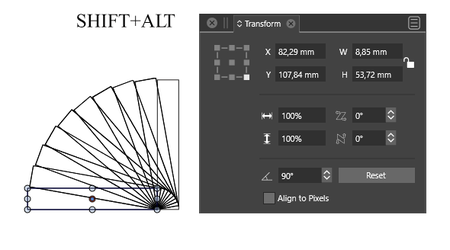
          0_1681109488876_Alt-Scrollwheel-copies.png

          Win 11
          CPU: AMD Ryzen 5 9600X, 6-core.
          GPU: Nvidia Geforce RTX 5070.

          encartE 1 Reply Last reply Reply Quote 1
          • encartE Offline
            encart @Subpath
            last edited by encart

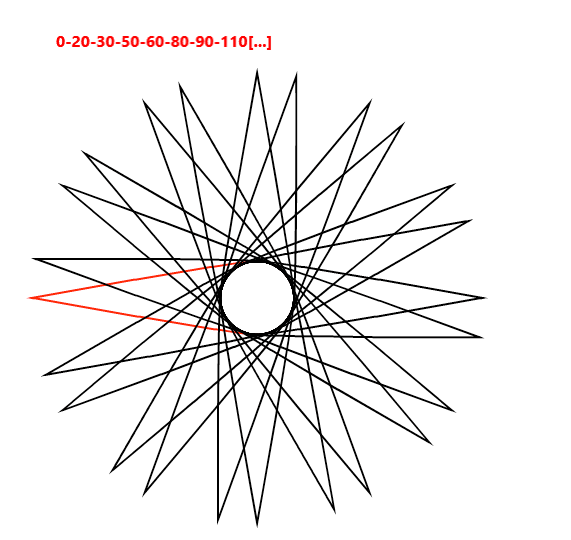
            @Subpath Regarding the use of the Scrollwheel , I have long had a problem with inconsistent step values. The problem also occurs in other fields. When I need a specific value, I have to enter it manually.
            Width value sequence: 99-100-101-103-104-105-107mm
            0_1681119806746_screenshot_20230410_113407.png

            Windows 11 Home 10.0.22621

            S 1 Reply Last reply Reply Quote 0
            • S Offline
              Subpath @encart
              last edited by Subpath

              @encart

              ....Regarding the use of the Scrollwheel , I have long had a problem
              with inconsistent step values....

              Thats not good of course.

              It was just a though of mine. Came on to that Idea because
              @VectorStyler wrote to add a step size for transforming
              into the backlog in the Thread i mentioned before.

              Btw. changing Values in the transform panel
              works also with the Arrow Keys and Shift-key
              adds also a multiplikator of 10 to it.
              The Alt-key (Bug) works too.

              Here a short video

              Win 11
              CPU: AMD Ryzen 5 9600X, 6-core.
              GPU: Nvidia Geforce RTX 5070.

              1 Reply Last reply Reply Quote 0
              • S Offline
                Subpath
                last edited by

                @encart, @VectorStyler

                Found out that using the Alt-key to copy
                shapes in the Transform panel (Panels > Transform)
                does not work consistently.

                It only works with scaling and rotation.
                Move does not work.

                So in this state it is yet more like bug
                then a feature.

                Win 11
                CPU: AMD Ryzen 5 9600X, 6-core.
                GPU: Nvidia Geforce RTX 5070.

                VectorStylerV 1 Reply Last reply Reply Quote 1
                • VectorStylerV Offline
                  VectorStyler @Subpath
                  last edited by

                  @Subpath I will try to fix the moving issue.

                  S 1 Reply Last reply Reply Quote 1
                  • S Offline
                    Subpath @VectorStyler
                    last edited by Subpath

                    @VectorStyler said in Alt+ Scroll wheel creates new obcjects while changing width/height value in Transform Panel:

                    @Subpath I will try to fix the moving issue.

                    great to hear, then please look that it works with the Scrollwheel
                    and the Arrow-keys too
                    like scale an rotating do

                    Win 11
                    CPU: AMD Ryzen 5 9600X, 6-core.
                    GPU: Nvidia Geforce RTX 5070.

                    1 Reply Last reply Reply Quote 1
                    • VectorStylerV Offline
                      VectorStyler @encart
                      last edited by

                      @encart This issue should be fixed in build 1.1.080

                      1 Reply Last reply Reply Quote 0
                      • First post
                        Last post
