VectorStyler
    • Categories
    • Unread
    • Recent
    • Tags
    • Popular
    • Register
    • Login

    update 1.1.080

    Scheduled Pinned Locked Moved Release notes of past builds
    20 Posts 6 Posters 2.5k Views 4 Watching
    Loading More Posts
    • Oldest to Newest
    • Newest to Oldest
    • Most Votes
    Reply
    • Reply as topic
    Log in to reply
    This topic has been deleted. Only users with topic management privileges can see it.
    • BoldlineB Offline
      Boldline @b77
      last edited by

      @b77 said in update 1.1.080:

      • Visual confirmation when snapping nodes.

      Thanks for this, however I'm not sure about that circle — red and small.

      Any opinions from other users?

      Personally I like it how it is with the new build 80 update - it's subtle and simple. Snapping overall feels much improved as well. What ideas do you have for improving the indicator?

      🍎 macOS Tahoe 26.2, Mac mini (M1, 2020), Chip Apple M1, Memory 16 GB
      Cintiq 27QHD Display and LG Ultra HD Display

      1 Reply Last reply Reply Quote 0
      • syllieS Offline
        syllie
        last edited by

        Oh wow - got tied up in work this morning and only just now checked the forum seeing we've got an update - so exciting! will be another couple of hours before I can give it a try - but that list is impressive! Thank you for your hard work!

        Windows 10 Pro | 22H2

        1 Reply Last reply Reply Quote 0
        • VectorStylerV Offline
          VectorStyler @b77
          last edited by

          @b77 said in update 1.1.080:

          however I'm not sure about that circle — red and small.

          Is this when the node is snapped? It should also display an orange line.

          b77B 1 Reply Last reply Reply Quote 0
          • S Offline
            Subpath @b77
            last edited by

            @b77 , @Boldline

            .... Visual confirmation when snapping nodes.....

            could someone post a screenshot
            could not really figure out which circle
            is meant or what it is about

            Win 11
            CPU: AMD Ryzen 5 9600X, 6-core.
            GPU: Nvidia Geforce RTX 5070.

            VectorStylerV 1 Reply Last reply Reply Quote 0
            • VectorStylerV Offline
              VectorStyler @Subpath
              last edited by

              @Subpath Cannot make a screenshot now, but if you move a node (path editor) over a guideline (snapping enabled), then there should be an orange line over the guideline. This indicator was missing previously.

              S 1 Reply Last reply Reply Quote 1
              • S Offline
                Subpath @VectorStyler
                last edited by

                @VectorStyler

                thanks, got it now
                the "guidline" was the missing thing

                Win 11
                CPU: AMD Ryzen 5 9600X, 6-core.
                GPU: Nvidia Geforce RTX 5070.

                1 Reply Last reply Reply Quote 0
                • b77B Offline
                  b77 @VectorStyler
                  last edited by

                  @VectorStyler said in update 1.1.080:

                  @b77 said in update 1.1.080:

                  however I'm not sure about that circle — red and small.

                  Is this when the node is snapped? It should also display an orange line.

                  Sorry for not being clear: it's when a node snaps to another node.

                  MacBook Pro (Intel) running Monterey 12.6.4

                  VectorStylerV 1 Reply Last reply Reply Quote 1
                  • VectorStylerV Offline
                    VectorStyler @b77
                    last edited by

                    @b77 said in update 1.1.080:

                    it's when a node snaps to another node.

                    Got it! How should this be indicated with two lines (cross)?

                    S b77B 2 Replies Last reply Reply Quote 0
                    • S Offline
                      Subpath @VectorStyler
                      last edited by Subpath

                      @VectorStyler said in update 1.1.080:
                      @b77 said in update 1.1.080:

                      it's when a node snaps to another node.

                      The size of the orange circle seems to me to be a bit too small.
                      But thats a very minor thing to me, have no problem with other
                      solutions.

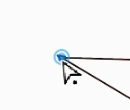
                      here a comparison with the closing indicator (blue circle)
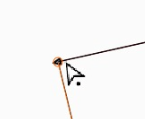
                      see video here

                      0_1683017614982_orange-circle.png

                      0_1683017624564_closing circle.png

                      Win 11
                      CPU: AMD Ryzen 5 9600X, 6-core.
                      GPU: Nvidia Geforce RTX 5070.

                      IngolfI 1 Reply Last reply Reply Quote 2
                      • BoldlineB Offline
                        Boldline @VectorStyler
                        last edited by

                        @VectorStyler said in update 1.1.080:

                        Better path closing in pen tool.

                        Really love the improvements to the pen tool! It's smooth and the path closes efficiently even when I'm using the stylus and moving quickly. It's a joy to use now. Noticed you also updated the pen tool cursor

                        🍎 macOS Tahoe 26.2, Mac mini (M1, 2020), Chip Apple M1, Memory 16 GB
                        Cintiq 27QHD Display and LG Ultra HD Display

                        1 Reply Last reply Reply Quote 1
                        • b77B Offline
                          b77 @VectorStyler
                          last edited by b77

                          @VectorStyler said in update 1.1.080:

                          Got it! How should this be indicated with two lines (cross)?

                          A filled opaque circle, slightly bigger than the node so that it covers it?

                          Light blue, like the indicator for closing a path?

                          Other opinions welcome.

                          MacBook Pro (Intel) running Monterey 12.6.4

                          BoldlineB 1 Reply Last reply Reply Quote 0
                          • IngolfI Offline
                            Ingolf @Subpath
                            last edited by

                            @Subpath said in update 1.1.080:

                            The size of the orange circle seems to me to be a bit too small.

                            Well it is too small 🙂

                            🍏 macOS Sequoia Apple Silicon

                            1 Reply Last reply Reply Quote 0
                            • IngolfI Offline
                              Ingolf
                              last edited by

                              I also personally recommend a few pixels (literally, 1 or 2 px) between the pen tool and closing circle. On this Mac they touch each other. Otherwise I am very satisfied with that part.

                              🍏 macOS Sequoia Apple Silicon

                              VectorStylerV 1 Reply Last reply Reply Quote 1
                              • BoldlineB Offline
                                Boldline @b77
                                last edited by

                                @b77 I'm not intentionally seeking to disagree I promise! 🙂

                                I can see making it similar to the blue circle close indicator in size. I like that orange represents snapping and the light blue represents nodes and paths.

                                I like the ring effect because it still allows me to see the node itself, it's not obscuring the node

                                I've not been a fan of the previous attempts to use a cross as an indicator but I'm open minded

                                🍎 macOS Tahoe 26.2, Mac mini (M1, 2020), Chip Apple M1, Memory 16 GB
                                Cintiq 27QHD Display and LG Ultra HD Display

                                1 Reply Last reply Reply Quote 0
                                • VectorStylerV Offline
                                  VectorStyler @Ingolf
                                  last edited by

                                  @Ingolf said in update 1.1.080:

                                  I also personally recommend a few pixels (literally, 1 or 2 px) between the pen tool and closing circle.

                                  Do you refer to the blue closing circle or the small circle next to the pen cursor? (this could be made larger).

                                  The blue circle can be made a bit larger if needed (yes it can be a visibility issue). The problem here is that both the pen cursor tip and the blue circle center must be exactly on the node.

                                  BoldlineB IngolfI 2 Replies Last reply Reply Quote 0
                                  • BoldlineB Offline
                                    Boldline @VectorStyler
                                    last edited by

                                    @VectorStyler The pen tool blue circle and ring setup for the close indicator looks and feels near perfect to me right now. If it gets too large it's going to go back to looking clunky in my opinion. The current look and feel, the transparency level and the amount of magnetic pull when closing a pen tool path is perfect. I'd love to see the snapping indicator look and work the same way while retaining the orange color.

                                    🍎 macOS Tahoe 26.2, Mac mini (M1, 2020), Chip Apple M1, Memory 16 GB
                                    Cintiq 27QHD Display and LG Ultra HD Display

                                    1 Reply Last reply Reply Quote 1
                                    • IngolfI Offline
                                      Ingolf @VectorStyler
                                      last edited by

                                      @VectorStyler said in update 1.1.080:

                                      @Ingolf said in update 1.1.080:

                                      I also personally recommend a few pixels (literally, 1 or 2 px) between the pen tool and closing circle.
                                      Do you refer to the blue closing circle or the small circle next to the pen cursor? (this could be made larger).

                                      This is what I am referring to:

                                      alt text

                                      🍏 macOS Sequoia Apple Silicon

                                      1 Reply Last reply Reply Quote 1
                                      • First post
                                        Last post