On Ruler, guidelines and indicator line styles
-
Small Cap Figures are actually not a different font size but only a different style.
Plus spacing helps readability.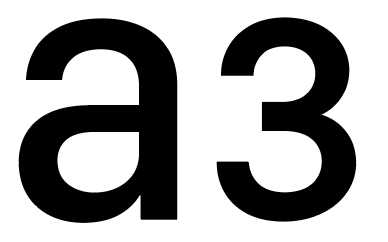
-
@b77 said in On Ruler, guidelines and indicator line styles:
I can't say I like the numbers being so close to the small tick
Indeed too close in the quick visual example. Example was about top lining. Long tick marks should be little longer to give more space below. All about detailing
-
@Ayo Yes, the top tick marks could be just a bit taller.
Using small caps figures means running code that converts the values calculated
in "normal" numbers to small caps numbers, with possibly constant slower refresh
rates (lag) when you pan or zoom in or out.And I'm not sure this is necessary, as the numbers can simply be displayed in Medium
instead of Regular, let's say.(But as I said, personally I think the size & weight is a good compromise now).
-
@Ayo Btw, do you know you can show the position of the selection on the
rulers if you enable 'Show Position in Ruler' in Prefs > Performance? -
@b77 Yes, ticked on, like that to see if I want rulers
-
@Ayo said in On Ruler, guidelines and indicator line styles:
Small Cap Figures are actually not a different font size but only a different style.
FYI and perhaps superfluously, but I didn't know, that but SF-Compact has real drawn (not simulated) SC figures in its (rich)repertoire!

-
@Ayo I will try find a way to use those for the ruler.
The problem is that in VS the document and the UI is rendered with different engines.
The document is rendered with VS own rendering engine, and it has all the OpenType font features.The UI is rendered with the host OS (MacOS or Windows) and this one does not provide access to all these OpenType features.
Maybe the ruler needs its own font settings in the preferences?
-
@Ayo Maybe I'm dense, but why should Small Caps be used for the rulers instead of
normal numbers in a thicker weight of SF Pro at a smaller font size?MacBook Pro (Intel) running Monterey 12.6.4
-
@VectorStyler said in On Ruler, guidelines and indicator line styles:
Maybe the ruler needs its own font settings in the preferences?
Well, it's not such an important point, but I stumbled over the big numbers. Looks a bit childish and/or for the elderly. Nothing wrong with that, but not technically anyway.
A separate setting? Since there are already so many settings, there is always something to add. It would then only give the small/large option. Don't make it too complicated.
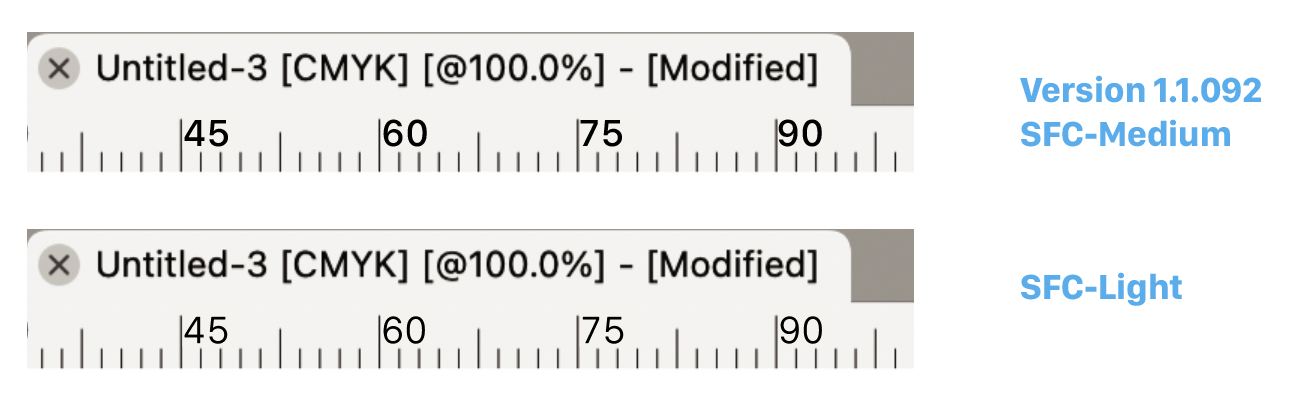
Could also be a matter of weight to bring about some contrast. Look...
-
@Ayo said in On Ruler, guidelines and indicator line styles:
Could also be a matter of weight to bring about some contrast. Look...
I think even better than the SC. Matches (belong to) the tick line style!
-
@b77 said in On Ruler, guidelines and indicator line styles:
why should Small Caps be used for the rulers instead of
normal numbers in a thicker weightBecause they are optimized for it on the drawing board.
-
@Ayo Are you saying that now in 1.1.093 the ruler numbers need to be thicker?
If so, to visually match what element?…………………………………………………
In any case, just to make sure we are on the same page about Small Caps:
True Small Caps (which SF Pro indeed has) are special letters and numbers that
are shorter in height than the capitals, somewhere between capital height and
x-height (lowercase x height).(Petite Caps are all x-height, btw).
As I'm sure you know already, true Small Caps are not simply scaled down capitals
and numbers — their weight is optimized to visually match the weight of the "normal"
uppercase and lowercase characters.In this case, if the normal scaled down numbers would be used, they would
indeed look thinner — not matching the look of "normal" characters.(But again, what element do the ruler numbers need to match visually?)
What I'm saying is that if smaller numbers with thicker weights are needed (if…),
I see no need to use Small Caps — Medium or SemiBold weights can be used
instead of Regular (or Regular instead of Light, etc).
……
(Again, sorry if I misunderstood something, it's a long thread…)MacBook Pro (Intel) running Monterey 12.6.4
-
@VectorStyler said in On Ruler, guidelines and indicator line styles:
I did hesitate a bit with the font size. It can become hard to read at smaller sizes.
While I can read the @Ayo suggestion just fine on my non-retina monitor, it is kind of on the edge of it. I can easily see how for many users that would be a problem, so agree that it should be larger than what he had pictured.
As a point of reference I pulled out a physical ruler and looked at the centimeter scale along the edge. With the exception of the zero, the numbers are on the left side of the mark and right-aligned rather than being left-aligned to the right side of the mark they reflect, as is typical for physical rulers, but not for digital ones.
The more important thing I took note of (in terms of relevance to this discussion) is that the 20 (as an example) is 3 mm (three tick marks) wide and spaced 1 mm (one tick mark) from the 20 cm mark. In other words, even larger than on the version 1.1.092 ruler in comparison to its tick marks, and still slightly larger than in the version 1.1.092 ruler, when looking at the examples that @Ayo provided. The numbers on this suggestion appear to come closest to the 3mm sizing, but only because his tick marks are so much smaller. All of the examples show the numbers closer to the mark than they are on the physical ruler I was comparing against.
-
@b77 said in On Ruler, guidelines and indicator line styles:
to make sure we are on the same page
Guess we're not on the same page.
Must be due to my Dunglish (bad English spoken with a mixture of Dutch). -
@Ayo
Looks like democratic design
To make things clear:
My last suggestion was to keep the size the same as before but change the weight (SFC-Light). To make it less blunt and to create some contrast with the other typography. No smallcapping at all! -


