VectorStyler
    • Categories
    • Unread
    • Recent
    • Tags
    • Popular
    • Register
    • Login

    Text disappears

    Scheduled Pinned Locked Moved VectorStyler 1.2 beta
    20 Posts 3 Posters 19.6k Views 3 Watching
    Loading More Posts
    • Oldest to Newest
    • Newest to Oldest
    • Most Votes
    Reply
    • Reply as topic
    Log in to reply
    This topic has been deleted. Only users with topic management privileges can see it.
    • B Offline
      B-Vs-V @B-Vs-V
      last edited by

      ... same issue if I change the size.

      W11 Pro 25H2 - 12th Gen Intel(R) i7-12700K 3.61 GHz - RAM 64 Go - NVIDIA GF GTX 4070 Ti - Intuos - Dell UP3216Q / Eizo ColorEdge
      W11 Pro 25H2 - 12th Gen Intel(R) i7-12700KF 3.60 GHz -RAM 64 Go - NVIDIA GF GTX 3080 - IntuosPro- ProArt PA329C

      1 Reply Last reply Reply Quote 0
      • VectorStylerV Offline
        VectorStyler @B-Vs-V
        last edited by

        @Pat I need an example for this. What is the font size and the frame size?

        B 1 Reply Last reply Reply Quote 0
        • B Offline
          B-Vs-V @VectorStyler
          last edited by

          @VectorStyler File sent ☺

          W11 Pro 25H2 - 12th Gen Intel(R) i7-12700K 3.61 GHz - RAM 64 Go - NVIDIA GF GTX 4070 Ti - Intuos - Dell UP3216Q / Eizo ColorEdge
          W11 Pro 25H2 - 12th Gen Intel(R) i7-12700KF 3.60 GHz -RAM 64 Go - NVIDIA GF GTX 3080 - IntuosPro- ProArt PA329C

          1 Reply Last reply Reply Quote 1
          • K Offline
            Kumr
            last edited by

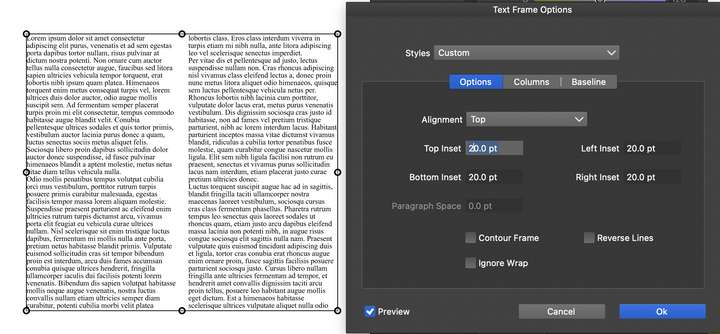
            I experience the same. Also the text frame settings are not working properly, inset and column options most of the time doesn't work.
            0_1697690485629_Screenshot 2023-10-19 at 10.08.24 AM.png

            M1 MacBook Air, 16GB, macOS Sonoma 14.4.1

            VectorStylerV 1 Reply Last reply Reply Quote 0
            • VectorStylerV Offline
              VectorStyler @Kumr
              last edited by

              @Kumr said in Text disappears:

              Also the text frame settings are not working properly, inset and column options most of the time doesn't work

              Could not replicate this with a basic test. Email me the file where this occurs.

              1 Reply Last reply Reply Quote 0
              • K Offline
                Kumr
                last edited by

                emailed the file. Thanks

                M1 MacBook Air, 16GB, macOS Sonoma 14.4.1

                VectorStylerV 1 Reply Last reply Reply Quote 1
                • VectorStylerV Offline
                  VectorStyler @Kumr
                  last edited by

                  @Kumr said in Text disappears:

                  emailed the file. Thanks

                  Tested with the file and changing the inset seems to be working fine here (both 1.1 and 1.2)
                  Was the text frame option accessed from the Text menu Text Frame Options command.

                  K 1 Reply Last reply Reply Quote 0
                  • K Offline
                    Kumr @VectorStyler
                    last edited by

                    @VectorStyler Yes, accessed via Text > Text Frame options.

                    M1 MacBook Air, 16GB, macOS Sonoma 14.4.1

                    VectorStylerV 1 Reply Last reply Reply Quote 0
                    • VectorStylerV Offline
                      VectorStyler @Kumr
                      last edited by

                      @Kumr Try reseting the app, not sure what could cause this issue.

                      K 2 Replies Last reply Reply Quote 0
                      • K Offline
                        Kumr @VectorStyler
                        last edited by

                        @VectorStyler I did the app reset, same result. I completely uninstalled the app and reinstalled the app. No luck.

                        M1 MacBook Air, 16GB, macOS Sonoma 14.4.1

                        1 Reply Last reply Reply Quote 1
                        • K Offline
                          Kumr @VectorStyler
                          last edited by

                          @VectorStyler Just figured it out. I have to select the text inside the frame for the tool to work, not the frame. Thanks for all the support.

                          M1 MacBook Air, 16GB, macOS Sonoma 14.4.1

                          VectorStylerV 1 Reply Last reply Reply Quote 1
                          • VectorStylerV Offline
                            VectorStyler @Kumr
                            last edited by

                            @Kumr said in Text disappears:

                            @VectorStyler Just figured it out. I have to select the text inside the frame for the tool to work, not the frame. Thanks for all the support.

                            There was a bug when the frame was selected. That should be fixed now in 1.2.004 beta.
                            Please try again with the frame selection also, and let me know if this works.

                            K 1 Reply Last reply Reply Quote 0
                            • K Offline
                              Kumr @VectorStyler
                              last edited by

                              @VectorStyler Frame selection is not working here. I am using 1.2.004 beta.

                              https://recordit.co/E6xHPS9cEu

                              M1 MacBook Air, 16GB, macOS Sonoma 14.4.1

                              VectorStylerV 2 Replies Last reply Reply Quote 0
                              • VectorStylerV Offline
                                VectorStyler @Kumr
                                last edited by

                                @Kumr said in Text disappears:

                                Frame selection is not working here.

                                Could not replicate it here. Could be a settings or workspace issue.

                                Go to the user settings/workspace folder (Help menu -> Reveal Workspace), back up the files and remove the resources folder and the restart.

                                K 1 Reply Last reply Reply Quote 0
                                • K Offline
                                  Kumr @VectorStyler
                                  last edited by

                                  @VectorStyler said in Text disappears:

                                  Go to the user settings/workspace folder (Help menu -> Reveal Workspace), back up the files and remove the resources folder and the restart.

                                  Didnt work for me. Same behaviour.

                                  M1 MacBook Air, 16GB, macOS Sonoma 14.4.1

                                  VectorStylerV 1 Reply Last reply Reply Quote 0
                                  • VectorStylerV Offline
                                    VectorStyler @Kumr
                                    last edited by

                                    @Kumr I opened a bug on this one and will try to replicate it.

                                    K 1 Reply Last reply Reply Quote 0
                                    • K Offline
                                      Kumr @VectorStyler
                                      last edited by

                                      @VectorStyler Thanks

                                      M1 MacBook Air, 16GB, macOS Sonoma 14.4.1

                                      1 Reply Last reply Reply Quote 0
                                      • VectorStylerV Offline
                                        VectorStyler @Kumr
                                        last edited by

                                        @Kumr said in Text disappears:

                                        Frame selection is not working here. I am using 1.2.004 beta

                                        When you confirm the frame options (OK), does the frame change (columns or margins)?

                                        K 1 Reply Last reply Reply Quote 0
                                        • K Offline
                                          Kumr @VectorStyler
                                          last edited by

                                          @VectorStyler This is what I am experiencing. Column and inset options work when text in the frame are selected not the frame.

                                          https://recordit.co/0haxza4pA5

                                          M1 MacBook Air, 16GB, macOS Sonoma 14.4.1

                                          1 Reply Last reply Reply Quote 0
                                          • First post
                                            Last post