VectorStyler
    • Categories
    • Unread
    • Recent
    • Tags
    • Popular
    • Register
    • Login

    duplicate object lag & snap indicators invisible
    Scheduled Pinned Locked Moved VectorStyler 1.1 Bugs
    19 Posts 5 Posters 18.0k Views 5 Watching
    Loading More Posts
    • Oldest to Newest
    • Newest to Oldest
    • Most Votes
    Reply
    • Reply as topic
    Log in to reply
    This topic has been deleted. Only users with topic management privileges can see it.
    • I Offline
      Iriseg524 @VectorStyler
      last edited by

      @VectorStyler Thanks for early reply.
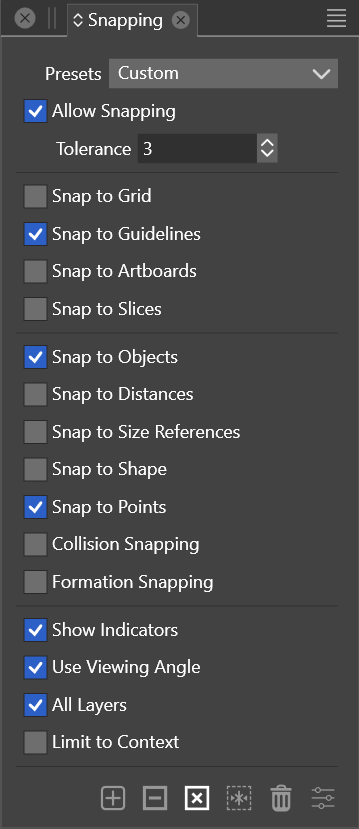
      Here is the screenshot of my snap settings menu:
      0_1701947747515_Snipaste_2023-12-07_19-14-16.png
      As we can see, I enabled the "Snap to Objects", "Snap to points" option.
      Here are some additional info:
      I started trial of VS about 1 week ago and it was at version 1.1.113 when I noticed this issue.
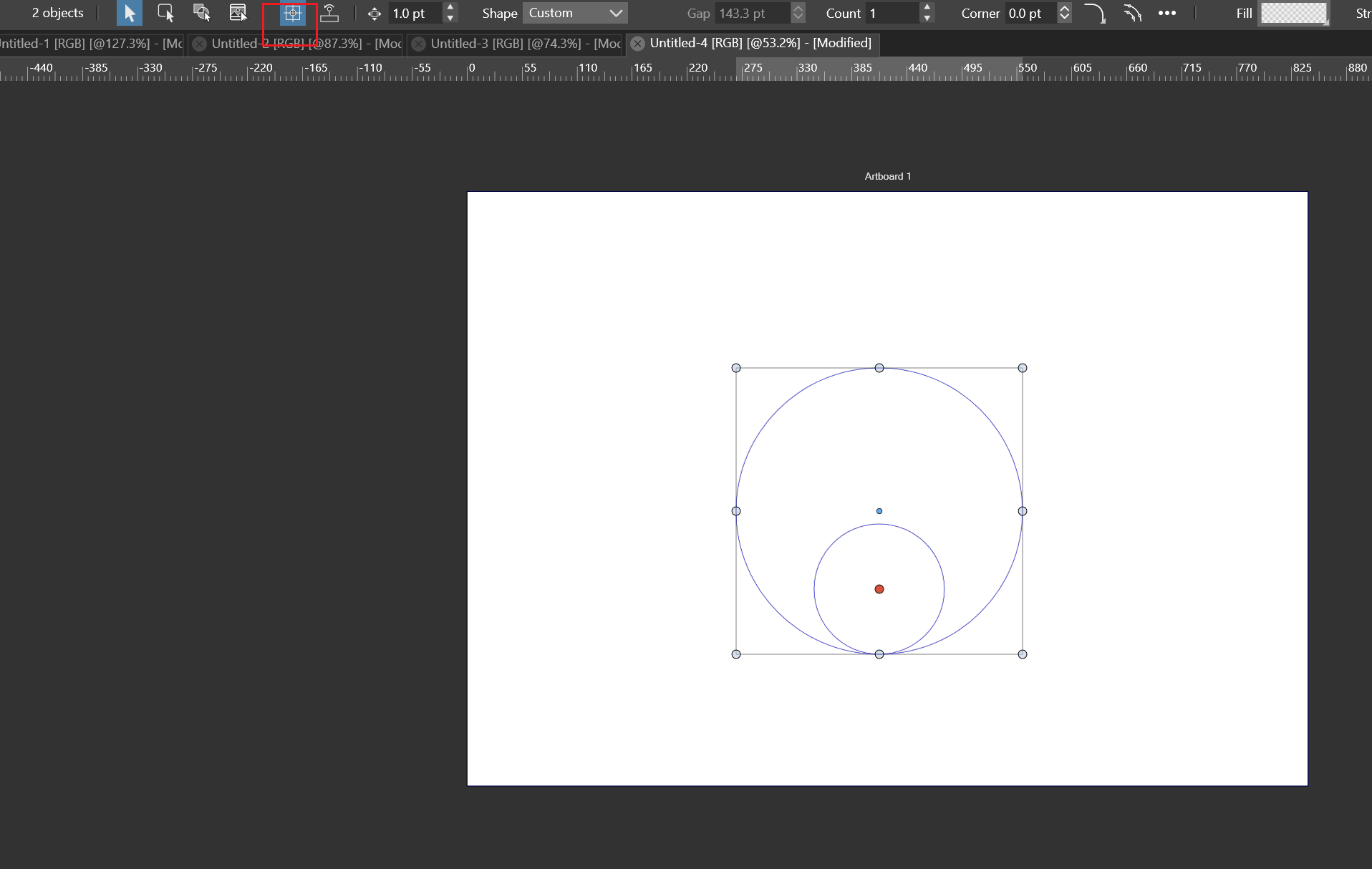
      At the moment I can by chance trigger the snapping incicators by following steps below:

      1. save document and restart VS
      2. switch document view mode to outline view
      3. do the pivot point snapping
      4. the indicators work properly.
        However, though these are the steps, if I follow them, indicators will appear by chance; if not, they never appear.
        I did all of these with the same options shown in picture that time.

      windows11 23H2
      Nvidia Geforce RTX 3060 laptop GPU
      intel i7-12700H CPU
      16GB memory
      2560*1600 150%

      1 Reply Last reply Reply Quote 1
      • I Offline
        Iriseg524 @FastVector
        last edited by

        @FastVector Please see my newest post.

        windows11 23H2
        Nvidia Geforce RTX 3060 laptop GPU
        intel i7-12700H CPU
        16GB memory
        2560*1600 150%

        1 Reply Last reply Reply Quote 0
        • L Online
          Li Xiao @Iriseg524
          last edited by Li Xiao

          @Iriseg524 I can reproduce the issue of lag when duplicating objects in both version 1.1.116 and 1.2.007 (beta). The solution is to press the Alt key once and hold it until before releasing the mouse button to complete the duplication. Avoid continuously holding down the Alt key while moving the mouse.
          video

          VectorStylerV 1 Reply Last reply Reply Quote 0
          • VectorStylerV Offline
            VectorStyler @Li Xiao
            last edited by

            @Li-Xiao said in duplicate object lag & snap indicators invisible:

            @Iriseg524

            Avoid continuously holding down the Alt key while moving the mouse.

            Yes, this was an issue in the past with the Alt key, are you using the right Alt key?

            L 1 Reply Last reply Reply Quote 0
            • L Online
              Li Xiao @VectorStyler
              last edited by

              @VectorStyler The same issue occurs with both the left Alt key and the right Alt key.

              1 Reply Last reply Reply Quote 1
              • L Online
                Li Xiao
                last edited by

                @Iriseg524 @VectorStyler The snapping issues cannot be reproduced in both versions, but a different problem arises in version 1.1.116. Please refer to the recorded video for more details.
                video

                I VectorStylerV 2 Replies Last reply Reply Quote 1
                • I Offline
                  Iriseg524 @Li Xiao
                  last edited by

                  @Li-Xiao Thank you, avoiding continuously holding may be a temporary alternative solution. I believe the issue will be solved eventually as in Adobe Illustrator it works well(I come to VS from it so I'm trying to test as more as possibly every feature I know that works in AI).
                  For snapping issue, few moments ago I tried to enable "Formation Snapping" option in the snapping panel and another form of indicator appeared and help me with aligning pivot point with the inner center. But I still can't see indicators appear in @Li-Xiao 's video.
                  @VectorStyler btw do I have access to beta versions of VS? Or they can be accessed only after purchasing? I want to test if these issues don't exist on the beta version for my device setup.

                  windows11 23H2
                  Nvidia Geforce RTX 3060 laptop GPU
                  intel i7-12700H CPU
                  16GB memory
                  2560*1600 150%

                  L VectorStylerV 2 Replies Last reply Reply Quote 0
                  • L Online
                    Li Xiao @Iriseg524
                    last edited by

                    @Iriseg524 I introduced it to some friends, and many of them have purchased it. Now it's 50% off, and if you buy it, you definitely won't regret it.

                    1 Reply Last reply Reply Quote 0
                    • S Offline
                      Subpath
                      last edited by Subpath

                      I don't regret it even for the full price 🙂
                      its my main vector graphics app since then
                      ( was CorelDraw User before but know many other vector graphics apps)

                      Win 11
                      CPU: AMD Ryzen 5 9600X, 6-core.
                      GPU: Nvidia Geforce RTX 5070.

                      1 Reply Last reply Reply Quote 1
                      • VectorStylerV Offline
                        VectorStyler @Iriseg524
                        last edited by VectorStyler

                        @Iriseg524 said in duplicate object lag & snap indicators invisible:

                        Or they can be accessed only after purchasing?

                        Currently the beta works only with a license.
                        But it is possible to get an email registration for a trial mode of the beta also (not yet public).
                        From 1.2 onwards, the trial will require a simple email registration.

                        I want to test if these issues don't exist on the beta version for my device setup.

                        When it comes to bugs, they are the same in the 1.2 beta as in the 1.1 😞
                        This Alt key was reported before on some Windows versions, could also be related to the keyboard driver.

                        EDIT: I will try to find a solution for this Alt key holding-down problem.

                        1 Reply Last reply Reply Quote 0
                        • VectorStylerV Offline
                          VectorStyler @Li Xiao
                          last edited by

                          @Li-Xiao said in duplicate object lag & snap indicators invisible:

                          The snapping issues cannot be reproduced in both versions, but a different problem arises in version 1.1.116. Please refer to the recorded video for more details.

                          I opened a bug on this one. Looks like restoring default workspace requires a restart.

                          L 1 Reply Last reply Reply Quote 0
                          • L Online
                            Li Xiao @VectorStyler
                            last edited by

                            @VectorStyler Even after restoring the default workspace and restarting, the issue persists. To resolve it, need to delete the settings.xml file and then restart for it to work properly.

                            VectorStylerV 1 Reply Last reply Reply Quote 0
                            • VectorStylerV Offline
                              VectorStyler @Li Xiao
                              last edited by

                              @Li-Xiao Send me that settings file before deleting.

                              L 1 Reply Last reply Reply Quote 0
                              • L Online
                                Li Xiao @VectorStyler
                                last edited by Li Xiao

                                @VectorStyler 0_1701972225878_settings.xml

                                Comparing the settings.xml files, after restoring the default workspace, the settings.xml file only retains two lines, and the second line is still incomplete.

                                1 Reply Last reply Reply Quote 0
                                • I Offline
                                  Iriseg524
                                  last edited by

                                  @VectorStyler I purchased VS about 8 hours ago and when I enter the register info into VS I got "invalid license info" error. I sent an email to your support mailbox and for a quicker feedback I'll open another topic for it. Please check it later.

                                  windows11 23H2
                                  Nvidia Geforce RTX 3060 laptop GPU
                                  intel i7-12700H CPU
                                  16GB memory
                                  2560*1600 150%

                                  VectorStylerV 1 Reply Last reply Reply Quote 0
                                  • VectorStylerV Offline
                                    VectorStyler @Iriseg524
                                    last edited by

                                    @Iriseg524 You should have a new license now.

                                    1 Reply Last reply Reply Quote 0
                                    • First post
                                      Last post