VectorStyler
    • Categories
    • Unread
    • Recent
    • Tags
    • Popular
    • Register
    • Login

    beta 1.2.013

    Scheduled Pinned Locked Moved VectorStyler 1.2 beta
    16 Posts 6 Posters 13.8k Views 5 Watching
    Loading More Posts
    • Oldest to Newest
    • Newest to Oldest
    • Most Votes
    Reply
    • Reply as topic
    Log in to reply
    This topic has been deleted. Only users with topic management privileges can see it.
    • VectorStylerV Offline
      VectorStyler @Harry
      last edited by VectorStyler

      Found the issue a fix will be uploaded soon.

      D B 2 Replies Last reply Reply Quote 0
      • D Offline
        DMBrown @VectorStyler
        last edited by DMBrown

        @VectorStyler Between reading Harry's message and testing on my computer, VectorStyler reports that the problem has been found. Never the less, for what it is worth, I installed 1.2.013 on my Mac Studio M2 Ultra running macOS 14.3.1 and after testing half a dozen keyboard shortcuts there were no problems.

        1 Reply Last reply Reply Quote 0
        • BoldlineB Offline
          Boldline
          last edited by

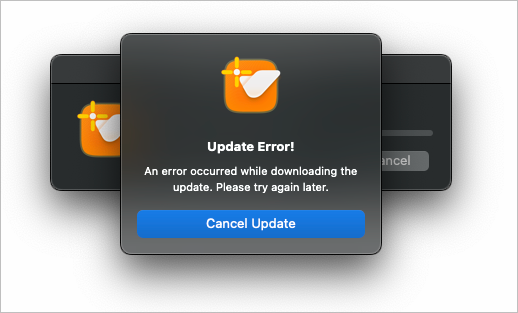
          I'm currently getting an error when I try to upgrade, I assume @VectorStyler is replacing the build?
          0_1708015817563_f0df984c-51d9-44b9-a605-4a98150a917b-BLD 2024-02-15 at 11.49.15.png

          🍎 macOS Tahoe 26.2, Mac mini (M1, 2020), Chip Apple M1, Memory 16 GB
          Cintiq 27QHD Display and LG Ultra HD Display

          VectorStylerV 1 Reply Last reply Reply Quote 0
          • VectorStylerV Offline
            VectorStyler @Harry
            last edited by

            @Harry Uploaded the fix, it affected the Windows version only. Thanks for notifying, and please try again.

            H 1 Reply Last reply Reply Quote 0
            • VectorStylerV Offline
              VectorStyler @Boldline
              last edited by

              @Boldline Try again, yes it was an update of the files.

              BoldlineB 1 Reply Last reply Reply Quote 0
              • BoldlineB Offline
                Boldline @VectorStyler
                last edited by

                @VectorStyler said in beta 1.2.013:

                @Boldline Try again, yes it was an update of the files.

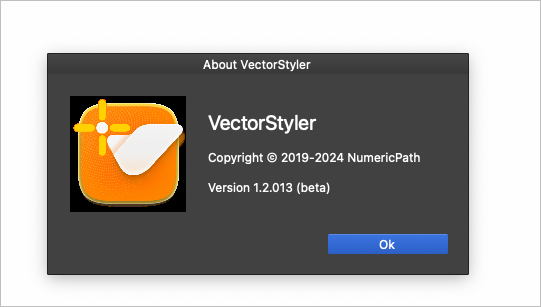
                Success! thank you
                0_1708016322214_c8b1d306-3fc6-42d5-9426-ac33f115f8a1-BLD 2024-02-15 at 11.58.26.png

                🍎 macOS Tahoe 26.2, Mac mini (M1, 2020), Chip Apple M1, Memory 16 GB
                Cintiq 27QHD Display and LG Ultra HD Display

                1 Reply Last reply Reply Quote 1
                • H Offline
                  Harry @VectorStyler
                  last edited by

                  @VectorStyler said in beta 1.2.013:

                  @Harry Uploaded the fix, it affected the Windows version only. Thanks for notifying, and please try again.

                  Thanks! It works now!

                  Win 11, XP Pen Deco 01 V2 graphic tablet

                  1 Reply Last reply Reply Quote 1
                  • B Offline
                    B-Vs-V
                    last edited by

                    @VectorStyler I can't test text blocks on one of my files. As soon as I click on a block VS crashes. You must have received at least 5 crash reports and I'm sending you the file, just to let you know ☺

                    W11 Pro 25H2 - 12th Gen Intel(R) i7-12700K 3.61 GHz - RAM 64 Go - NVIDIA GF GTX 4070 Ti - Intuos - Dell UP3216Q / Eizo ColorEdge
                    W11 Pro 25H2 - 12th Gen Intel(R) i7-12700KF 3.60 GHz -RAM 64 Go - NVIDIA GF GTX 3080 - IntuosPro- ProArt PA329C

                    VectorStylerV 1 Reply Last reply Reply Quote 1
                    • VectorStylerV Offline
                      VectorStyler @B-Vs-V
                      last edited by

                      @Pat Got the file. Double clicking the guideline causes the crash. I will fix this ASAP.

                      861475_VctSt8 1 Reply Last reply Reply Quote 0
                      • 861475_VctSt8 Offline
                        861475_VctSt @VectorStyler
                        last edited by

                        @VectorStyler

                        Double-clicking on the four corners
                        The entire text frame is shrunk.

                        https://recordit.co/sqSTbCH2F0

                        I wonder if my settings are bad.

                        macOS Catalina 10.15.7
                        MacBookAir5,2 (13-inch, Mid 2012)
                        1.8 GHz Dual-Core Intel Core i5
                        8 GB 1600 MHz DDR3
                        Intel HD Graphics 4000 1536 MB

                        LIc. 0 OS10.15.7
                        MacBook Air (13-inch, Mid 2012) / Intel Core i5, 8GB / Intel HD Graphics 4000
                        LIc. 1 OS13.6.7
                        MacBook Pro (14-inch, 2023) / Apple M2 Pro, 16GB / Apple GPU

                        VectorStylerV 1 Reply Last reply Reply Quote 0
                        • VectorStylerV Offline
                          VectorStyler @861475_VctSt
                          last edited by

                          @861475_VctSt said in beta 1.2.013:

                          Double-clicking on the four corners

                          There is a bug in this new frame fitting feature. First you should resize a bit the text frame and then use the double click.
                          The bug is already fixed and the fix will be in the next build.

                          861475_VctSt8 1 Reply Last reply Reply Quote 0
                          • 861475_VctSt8 Offline
                            861475_VctSt @VectorStyler
                            last edited by

                            @VectorStyler

                            Thanks.
                            😃
                            I was able to confirm the issue.
                            I'm holding on to this for a while.

                            LIc. 0 OS10.15.7
                            MacBook Air (13-inch, Mid 2012) / Intel Core i5, 8GB / Intel HD Graphics 4000
                            LIc. 1 OS13.6.7
                            MacBook Pro (14-inch, 2023) / Apple M2 Pro, 16GB / Apple GPU

                            1 Reply Last reply Reply Quote 1
                            • B Offline
                              B-Vs-V @VectorStyler
                              last edited by

                              @VectorStyler said in beta 1.2.013:

                              @Harry Foud the issue a fix will be uploaded soon.

                              @VectorStyler I'm having this problem (notably with ctrl+z) and I understand that the problem has been fixed, but VS doesn't report any updates. Do I have to install VS manually?

                              Is a new update due soon, in which case I can wait.
                              Thanks ☺

                              W11 Pro 25H2 - 12th Gen Intel(R) i7-12700K 3.61 GHz - RAM 64 Go - NVIDIA GF GTX 4070 Ti - Intuos - Dell UP3216Q / Eizo ColorEdge
                              W11 Pro 25H2 - 12th Gen Intel(R) i7-12700KF 3.60 GHz -RAM 64 Go - NVIDIA GF GTX 3080 - IntuosPro- ProArt PA329C

                              VectorStylerV 1 Reply Last reply Reply Quote 1
                              • VectorStylerV Offline
                                VectorStyler @B-Vs-V
                                last edited by

                                @Pat You need to download and install manually, the version was not incremented for this fix.

                                1 Reply Last reply Reply Quote 0
                                • First post
                                  Last post