VectorStyler
    • Categories
    • Unread
    • Recent
    • Tags
    • Popular
    • Register
    • Login

    History issue with cloned objects (?)

    Scheduled Pinned Locked Moved Bugs in VectorStyler
    7 Posts 3 Posters 6.4k Views 2 Watching
    Loading More Posts
    • Oldest to Newest
    • Newest to Oldest
    • Most Votes
    Reply
    • Reply as topic
    Log in to reply
    This topic has been deleted. Only users with topic management privileges can see it.
    • B Offline
      B-Vs-V
      last edited by B-Vs-V

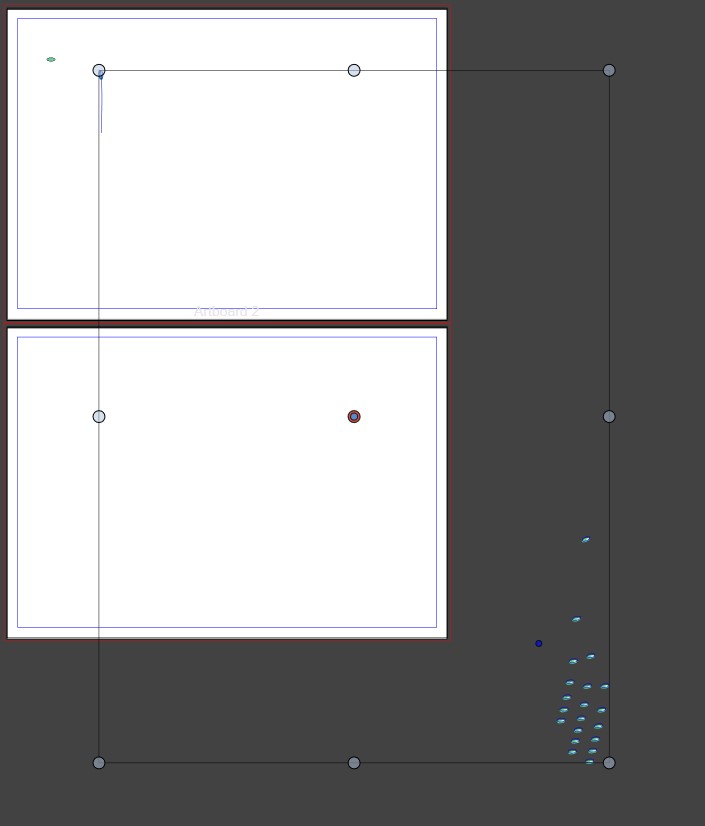
      Simple object with a colour gradient, I've moved 20 cloned objects (Object --> Move...). When I change the shape of the original object, alignment is off:
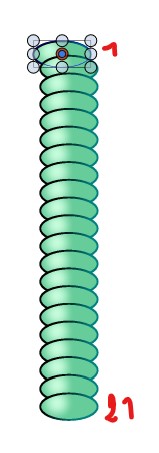
      0_1729698400062_b1.jpg

      when I go back in history, it is missing:
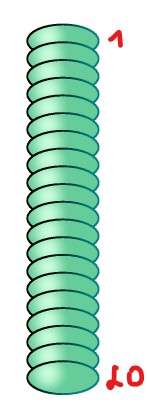
      0_1729698431752_b2.jpg

      W11 Pro 25H2 - 12th Gen Intel(R) i7-12700K 3.61 GHz - RAM 64 Go - NVIDIA GF GTX 4070 Ti - Intuos - Dell UP3216Q / Eizo ColorEdge
      W11 Pro 25H2 - 12th Gen Intel(R) i7-12700KF 3.60 GHz -RAM 64 Go - NVIDIA GF GTX 3080 - IntuosPro- ProArt PA329C

      BoldlineB 1 Reply Last reply Reply Quote 1
      • BoldlineB Offline
        Boldline @B-Vs-V
        last edited by

        @Pat It might expedite things to include the VS file with this post or email it directly to the developer

        🍎 macOS Tahoe 26.2, Mac mini (M1, 2020), Chip Apple M1, Memory 16 GB
        Cintiq 27QHD Display and LG Ultra HD Display

        1 Reply Last reply Reply Quote 2
        • B Offline
          B-Vs-V
          last edited by B-Vs-V

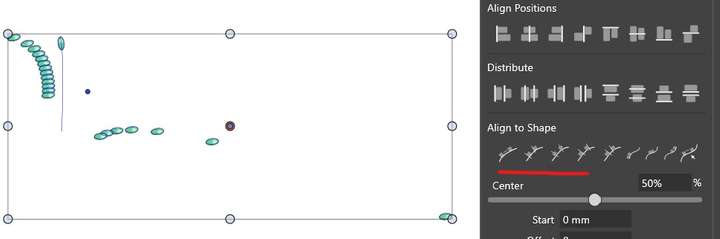
          Trying to align along a stroke:

          0_1729700484610_b3.jpg

          W11 Pro 25H2 - 12th Gen Intel(R) i7-12700K 3.61 GHz - RAM 64 Go - NVIDIA GF GTX 4070 Ti - Intuos - Dell UP3216Q / Eizo ColorEdge
          W11 Pro 25H2 - 12th Gen Intel(R) i7-12700KF 3.60 GHz -RAM 64 Go - NVIDIA GF GTX 3080 - IntuosPro- ProArt PA329C

          VectorStylerV 1 Reply Last reply Reply Quote 1
          • VectorStylerV Offline
            VectorStyler @B-Vs-V
            last edited by

            @Pat Got the file in email. I opened a bug and will try to find a solution for this.

            There is one thing with the clones (when aligning), if the original is transformed, the others will also copy that transform in addition to their own transforms.
            So align to path could be problematic with clones.

            B 2 Replies Last reply Reply Quote 1
            • B Offline
              B-Vs-V @VectorStyler
              last edited by

              @VectorStyler said in History issue with cloned objects (?):

              There is one thing with the clones (when aligning), if the original is transformed, the others will also copy that transform in addition to their own transforms.
              So align to path could be problematic with clones.

              Right, I recall having had similar issues with clones...

              W11 Pro 25H2 - 12th Gen Intel(R) i7-12700K 3.61 GHz - RAM 64 Go - NVIDIA GF GTX 4070 Ti - Intuos - Dell UP3216Q / Eizo ColorEdge
              W11 Pro 25H2 - 12th Gen Intel(R) i7-12700KF 3.60 GHz -RAM 64 Go - NVIDIA GF GTX 3080 - IntuosPro- ProArt PA329C

              1 Reply Last reply Reply Quote 1
              • B Offline
                B-Vs-V @VectorStyler
                last edited by

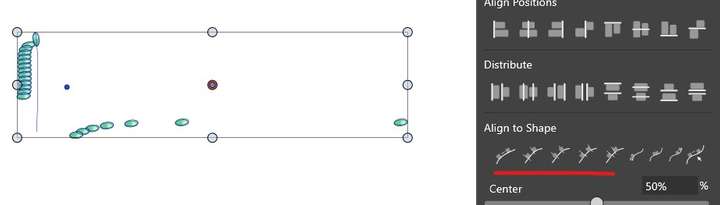
                @VectorStyler Although they are clones, I don't understand the chaotic distribution of objects:

                0_1729751486374_b1.jpg

                0_1729751493371_b2.jpg

                W11 Pro 25H2 - 12th Gen Intel(R) i7-12700K 3.61 GHz - RAM 64 Go - NVIDIA GF GTX 4070 Ti - Intuos - Dell UP3216Q / Eizo ColorEdge
                W11 Pro 25H2 - 12th Gen Intel(R) i7-12700KF 3.60 GHz -RAM 64 Go - NVIDIA GF GTX 3080 - IntuosPro- ProArt PA329C

                VectorStylerV 1 Reply Last reply Reply Quote 1
                • VectorStylerV Offline
                  VectorStyler @B-Vs-V
                  last edited by

                  @Pat said in History issue with cloned objects (?):

                  Although they are clones, I don't understand the chaotic distribution of objects

                  It calculates the movement and rotation of each clone relative to its original. But the original will be transformed by then.
                  The effect is the accumulation of two transforms (wrong) with a wrong rotation center.
                  I will fix this in the next build: the alignment tool has to take into account that the objects are clones.

                  A similar thing will occur with aligning sizes, or when working with references.

                  1 Reply Last reply Reply Quote 1
                  • First post
                    Last post