list of errors
-
@monsterfox said in list of errors:
This AI file cannot be imported.
Same here. I will try to fix this.
-
@VectorStyler https://youtu.be/kc87331fVTw?feature=shared
0_1754577330883_偏移数据错误.vstyler
No extra operations (especially do not use the magnifying glass); the error in this history record can be copied. -
@VectorStyler https://youtu.be/8vY-PU0TpfQ?feature=shared
The previous file still has errors. There's no problem when using the graphic selection tool, but when using the graphic selection function in the menu, the selected graphics are offset. This issue still needs to be fixed. -
@monsterfox Was that toolbar created with a previous version?
If so, the action parameter is changed now, so please recreate the toolbar or remove and add the action again. -
@VectorStyler You might not have noticed that there's a step in my video where I operate via the menu. Additionally, the same error occurs with the button I re-added. It's important to note the order in which you select the graphics: first click the red one, then the black one.
-
-
-
@VectorStyler https://youtu.be/2tymaMPgsp0?feature=shared
https://youtu.be/-1idSoMPKSY?feature=shared[0_1755787575851_测试+1.vstyler](/forum/assets/uploads/files/1755787578727-测试-1.vstyler)
Video 1: When using the shape selection function, displacement still occurs. However, if they are converted to curves and then this function is used, most shapes are normal, while a small number still have offsets. If the shape selector tool is used, none of the above problems exist.Video 2: A special error occurs. Some of the lines in it do not change.
-
@monsterfox I will try to fix these.
-
@VectorStyler I wonder if you have tested with the file I provided. Currently, the error in shape selection still persists, and it seems somewhat difficult to resolve.
-
@monsterfox Yes I tested it. If you try to overlap the two shapes they are different, that causes the small relative movement between the parts of the shape.
Is there some other error I'm not aware of?
-
@VectorStyler said in list of errors:
Is there some other error I'm not aware of?
So far, the only issues found are the two mentioned in my video.
-
@VectorStyler https://youtu.be/mAvJ112O928?feature=shared
I'll mainly talk about Issue 2: When two shapes are blended, undoing one step of the operation while they are in the blended state will cause one of the shapes to disappear, and it cannot be recovered. -
This post is deleted! -
@monsterfox said in list of errors:
When two shapes are blended, undoing one step of the operation while they are in the blended state will cause one of the shapes to disappear, and it cannot be recovered.
I did not yet fix this. I will try to replicate and fix for the next build.
-
@VectorStyler https://youtu.be/wMf28fMFx_0?feature=shared
I have pinned the custom toolbar to the top-left corner. When I drag the right panel bar, the tools on the left jitter. This issue does not occur when the custom toolbar is removed, and I hope this can be fixed. -
@monsterfox I will try to replicate and fix this.
-
@VectorStyler https://youtu.be/gBMnHHnm1Fk?feature=shared
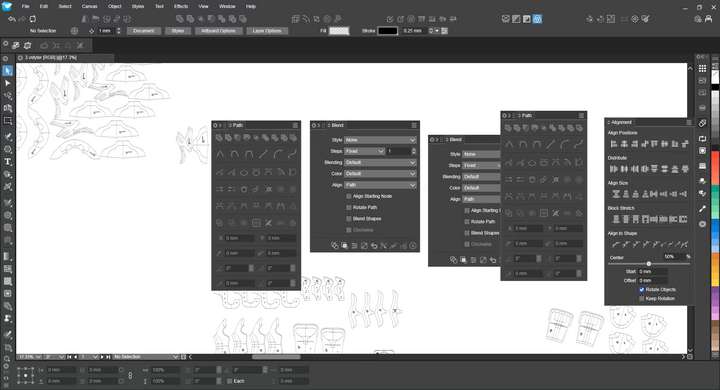 I set a shortcut key for the Align Panel and added the panel to the Mini Panel Bar. Here are the operations that cause errors: Use the shortcut key to open the Align Panel, then press the Alt+P shortcut to open the Path Panel, and drag the Path Panel into the Align Panel to form a panel group. At this point, the shortcut key for the Align Panel will fail; if you press Alt+P again to open the Path Panel, you'll find that two identical panels appear. (The same issue occurs when replacing the Path Panel with the Blend Panel.)
 -
@VectorStyler https://youtu.be/mkdtbDXrmTU?feature=shared
0_1759675136200_gy.vstyler
1. There are still issues with the Node Simplification tool: sometimes it doesn’t work, and other times it functions normally at the initial stage of operation but fails later on.
2. The Offset Path tool works fairly well when operated in the middle of a single path segment, but it becomes cumbersome if applied across two segments. It would be better and more precise if the controls at both ends were nodes. Another problem is that the path sometimes becomes unsmooth after such an offset, which also needs optimization.
3. Resetting the transformation center causes the graphics within the group to shift. Hope these issues can be resolved. Thank you. -
@monsterfox I added these to the backlog

](https://youtu.be/ema-3fKkLcA?feature=shared!%5B0_1755442541826_mmexport1755442255412.jpg%5D(/forum/assets/uploads/files/1755442544054-mmexport1755442255412-resized.jpg))