VectorStyler
    • Categories
    • Unread
    • Recent
    • Tags
    • Popular
    • Register
    • Login

    list of errors

    Scheduled Pinned Locked Moved Bugs in VectorStyler
    46 Posts 2 Posters 33.1k Views 2 Watching
    Loading More Posts
    • Oldest to Newest
    • Newest to Oldest
    • Most Votes
    Reply
    • Reply as topic
    Log in to reply
    This topic has been deleted. Only users with topic management privileges can see it.
    • VectorStylerV Offline
      VectorStyler @monsterfox
      last edited by

      @monsterfox said in list of errors:

      When two shapes are blended, undoing one step of the operation while they are in the blended state will cause one of the shapes to disappear, and it cannot be recovered.

      I did not yet fix this. I will try to replicate and fix for the next build.

      M 1 Reply Last reply Reply Quote 0
      • M Offline
        monsterfox @VectorStyler
        last edited by

        @VectorStyler https://youtu.be/wMf28fMFx_0?feature=shared
        I have pinned the custom toolbar to the top-left corner. When I drag the right panel bar, the tools on the left jitter. This issue does not occur when the custom toolbar is removed, and I hope this can be fixed.

        VectorStylerV 1 Reply Last reply Reply Quote 1
        • VectorStylerV Offline
          VectorStyler @monsterfox
          last edited by

          @monsterfox I will try to replicate and fix this.

          M 2 Replies Last reply Reply Quote 0
          • M Offline
            monsterfox @VectorStyler
            last edited by

            @VectorStyler https://youtu.be/gBMnHHnm1Fk?feature=shared
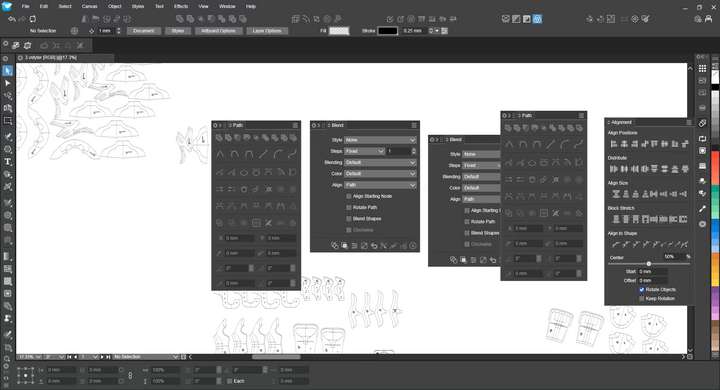
            0_1759330707868_mmexport1759330402227.jpg I set a shortcut key for the Align Panel and added the panel to the Mini Panel Bar. Here are the operations that cause errors: Use the shortcut key to open the Align Panel, then press the Alt+P shortcut to open the Path Panel, and drag the Path Panel into the Align Panel to form a panel group. At this point, the shortcut key for the Align Panel will fail; if you press Alt+P again to open the Path Panel, you'll find that two identical panels appear. (The same issue occurs when replacing the Path Panel with the Blend Panel.)

            1 Reply Last reply Reply Quote 0
            • M Offline
              monsterfox @VectorStyler
              last edited by

              @VectorStyler https://youtu.be/mkdtbDXrmTU?feature=shared
              0_1759675136200_gy.vstyler
              1. There are still issues with the Node Simplification tool: sometimes it doesn’t work, and other times it functions normally at the initial stage of operation but fails later on.
              ​
              2. The Offset Path tool works fairly well when operated in the middle of a single path segment, but it becomes cumbersome if applied across two segments. It would be better and more precise if the controls at both ends were nodes. Another problem is that the path sometimes becomes unsmooth after such an offset, which also needs optimization.
              ​
              3. Resetting the transformation center causes the graphics within the group to shift. Hope these issues can be resolved. Thank you.

              VectorStylerV 1 Reply Last reply Reply Quote 1
              • VectorStylerV Offline
                VectorStyler @monsterfox
                last edited by

                @monsterfox I added these to the backlog

                1 Reply Last reply Reply Quote 0
                • M Offline
                  monsterfox
                  last edited by

                  @VectorStyler https://youtu.be/xqaLZQQKzBI?feature=shared[0_1760194883346_YY.vstyler](/forum/assets/uploads/files/1760194886882-yy.vstyler)
                  The expanded mixed graphics have experienced displacement

                  VectorStylerV 1 Reply Last reply Reply Quote 1
                  • VectorStylerV Offline
                    VectorStyler @monsterfox
                    last edited by

                    @monsterfox I added this to the backlog

                    M 1 Reply Last reply Reply Quote 0
                    • M Offline
                      monsterfox @VectorStyler
                      last edited by

                      @VectorStyler The Outline path tool seems to be not working。

                      VectorStylerV 1 Reply Last reply Reply Quote 1
                      • VectorStylerV Offline
                        VectorStyler @monsterfox
                        last edited by

                        @monsterfox said in list of errors:

                        The Outline path tool seems to be not working

                        Which tool is this?

                        M 1 Reply Last reply Reply Quote 0
                        • M Offline
                          monsterfox @VectorStyler
                          last edited by

                          @VectorStyler This is an effect, and it is in the same toolbar as the Offset Tool.

                          VectorStylerV 1 Reply Last reply Reply Quote 1
                          • VectorStylerV Offline
                            VectorStyler @monsterfox
                            last edited by

                            @monsterfox It seems to be working here, tested both Mac and Windows

                            M 1 Reply Last reply Reply Quote 0
                            • M Offline
                              monsterfox @VectorStyler
                              last edited by

                              @VectorStyler It’s strange that it isn’t working for me. I wonder if it’s caused by any settings I might have changed.

                              VectorStylerV 1 Reply Last reply Reply Quote 0
                              • VectorStylerV Offline
                                VectorStyler @monsterfox
                                last edited by

                                @monsterfox Send me your workspace and settings files by email.

                                M 2 Replies Last reply Reply Quote 0
                                • M Offline
                                  monsterfox @VectorStyler
                                  last edited by

                                  @VectorStyler https://youtu.be/mSK0LxM9YdY?feature=shared
                                  After deleting a record in the repeat panel, no new records will be generated for subsequent operations. It is hoped that this error can be fixed.

                                  VectorStylerV 1 Reply Last reply Reply Quote 1
                                  • VectorStylerV Offline
                                    VectorStyler @monsterfox
                                    last edited by

                                    @monsterfox Looks like a bug, can be replicated here also.

                                    M 3 Replies Last reply Reply Quote 0
                                    • M Offline
                                      monsterfox @VectorStyler
                                      last edited by

                                      @VectorStyler I forgot my email password, and it will take some time to retrieve it. ☠

                                      1 Reply Last reply Reply Quote 1
                                      • M Offline
                                        monsterfox @VectorStyler
                                        last edited by

                                        This post is deleted!
                                        1 Reply Last reply Reply Quote 0
                                        • M Offline
                                          monsterfox @VectorStyler
                                          last edited by

                                          @VectorStyler The document has been sent by mail

                                          1 Reply Last reply Reply Quote 1
                                          • M Offline
                                            monsterfox @VectorStyler
                                            last edited by

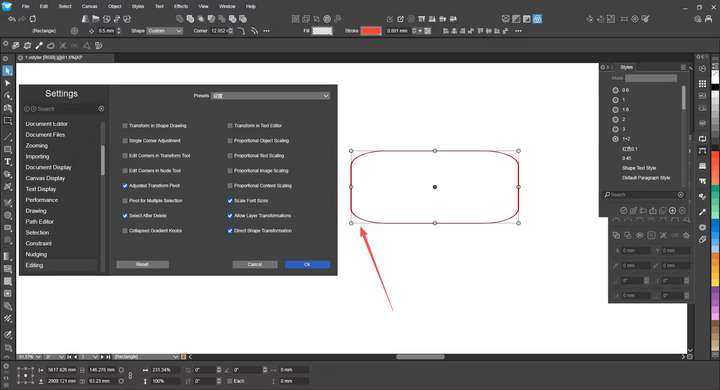
                                            @VectorStyler The outline effect is fine. I just realized I accidentally turned off the eye icon while operating.0_1760625719624_mmexport1760625669307.jpg
                                            By the way, could you help me figure out why this function in my workspace isn’t working?

                                            1 Reply Last reply Reply Quote 1
                                            • First post
                                              Last post