VectorStyler
    • Categories
    • Unread
    • Recent
    • Tags
    • Popular
    • Register
    • Login

    Bug List for Version 1.3

    Scheduled Pinned Locked Moved Bugs in VectorStyler
    64 Posts 4 Posters 18.1k Views 4 Watching
    Loading More Posts
    • Oldest to Newest
    • Newest to Oldest
    • Most Votes
    Reply
    • Reply as topic
    Log in to reply
    This topic has been deleted. Only users with topic management privileges can see it.
    • M Online
      monsterfox @VectorStyler
      last edited by

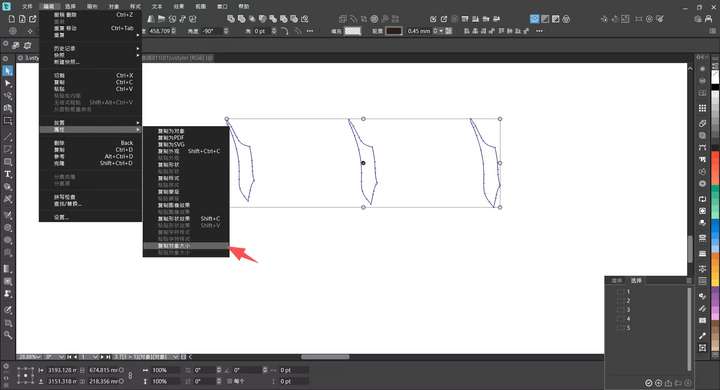
      @VectorStyler 1_1765469312130_mmexport1765469232574.png 0_1765469312112_mmexport1765469235264.jpg
      13. The options for copying and pasting object dimensions cannot be found in the shortcut menu, and they need to be added.

      1 Reply Last reply Reply Quote 1
      • VectorStylerV Offline
        VectorStyler @monsterfox
        last edited by

        @monsterfox said in Bug List for Version 1.3:

        Error 5 Addendum: Several incomplete translations have also been found

        If a document was saved while using the English UI, then some text will be in English. These names (customizable by the user) are stored in the document, not by the current language.

        M 1 Reply Last reply Reply Quote 0
        • VectorStylerV Offline
          VectorStyler @monsterfox
          last edited by

          @monsterfox said in Bug List for Version 1.3:

          the current version 1.3, it is bundled with randomization, which undermines the practicality of this function.

          If randomization is disabled, what would the difference between "Transform Each" or normal move be?

          M 1 Reply Last reply Reply Quote 0
          • M Online
            monsterfox @VectorStyler
            last edited by

            @VectorStyler When multiple objects are selected: 1. A normal move shifts all objects by the same distance synchronously. If the patterns are stacked initially, they remain stacked after moving. 2. When "Transform Each" is checked, multiple objects move with increasing parameters, resulting in them being separated in the end. Example: Select three objects, align them center horizontally and vertically, then set the move parameter to 10. The first object moves by 10, the second by 20, and the third by 30. Their movement order is determined by the size of the objects. This operation would greatly enhance usability, and we hope this feature can be added.

            VectorStylerV 1 Reply Last reply Reply Quote 0
            • VectorStylerV Offline
              VectorStyler @monsterfox
              last edited by

              @monsterfox said in Bug List for Version 1.3:

              @VectorStyler When multiple objects are selected: 1. A normal move shifts all objects by the same distance synchronously. If the patterns are stacked initially, they remain stacked after moving. 2. When "Transform Each" is checked, multiple objects move with increasing parameters, resulting in them being separated in the end. Example: Select three objects, align them center horizontally and vertically, then set the move parameter to 10. The first object moves by 10, the second by 20, and the third by 30. Their movement order is determined by the size of the objects. This operation would greatly enhance usability, and we hope this feature can be added.

              I will try to implement this.

              M 2 Replies Last reply Reply Quote 0
              • M Online
                monsterfox @VectorStyler
                last edited by

                @VectorStyler The issue where DXF files were imported as images has been resolved. There are still two remaining problems: 1. The imported images are not in the correct size. I have provided two types of files, one that becomes larger and one that becomes smaller. 2. All exported DXF files will increase in size. These two issues need to be fixed. Additionally, an AI file in the compressed package cannot be imported either.
                0_1765636913759_DXF+AI.zip

                1 Reply Last reply Reply Quote 0
                • M Online
                  monsterfox @VectorStyler
                  last edited by

                  @VectorStyler The "Copy Object Dimensions" option has been added to the shortcut menu, but the "Paste Object Dimensions" option is missing. Please fix this.

                  VectorStylerV 1 Reply Last reply Reply Quote 1
                  • VectorStylerV Offline
                    VectorStyler @monsterfox
                    last edited by

                    @monsterfox said in Bug List for Version 1.3:

                    @VectorStyler The "Copy Object Dimensions" option has been added to the shortcut menu, but the "Paste Object Dimensions" option is missing. Please fix this.

                    Will be added

                    1 Reply Last reply Reply Quote 0
                    • M Online
                      monsterfox @VectorStyler
                      last edited by

                      @VectorStyler Error 10 added: Currently, mirror groups support expansion, but the expanded result is not as expected. I have communicated this issue with Li Xiao, and we both agree that the optimal expanded result should be the united state of the objects. Those masks are not very useful; please fix this problem.

                      VectorStylerV 1 Reply Last reply Reply Quote 0
                      • VectorStylerV Offline
                        VectorStyler @monsterfox
                        last edited by

                        @monsterfox said in Bug List for Version 1.3:

                        optimal expanded result should be the united state of the objects

                        Not clear what this would be? Can you send me some examples?

                        M 1 Reply Last reply Reply Quote 0
                        • M Online
                          monsterfox @VectorStyler
                          last edited by monsterfox

                          @VectorStyler0_1765646956038_Mirror Group(1).vstyler0_1765647266474_扫描文档2025-12-14 01-30-28.pdf

                          VectorStylerV S 2 Replies Last reply Reply Quote 1
                          • VectorStylerV Offline
                            VectorStyler @monsterfox
                            last edited by

                            @monsterfox This would only work for mirrors containing single objects, or objects of the same style, as it would require a sort of union of these objects.

                            M 1 Reply Last reply Reply Quote 0
                            • M Online
                              monsterfox @VectorStyler
                              last edited by

                              @VectorStyler Objects generally have only three forms: stroke only, fill only, and stroke + fill (gradients excluded). I’ve tried to imagine it, and it seems feasible — closed objects can be united, while unclosed paths can use a trim-like tool to merge two lines into one.

                              VectorStylerV 1 Reply Last reply Reply Quote 1
                              • VectorStylerV Offline
                                VectorStyler @monsterfox
                                last edited by

                                @monsterfox said in Bug List for Version 1.3:

                                Objects generally have only three forms

                                There can also be images, linked content, clipped groups, etc

                                M 1 Reply Last reply Reply Quote 0
                                • M Online
                                  monsterfox @VectorStyler
                                  last edited by

                                  @VectorStyler Images and link content should not be supported, but clipping groups should work, right?

                                  VectorStylerV 1 Reply Last reply Reply Quote 0
                                  • VectorStylerV Offline
                                    VectorStyler @monsterfox
                                    last edited by

                                    @monsterfox If possible, all content types should be supported in mirror groups

                                    M 2 Replies Last reply Reply Quote 0
                                    • S Offline
                                      Subpath @monsterfox
                                      last edited by Subpath

                                      @monsterfox

                                      No vector graphics mirror/symmetry tool i know can do this after expanding
                                      he symmetry, all need a addtional boolean step to geht such a result.

                                      The case in the PDF file seems easy to do with a boolean after expanding
                                      and all steps needed may also be possible with a makro ?

                                      Win 11
                                      CPU: AMD Ryzen 5 9600X, 6-core.
                                      GPU: Nvidia Geforce RTX 5070.

                                      M 1 Reply Last reply Reply Quote 0
                                      • M Online
                                        monsterfox @VectorStyler
                                        last edited by

                                        @VectorStyler https://youtu.be/AHm8GsORLdE?si=UnJdrEkBSZVmGqoC

                                        14.The first error only occurs in this file. For the second error: create a blend between two shapes to generate several copies, then align the blend to a path. When creating a second blend and aligning it to a path, an error will occur, and undoing one step will also trigger the error.
                                        0_1765811447601_3 (1).vstyler

                                        1 Reply Last reply Reply Quote 0
                                        • M Online
                                          monsterfox @VectorStyler
                                          last edited by

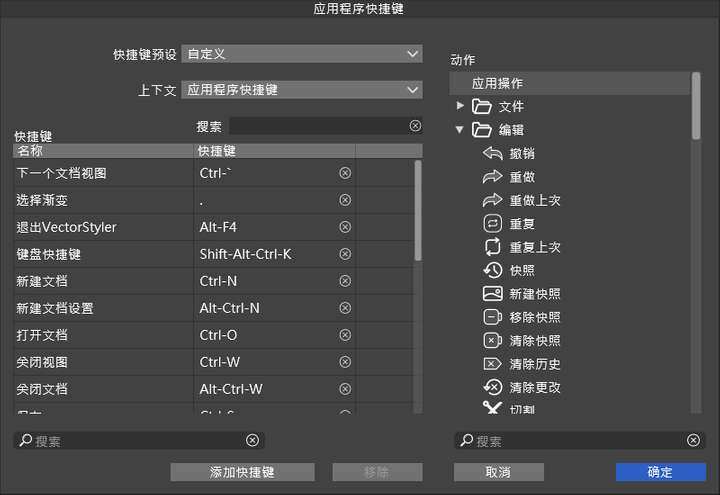
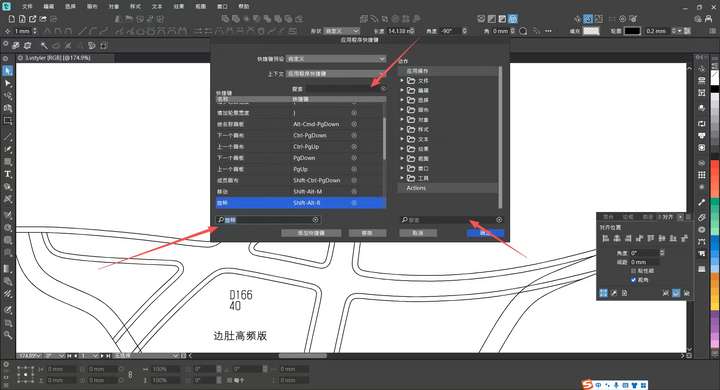
                                          @VectorStyler 15. In the shortcut settings dialog box and custom toolbar, any characters or text typed during a search will be automatically selected. To continue typing, you have to click the cursor position with the mouse, which is very annoying. Hope this issue can be fixed.
                                          0_1765811926763_mmexport1765809160320.jpg

                                          1 Reply Last reply Reply Quote 1
                                          • M Online
                                            monsterfox @Subpath
                                            last edited by

                                            @Subpath I don't know much about macros. Could you provide a video demo? Thank you.

                                            S 1 Reply Last reply Reply Quote 0
                                            • First post
                                              Last post