VectorStyler
    • Categories
    • Unread
    • Recent
    • Tags
    • Popular
    • Register
    • Login

    Bug List for Version 1.3

    Scheduled Pinned Locked Moved Bugs in VectorStyler
    64 Posts 4 Posters 18.1k Views 4 Watching
    Loading More Posts
    • Oldest to Newest
    • Newest to Oldest
    • Most Votes
    Reply
    • Reply as topic
    Log in to reply
    This topic has been deleted. Only users with topic management privileges can see it.
    • M Offline
      monsterfox @VectorStyler
      last edited by

      @VectorStyler The "Copy Object Dimensions" option has been added to the shortcut menu, but the "Paste Object Dimensions" option is missing. Please fix this.

      VectorStylerV 1 Reply Last reply Reply Quote 1
      • VectorStylerV Offline
        VectorStyler @monsterfox
        last edited by

        @monsterfox said in Bug List for Version 1.3:

        @VectorStyler The "Copy Object Dimensions" option has been added to the shortcut menu, but the "Paste Object Dimensions" option is missing. Please fix this.

        Will be added

        1 Reply Last reply Reply Quote 0
        • M Offline
          monsterfox @VectorStyler
          last edited by

          @VectorStyler Error 10 added: Currently, mirror groups support expansion, but the expanded result is not as expected. I have communicated this issue with Li Xiao, and we both agree that the optimal expanded result should be the united state of the objects. Those masks are not very useful; please fix this problem.

          VectorStylerV 1 Reply Last reply Reply Quote 0
          • VectorStylerV Offline
            VectorStyler @monsterfox
            last edited by

            @monsterfox said in Bug List for Version 1.3:

            optimal expanded result should be the united state of the objects

            Not clear what this would be? Can you send me some examples?

            M 1 Reply Last reply Reply Quote 0
            • M Offline
              monsterfox @VectorStyler
              last edited by monsterfox

              @VectorStyler0_1765646956038_Mirror Group(1).vstyler0_1765647266474_扫描文档2025-12-14 01-30-28.pdf

              VectorStylerV S 2 Replies Last reply Reply Quote 1
              • VectorStylerV Offline
                VectorStyler @monsterfox
                last edited by

                @monsterfox This would only work for mirrors containing single objects, or objects of the same style, as it would require a sort of union of these objects.

                M 1 Reply Last reply Reply Quote 0
                • M Offline
                  monsterfox @VectorStyler
                  last edited by

                  @VectorStyler Objects generally have only three forms: stroke only, fill only, and stroke + fill (gradients excluded). I’ve tried to imagine it, and it seems feasible — closed objects can be united, while unclosed paths can use a trim-like tool to merge two lines into one.

                  VectorStylerV 1 Reply Last reply Reply Quote 1
                  • VectorStylerV Offline
                    VectorStyler @monsterfox
                    last edited by

                    @monsterfox said in Bug List for Version 1.3:

                    Objects generally have only three forms

                    There can also be images, linked content, clipped groups, etc

                    M 1 Reply Last reply Reply Quote 0
                    • M Offline
                      monsterfox @VectorStyler
                      last edited by

                      @VectorStyler Images and link content should not be supported, but clipping groups should work, right?

                      VectorStylerV 1 Reply Last reply Reply Quote 0
                      • VectorStylerV Offline
                        VectorStyler @monsterfox
                        last edited by

                        @monsterfox If possible, all content types should be supported in mirror groups

                        M 2 Replies Last reply Reply Quote 0
                        • S Offline
                          Subpath @monsterfox
                          last edited by Subpath

                          @monsterfox

                          No vector graphics mirror/symmetry tool i know can do this after expanding
                          he symmetry, all need a addtional boolean step to geht such a result.

                          The case in the PDF file seems easy to do with a boolean after expanding
                          and all steps needed may also be possible with a makro ?

                          Win 11
                          CPU: AMD Ryzen 5 9600X, 6-core.
                          GPU: Nvidia Geforce RTX 5070.

                          M 1 Reply Last reply Reply Quote 0
                          • M Offline
                            monsterfox @VectorStyler
                            last edited by

                            @VectorStyler https://youtu.be/AHm8GsORLdE?si=UnJdrEkBSZVmGqoC
                            14.The first error only occurs in this file. For the second error: create a blend between two shapes to generate several copies, then align the blend to a path. When creating a second blend and aligning it to a path, an error will occur, and undoing one step will also trigger the error.
                            0_1765811447601_3 (1).vstyler

                            1 Reply Last reply Reply Quote 0
                            • M Offline
                              monsterfox @VectorStyler
                              last edited by

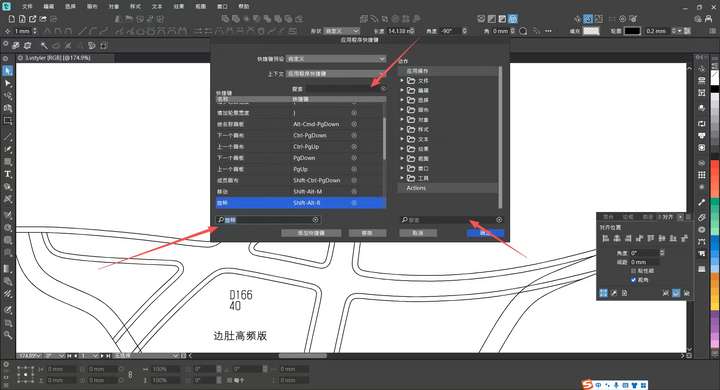
                              @VectorStyler 15. In the shortcut settings dialog box and custom toolbar, any characters or text typed during a search will be automatically selected. To continue typing, you have to click the cursor position with the mouse, which is very annoying. Hope this issue can be fixed.
                              0_1765811926763_mmexport1765809160320.jpg

                              1 Reply Last reply Reply Quote 1
                              • M Offline
                                monsterfox @Subpath
                                last edited by

                                @Subpath I don't know much about macros. Could you provide a video demo? Thank you.

                                S 1 Reply Last reply Reply Quote 0
                                • S Offline
                                  Subpath @monsterfox
                                  last edited by Subpath

                                  @monsterfox

                                  I'm a little surprised that you're creating designs that require repetitive
                                  steps and you don't know much about or use macros?

                                  A macro, or an "Action" in VS, are simply some recorded workflow
                                  steps recorded with a built-in or external Action/Macro recorder
                                  and played back later when needed. And recording an Action is death easy.

                                  Call the Action Recorder
                                  Press Record
                                  give the Action a name
                                  you could also add a shortcut
                                  go manually through all needed Steps
                                  Press End Record

                                  Note:
                                  Not all steps in VS can be recorded, but you can find out which by just
                                  experimenting. It may also be helpful to read the Manual about Actions.

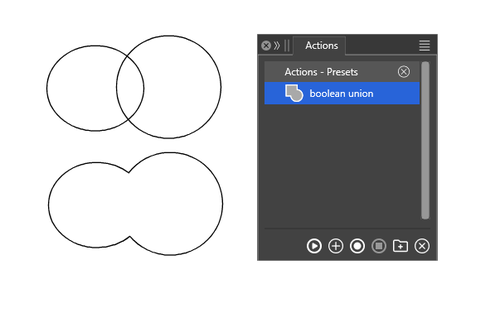
                                  Here a Video with Boolean Union

                                  0_1765879600699_boolean union.png

                                  Win 11
                                  CPU: AMD Ryzen 5 9600X, 6-core.
                                  GPU: Nvidia Geforce RTX 5070.

                                  M 1 Reply Last reply Reply Quote 1
                                  • M Offline
                                    monsterfox @VectorStyler
                                    last edited by

                                    @VectorStyler This is another blend failure error—the two shapes in the file cannot be blended. The file in question is a preset template I created from scratch. After consulting with Li Xiao, I confirmed that he can execute the blend operation without issues in a file he newly created. I suspect this problem is caused by a conflict with my custom styles and would appreciate a resolution to fix it.0_1765896294861_33 (1).vstyler

                                    VectorStylerV 1 Reply Last reply Reply Quote 1
                                    • M Offline
                                      monsterfox @Subpath
                                      last edited by

                                      @Subpath Oh right, I do know how to set up an Action—it’s just a terminology habit. That’s why the term "macro" sounds unfamiliar to me, but they’re actually the same thing.

                                      S 1 Reply Last reply Reply Quote 1
                                      • VectorStylerV Offline
                                        VectorStyler @monsterfox
                                        last edited by

                                        @monsterfox said in Bug List for Version 1.3:

                                        @VectorStyler This is another blend failure error—the two shapes in the file cannot be blended. The file in question is a preset template I created from scratch. After consulting with Li Xiao, I confirmed that he can execute the blend operation without issues in a file he newly created. I suspect this problem is caused by a conflict with my custom styles and would appreciate a resolution to fix it.0_1765896294861_33 (1).vstyler

                                        I managed to replicate the first issue (from the video).

                                        I do not have the exact shape for the second error from the video.

                                        M 1 Reply Last reply Reply Quote 0
                                        • S Offline
                                          Subpath @monsterfox
                                          last edited by Subpath

                                          @monsterfox

                                          ....it’s just a terminology habit...

                                          Seems so, maybe there are some minor differences sometimes ?
                                          As i know extern (standalone Macro recorders) useful when a program
                                          have no Macro/Action recording, but i never heard of a extern Action
                                          Recorder.

                                          Win 11
                                          CPU: AMD Ryzen 5 9600X, 6-core.
                                          GPU: Nvidia Geforce RTX 5070.

                                          M 1 Reply Last reply Reply Quote 0
                                          • M Offline
                                            monsterfox @Subpath
                                            last edited by

                                            @Subpath What I know is that macros can record the coordinate positions of operations, but the current actions don’t support this—they can only record the sequence of some regular operations. However, I think macros are basically useless in VectorStyler , because in the process of drawing graphics, you almost never encounter situations where you need to operate with the same coordinates. So the current actions should be more than sufficient.

                                            S 1 Reply Last reply Reply Quote 0
                                            • First post
                                              Last post