VectorStyler
    • Categories
    • Unread
    • Recent
    • Tags
    • Popular
    • Register
    • Login

    The behavior of the "remove color" button is strange.

    Scheduled Pinned Locked Moved Bugs in VectorStyler
    2 Posts 2 Posters 14 Views 2 Watching
    Loading More Posts
    • Oldest to Newest
    • Newest to Oldest
    • Most Votes
    Reply
    • Reply as topic
    Log in to reply
    This topic has been deleted. Only users with topic management privileges can see it.
    • 861475_VctSt8 Offline
      861475_VctSt
      last edited by

      I'm not sure when it started, but I've noticed strange behavior from the shortcut buttons in the color palette for some time, so I'm reporting it.

      Color settings are:
      Palette: Default CMYK
      Color: CMYK
      CMYK: Japan Color 2001 Corted

      Workflow

      SC2026-05-05 15.57.07.png

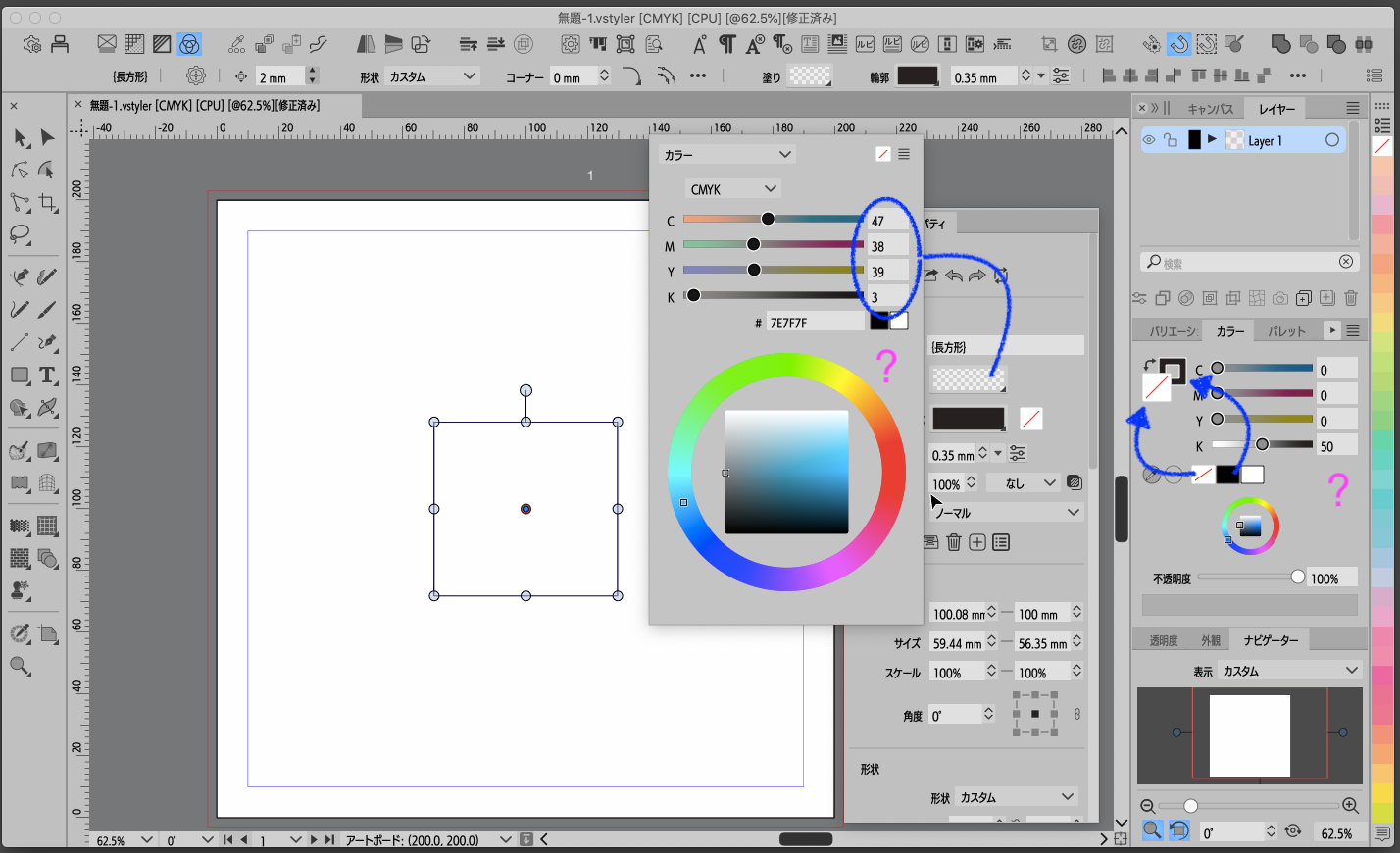
      I set the following on an object using the shortcut buttons in the color palette:
      Path: K100
      Fill: None

      The art display looks correct.

      The color palette displays:
      Indicator > Fill: None
      Slider > Fill: 50%

      In the Properties palette,
      Indicator > Fill: None

      However,
      Slider > Fill: C47, M38, Y39, K3

      It seems that the interpretation of Fill: None and Color: 0 is not working correctly.

      LIc. 0 OS10.15.8
      MacBook Air (13-inch, Mid 2012) / Intel Core i5, 8GB / Intel HD Graphics 4000
      LIc. 1 OS15.7.4
      MacBook Pro (14-inch, 2023) / Apple M2 Pro, 16GB / Apple GPU

      VectorStylerV 1 Reply Last reply Reply Quote 1
      • VectorStylerV Offline
        VectorStyler @861475_VctSt
        last edited by

        @861475_VctSt The problem is that it tries to show a color for the Fill (in this case the stroke does not affect it).
        I will try to fix this

        1 Reply Last reply Reply Quote 0
        • First post
          Last post