The behavior of the "remove color" button is strange.
-
I'm not sure when it started, but I've noticed strange behavior from the shortcut buttons in the color palette for some time, so I'm reporting it.
Color settings are:
Palette: Default CMYK
Color: CMYK
CMYK: Japan Color 2001 CortedWorkflow
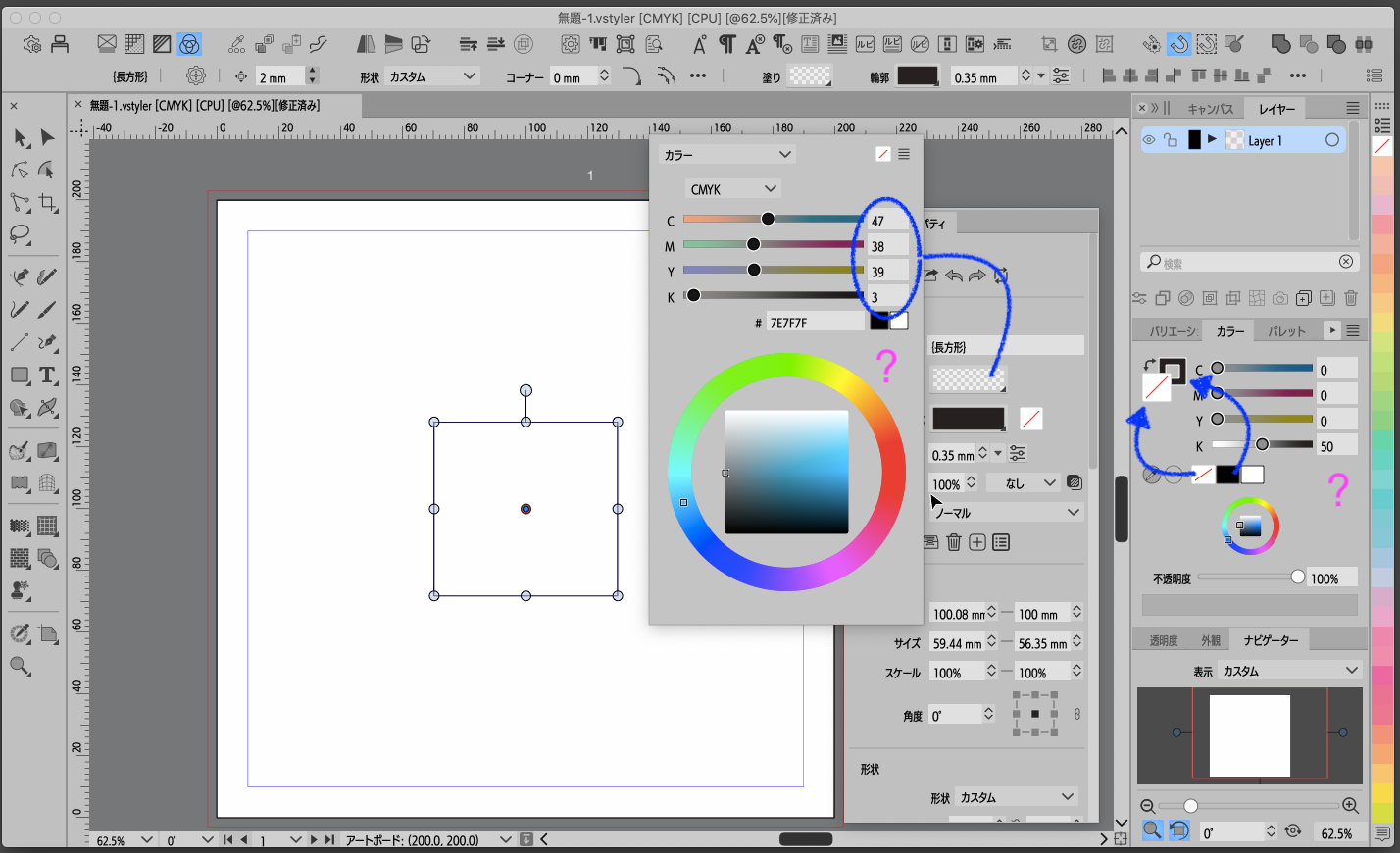
I set the following on an object using the shortcut buttons in the color palette:
Path: K100
Fill: NoneThe art display looks correct.
The color palette displays:
Indicator > Fill: None
Slider > Fill: 50%In the Properties palette,
Indicator > Fill: NoneHowever,
Slider > Fill: C47, M38, Y39, K3It seems that the interpretation of Fill: None and Color: 0 is not working correctly.
-
@861475_VctSt The problem is that it tries to show a color for the Fill (in this case the stroke does not affect it).
I will try to fix this -
1.3.017
Thanks
It finally cleared up the confusion I’ve been feeling for years.

