Bug Report & Improvement Request: Space/Dash Menu Mapping and ZENKAKU Space
-
@861475_VctSt said in Bug Report & Improvement Request: Space/Dash Menu Mapping and ZENKAKU Space:
Does this explanation help solve the puzzle for the implementation?
Yes, this helps a lot!
Please let me know if you need any other information about the Japanese environment!
What input method is selected in the MacOS menu (right side of the screen), when using Japanese input with your keyboard?
I only have international physical keyboard, and I try to replicate this with the "Japanese - Kana" input method:
With regular "Space" key I get U+0020
With regular "Option+Space" key I get U+3000I will try to find a Japanese keyboard
-
And one more thing:
Create a vstyler file with the following:
- a shape text with some text and the "Half-width space (U+0020)" as VectorStyler inputs it
- other shape text with some text and the "ZENKAKU space (U+3000)" as VectorStyler inputs it
and send me the file.
I want to check what action character codes are input
-
This post is deleted! -
@VectorStyler said in Bug Report & Improvement Request: Space/Dash Menu Mapping and ZENKAKU Space:
I have sent it via email.
However, I do not think this is the result you were hoping for. After all, this is precisely the heart of the problem.
other shape text with some text and the "ZENKAKU space (U+3000)" as VectorStyler inputs it

I attempted the input using a total of four different methods, including this one.
I hope at least one of them proves helpful to you. -
@861475_VctSt Got it!
-
ver. 1.3.022–1.3.023: Handled via email correspondence.
ver. 1.3.024
Follow-up report regarding two issues.
I will refrain from offering my own analysis of the causes (as I am not a programmer).
Note: The character code identification is based on the VS glyph palette.- Localization: Translation error
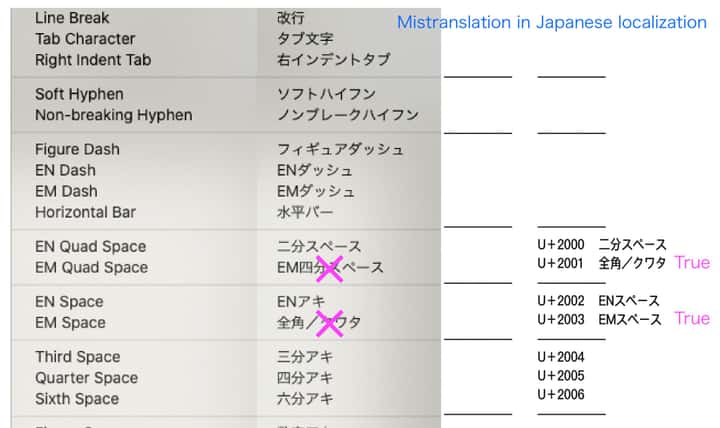
- Space character input
u3000 (ZENKAKU Space; Ideographic-Space): Input result is U+2003.
u0020 (HANKAKU-Space; Space): Input result displays as u100001 (Supplementary Private Use Area-B).
-
@861475_VctSt I will try to thix these.
Can you send me the translation errors as text, not image? Thanks!
-
I’m prone to making mistakes myself, so I’ll double-check everything and send it to you later.
-
Ver. 1.3.027
In my previous posts, I reported multiple issues together that should ideally be addressed separately. To avoid confusion, please let me organize the current situation.
The two issues I raised are as follows:A) Text > Insert Character: Japanese localization (translation) errors
B) Spaces during Japanese (Kana-Kanji conversion) input: Issues with half-width and full-width space input[Current Status]
A) Resolved (ver. 1.3.026) - Thank you for fixing this.
B) Unresolved (ver. 1.3.027)Additionally, regarding the character insertion from the menu (A), a new issue, "Issue A-1", has been found. The details are as follows:
[Details of Issue B (Unresolved)]
Current Bug:- When typing a half-width space on the keyboard, it does not become half-width. When checking the Glyph palette, it shows an abnormal code of "U+100001".
- When typing a full-width space on the keyboard, it visually appears as full-width, but the Glyph palette shows it as "U+2003 (EM Space)".
Expected Result:
- Half-width space = Space (U+0020)
- Full-width space = Ideographic Space (U+3000)
[Details of Issue A-1 (New)]
When inserting a space from the menu, the visual result on the screen is fine, but checking it in the VS Glyph palette reveals that the internal code seems incorrect.Current Bug:
- En Space: Displayed as "U+0000"
- Em Space (Kuwata): Displayed as "U+0000"
Expected Result:
- En Space = U+2000
- Em Space (Kuwata) = U+2001
[Proposal for Future Development]
Since I am not a programmer, I can only report the results I see on the screen. I have provided materials so far, but I assume that providing information solely from a user level might not be enough to reach a fundamental solution.If digging deeper into the specific requirements of the Japanese environment risks causing regressions or degrading other features, and becomes an obstacle to the overall development of VectorStyler, I believe it is a reasonable option to put this complex issue (such as the U+3000 problem) on hold for now and treat it as a "Known Issue".
However, even in that case, there is one top priority that I would like you to fix at the very least.
That is problem [Issue B - 1].
If we can just correctly input a standard "half-width space (U+0020)" from the keyboard, we will be able to proceed with our work for the time being.This is a proposal meant to avoid hindering the overall development progress of VectorStyler. Please consider this in light of the current situation.
-
@861475_VctSt Added some diagnostic for analyzing these issues.
More info in email.
-
I have sent the results.
Best regards.

