Bug Report & Improvement Request: Space/Dash Menu Mapping and ZENKAKU Space
-
@861475_VctSt Got it!
-
ver. 1.3.022–1.3.023: Handled via email correspondence.
ver. 1.3.024
Follow-up report regarding two issues.
I will refrain from offering my own analysis of the causes (as I am not a programmer).
Note: The character code identification is based on the VS glyph palette.- Localization: Translation error
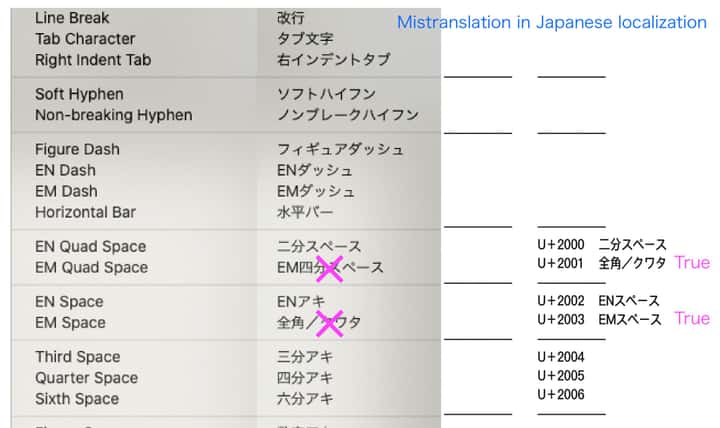
- Space character input
u3000 (ZENKAKU Space; Ideographic-Space): Input result is U+2003.
u0020 (HANKAKU-Space; Space): Input result displays as u100001 (Supplementary Private Use Area-B).
-
@861475_VctSt I will try to thix these.
Can you send me the translation errors as text, not image? Thanks!
-
I’m prone to making mistakes myself, so I’ll double-check everything and send it to you later.
-
Ver. 1.3.027
In my previous posts, I reported multiple issues together that should ideally be addressed separately. To avoid confusion, please let me organize the current situation.
The two issues I raised are as follows:A) Text > Insert Character: Japanese localization (translation) errors
B) Spaces during Japanese (Kana-Kanji conversion) input: Issues with half-width and full-width space input[Current Status]
A) Resolved (ver. 1.3.026) - Thank you for fixing this.
B) Unresolved (ver. 1.3.027)Additionally, regarding the character insertion from the menu (A), a new issue, "Issue A-1", has been found. The details are as follows:
[Details of Issue B (Unresolved)]
Current Bug:- When typing a half-width space on the keyboard, it does not become half-width. When checking the Glyph palette, it shows an abnormal code of "U+100001".
- When typing a full-width space on the keyboard, it visually appears as full-width, but the Glyph palette shows it as "U+2003 (EM Space)".
Expected Result:
- Half-width space = Space (U+0020)
- Full-width space = Ideographic Space (U+3000)
[Details of Issue A-1 (New)]
When inserting a space from the menu, the visual result on the screen is fine, but checking it in the VS Glyph palette reveals that the internal code seems incorrect.Current Bug:
- En Space: Displayed as "U+0000"
- Em Space (Kuwata): Displayed as "U+0000"
Expected Result:
- En Space = U+2000
- Em Space (Kuwata) = U+2001
[Proposal for Future Development]
Since I am not a programmer, I can only report the results I see on the screen. I have provided materials so far, but I assume that providing information solely from a user level might not be enough to reach a fundamental solution.If digging deeper into the specific requirements of the Japanese environment risks causing regressions or degrading other features, and becomes an obstacle to the overall development of VectorStyler, I believe it is a reasonable option to put this complex issue (such as the U+3000 problem) on hold for now and treat it as a "Known Issue".
However, even in that case, there is one top priority that I would like you to fix at the very least.
That is problem [Issue B - 1].
If we can just correctly input a standard "half-width space (U+0020)" from the keyboard, we will be able to proceed with our work for the time being.This is a proposal meant to avoid hindering the overall development progress of VectorStyler. Please consider this in light of the current situation.
-
@861475_VctSt Added some diagnostic for analyzing these issues.
More info in email.
-
I have sent the results.
Best regards. -
ver. 1.3.028
Thank you for this absolutely fantastic update!I have confirmed in Build 1.3.028 that the issues with the following codes have all been resolved as far as the VS Glyph palette is concerned:
- Keyboard input: U+0020, U+3000
- Menu input: U+2000, 2001, 2002, 2003, 2004, 2005, 2006
In particular, the fact that a Full-width space (U+3000) can now be inputted correctly via the Japanese Kana-Kanji conversion keyboard is a groundbreaking milestone for the Japanese environment. It has been over five years since the beta testing days. My long-held wish has finally been fulfilled, and I am deeply moved.
Users from other language regions might think, "It's just a space, why exaggerate?" However, in Japanese typography, a space is not merely a gap between characters; it is an absolute structural component that controls the framework of the layout, including justification. If the internal recognition of the space character is even slightly off, beautiful typesetting (Mojigumi) and spacing (Mojitsume) become entirely impossible.
That is exactly why this fundamental resolution is such a massive step forward for the advanced DTP capabilities of VectorStyler in the future.
I sincerely appreciate the brilliant work and the patience of the development team who saw this through to the end over these many years.
-
@861475_VctSt The text formatting issue should be fixed now.
-
Regressions related to this issue occurred in versions 027 through 030.
These have been fixed in version 031.
The issues, including the one involving full-width spaces, have been resolved, making the software even easier to use.Thank you.
P.S.
I believe the basic functions for Mojigumi and Mojitsume are currently working without any issues.
However, regarding the finer details and advanced settings, I lack the specialized knowledge and analytical skills to rigorously test and evaluate them, so I will refrain from making a definitive judgment at this time. Therefore, my personal assessment right now is that these features are "just one step away from completion."
I look forward to continuing to monitor how these features evolve in the future.

