VectorStyler
    • Categories
    • Unread
    • Recent
    • Tags
    • Popular
    • Register
    • Login

    Layer / object must be highlighted to be hidden / visible

    Scheduled Pinned Locked Moved Resolved Issues
    12 Posts 4 Posters 10.6k Views 3 Watching
    Loading More Posts
    • Oldest to Newest
    • Newest to Oldest
    • Most Votes
    Reply
    • Reply as topic
    Log in to reply
    This topic has been deleted. Only users with topic management privileges can see it.
    • IngolfI Offline
      Ingolf
      last edited by Ingolf

      Beta 1.1 - not sure if regression (but think it is)

      I can't click the eye icon in the layers panel to show or hide a layer or object if it is not already hightlighted. Icon toggles state for a second, nothing happens besides that.

      πŸ™‚

      🍏 macOS Sequoia Apple Silicon

      BoldlineB VectorStylerV 3 Replies Last reply Reply Quote 0
      • BoldlineB Online
        Boldline @Ingolf
        last edited by

        @Ingolf Windows or Mac? It's working correctly for me over here on Mac

        🍎 macOS Tahoe 26.2, Mac mini (M1, 2020), Chip Apple M1, Memory 16 GB
        Cintiq 27QHD Display and LG Ultra HD Display

        IngolfI 1 Reply Last reply Reply Quote 0
        • IngolfI Offline
          Ingolf @Boldline
          last edited by

          @Boldline said in Layer / object must be highlighted to be hidden / visible:

          @Ingolf Windows or Mac? It's working correctly for me over here on Mac

          Mac

          alt text

          🍏 macOS Sequoia Apple Silicon

          BoldlineB b77B VectorStylerV 3 Replies Last reply Reply Quote 0
          • BoldlineB Online
            Boldline @Ingolf
            last edited by

            @Ingolf Did you try restarting? I'm not getting that result here

            🍎 macOS Tahoe 26.2, Mac mini (M1, 2020), Chip Apple M1, Memory 16 GB
            Cintiq 27QHD Display and LG Ultra HD Display

            1 Reply Last reply Reply Quote 0
            • b77B Offline
              b77 @Ingolf
              last edited by

              @Ingolf Works here as expected β€” no highlight necessary.

              You could try resetting the app β€” hold Cmd-Option-Shift when starting it.

              MacBook Pro (Intel) running Monterey 12.6.4

              1 Reply Last reply Reply Quote 0
              • VectorStylerV Offline
                VectorStyler @Ingolf
                last edited by

                @Ingolf Could this be a still open bug related to "Select Highlighted" and "Highlight Selected" options of the panel?
                I tried to replicate it, but it worked as expected.

                IngolfI 1 Reply Last reply Reply Quote 0
                • IngolfI Offline
                  Ingolf @VectorStyler
                  last edited by

                  @vectoradmin said in Layer / object must be highlighted to be hidden / visible:

                  @Ingolf Could this be a still open bug related to "Select Highlighted" and "Highlight Selected" options of the panel?
                  I tried to replicate it, but it worked as expected.

                  I tried enabling both, disabling both also open selected - never made it work.

                  🍏 macOS Sequoia Apple Silicon

                  1 Reply Last reply Reply Quote 0
                  • VectorStylerV Offline
                    VectorStyler @Ingolf
                    last edited by

                    @Ingolf Try resetting VS by starting while holding Shift+Option+Command

                    IngolfI 2 Replies Last reply Reply Quote 1
                    • IngolfI Offline
                      Ingolf @VectorStyler
                      last edited by

                      @vectoradmin said in Layer / object must be highlighted to be hidden / visible:

                      @Ingolf Try resetting VS by starting while holding Shift+Option+Command

                      Solved this issue too, thx

                      🍏 macOS Sequoia Apple Silicon

                      1 Reply Last reply Reply Quote 1
                      • IngolfI Offline
                        Ingolf @VectorStyler
                        last edited by

                        @vectoradmin said in Layer / object must be highlighted to be hidden / visible:

                        @Ingolf Try resetting VS by starting while holding Shift+Option+Command

                        Issue is back - but probably related to this combo of settings:
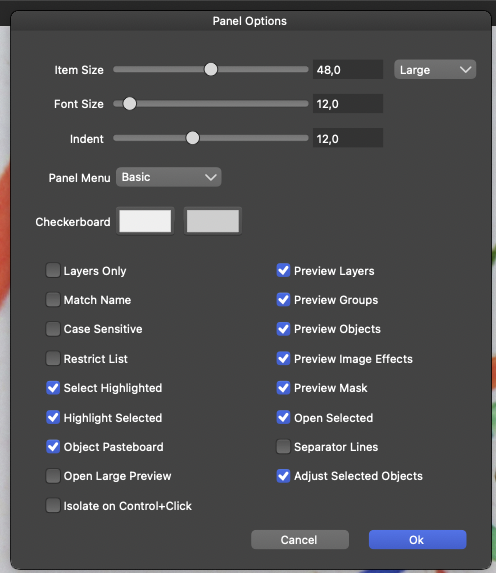
                        0_1639533559671_Skærmbillede 2021-12-15 kl. 02.57.53.png

                        De-selecting "Adjust Selected Objects" mitigates the issue.

                        🍏 macOS Sequoia Apple Silicon

                        1 Reply Last reply Reply Quote 1
                        • VectorStylerV Offline
                          VectorStyler @Ingolf
                          last edited by

                          @Ingolf This issue should be fixed in the new build 1.1.002 (beta)

                          1 Reply Last reply Reply Quote 1
                          • IngolfI Offline
                            Ingolf
                            last edited by

                            Verified as fixed!

                            🍏 macOS Sequoia Apple Silicon

                            1 Reply Last reply Reply Quote 1
                            • First post
                              Last post
