VectorStyler
    • Categories
    • Unread
    • Recent
    • Tags
    • Popular
    • Register
    • Login

    Snap to canvas centre vertically and horisontally

    Scheduled Pinned Locked Moved Implemented Features
    17 Posts 4 Posters 24.4k Views 4 Watching
    Loading More Posts
    • Oldest to Newest
    • Newest to Oldest
    • Most Votes
    Reply
    • Reply as topic
    Log in to reply
    This topic has been deleted. Only users with topic management privileges can see it.
    • b77B Offline
      b77 @Ingolf
      last edited by

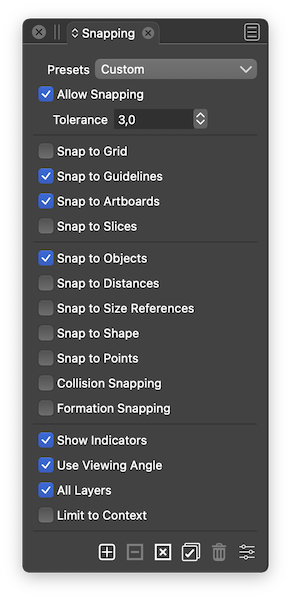
      @Ingolf These are my settings:

      0_1643247404147_sta.png

      MacBook Pro (Intel) running Monterey 12.6.4

      IngolfI 1 Reply Last reply Reply Quote 0
      • VectorStylerV Offline
        VectorStyler @Ingolf
        last edited by

        @Ingolf said in Snap to canvas centre vertically and horisontally:

        Using what settings? I just discovered the panel menu with... many more settings... whoa.

        Quick access to some snapping options in View -> Guides -> menu

        1 Reply Last reply Reply Quote 0
        • IngolfI Offline
          Ingolf @b77
          last edited by

          @b77 said in Snap to canvas centre vertically and horisontally:

          @Ingolf These are my settings:

          0_1643247404147_sta.png

          No centre of page snapping with those settings here - macOS and Win 10.

          🍏 macOS Sequoia Apple Silicon

          1 Reply Last reply Reply Quote 0
          • IngolfI Offline
            Ingolf
            last edited by

            Hmm, I think it actually does snap to the centres, but I see no indicator line allthough enabled. Win 10.

            Checking on macOS later.

            🍏 macOS Sequoia Apple Silicon

            1 Reply Last reply Reply Quote 0
            • IngolfI Offline
              Ingolf
              last edited by

              Same observation on macOS - it does snap to the centre(s) but no yellow line displayed.

              🍏 macOS Sequoia Apple Silicon

              b77B 1 Reply Last reply Reply Quote 0
              • b77B Offline
                b77 @Ingolf
                last edited by b77

                @Ingolf If 'Show Indicators' is enabled and indicators still don't show, check in Preferences > User Interface if the indicator is set to a non-white color and its opacity and outline width are like this:
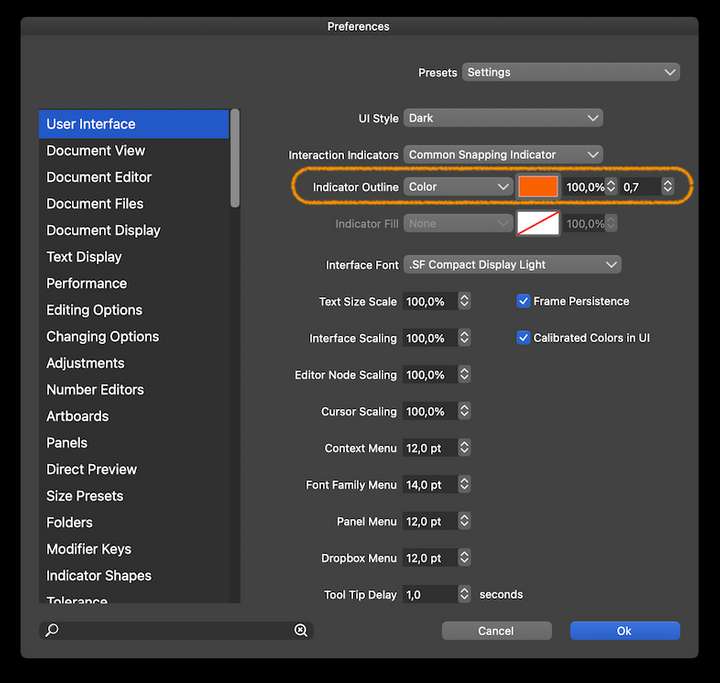
                0_1643278630109_indicat.png

                MacBook Pro (Intel) running Monterey 12.6.4

                1 Reply Last reply Reply Quote 1
                • IngolfI Offline
                  Ingolf
                  last edited by

                  Hm on both Windows and macOS almost all snapping indicators had an opacity of 0,0% - even when every snapping setting was enabled.

                  🍏 macOS Sequoia Apple Silicon

                  b77B 1 Reply Last reply Reply Quote 0
                  • IngolfI Offline
                    Ingolf
                    last edited by

                    But with your settings I still don't see the indicator lines. What outline color should I look for in preferences, @vectoradmin πŸ™‚

                    🍏 macOS Sequoia Apple Silicon

                    VectorStylerV 1 Reply Last reply Reply Quote 0
                    • b77B Offline
                      b77 @Ingolf
                      last edited by

                      @Ingolf and @vectoradmin
                      It is the same here by default (opacity is at 0.0%), but the snap indicators still work…

                      MacBook Pro (Intel) running Monterey 12.6.4

                      IngolfI 1 Reply Last reply Reply Quote 0
                      • IngolfI Offline
                        Ingolf @b77
                        last edited by

                        @b77 said in Snap to canvas centre vertically and horisontally:

                        @Ingolf and @vectoradmin
                        It is the same here by default (opacity is at 0.0%), but the snap indicators still work…

                        They also worked here - but no canvas centre lines to see after setting to 100%

                        🍏 macOS Sequoia Apple Silicon

                        1 Reply Last reply Reply Quote 0
                        • IngolfI Offline
                          Ingolf
                          last edited by

                          I also only see an indicator line when it snaps to the horisontal border of the canvas, not the vertical.

                          alt text

                          🍏 macOS Sequoia Apple Silicon

                          1 Reply Last reply Reply Quote 0
                          • VectorStylerV Offline
                            VectorStyler @Ingolf
                            last edited by

                            @Ingolf The "Common Snapping Indicator" color should be the one.

                            And the opacity should be 100% by default.

                            I open a bug on this one, and will try to replicate the issue.

                            1 Reply Last reply Reply Quote 1
                            • D Offline
                              DMBrown
                              last edited by

                              For information, I also do not have guidelines appearing when snapping to either the vertical or horizontal (or both) centers of the Artboard. I have verified the settings discussed in this post; e.g. Allow Snapping, Snap to Artboards, Show Indicators. As others have noted, the opacity of Indicators, in Preferences, was 0%, but setting it to 100% does not cause Indicators to appear.

                              I tried changing the Indicator Outline to layer (no indicator appeared) and back to Color again; changing the color; and changing the line thickness. None of those actions caused indicators to appear.

                              Mac Pro (Late 2019)
                              macOS 12.1
                              VectorStyler 1.1.008

                              1 Reply Last reply Reply Quote 1
                              • IngolfI Offline
                                Ingolf
                                last edited by

                                @vectoradmin Fixed in latest build (1.1.010)

                                🍏 macOS Sequoia Apple Silicon

                                1 Reply Last reply Reply Quote 0
                                • First post
                                  Last post