VectorStyler
    • Categories
    • Unread
    • Recent
    • Tags
    • Popular
    • Register
    • Login

    New user: Issues or user error?

    Scheduled Pinned Locked Moved Resolved Issues
    18 Posts 4 Posters 15.5k Views 3 Watching
    Loading More Posts
    • Oldest to Newest
    • Newest to Oldest
    • Most Votes
    Reply
    • Reply as topic
    Log in to reply
    This topic has been deleted. Only users with topic management privileges can see it.
    • b77B Offline
      b77 @MajorTom
      last edited by

      @MajorTom The grid disappearing might be a bug in certain conditions, but pressing Command-R should refresh the document and make the grid display again, without having to restart the app for that.

      MacBook Pro (Intel) running Monterey 12.6.4

      M 1 Reply Last reply Reply Quote 0
      • b77B Offline
        b77 @MajorTom
        last edited by b77

        @MajorTom said in New user: Issues or user error?:

        What's the best setting, if I want to snap things to the middle of a circle?

        'Snap to Objects' should do it.

        MacBook Pro (Intel) running Monterey 12.6.4

        1 Reply Last reply Reply Quote 1
        • M Offline
          MajorTom @VectorStyler
          last edited by MajorTom

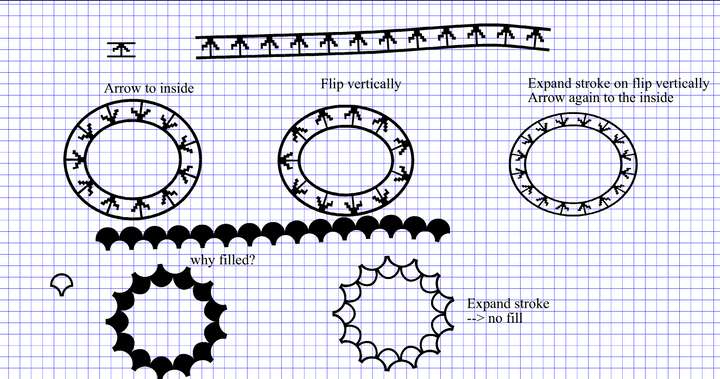
          @vectoradmin did send you one file with two vector brush examples.
          here a screenshot of the file.
          0_1643631209003_Screenshot 2022-01-31 at 20.12.09.png

          As said I am new to VS, and I could be mistaken with some things.

          VectorStylerV 1 Reply Last reply Reply Quote 1
          • M Offline
            MajorTom @b77
            last edited by

            @b77 Thanks for the tip, I will try it the next time it happens.

            1 Reply Last reply Reply Quote 1
            • VectorStylerV Offline
              VectorStyler @MajorTom
              last edited by

              @MajorTom Got it! The problem here is that all these brush types set the fill mode to Winding Fill mode.
              Workaround: edit the original shape, and reverse (Object -> Shape -> Reverse Path Direction) the path direction.
              Then create a new pattern brush.

              I open a bug on this one, and try to avoid setting the fill mode automatically to Winding Mode when doing brushes.

              M 1 Reply Last reply Reply Quote 1
              • M Offline
                MajorTom @VectorStyler
                last edited by

                @vectoradmin
                Thanks I will try the Reverse Path Direction, in the mean time I did check but the Winding Fill is not active for that shapes.
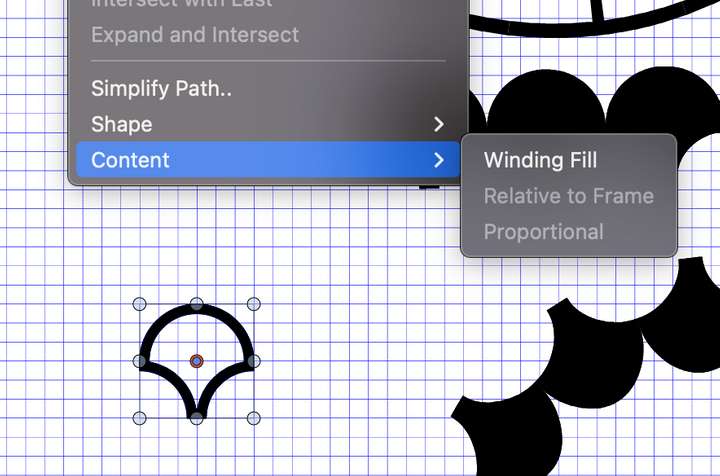
                0_1643637877092_Screenshot 2022-01-31 at 22.03.41.png

                One additional question. For the brush with the arrow.
                Should the arrow point to the out side or to the inside on the circle.
                I would like to have the arrow to point to the outside.

                Thanks a lot for the quick response here.

                VectorStylerV 1 Reply Last reply Reply Quote 0
                • VectorStylerV Offline
                  VectorStyler @MajorTom
                  last edited by

                  @MajorTom said in New user: Issues or user error?:

                  @vectoradmin in the mean time I did check but the Winding Fill is not active for that shapes.

                  Yes! And in this case it should be active, to display the shape as it will be displayed in the Pattern Brush, where this option is automatically on.

                  M 2 Replies Last reply Reply Quote 0
                  • M Offline
                    MajorTom @VectorStyler
                    last edited by

                    @vectoradmin Got it.

                    1 Reply Last reply Reply Quote 0
                    • M Offline
                      MajorTom @VectorStyler
                      last edited by

                      @vectoradmin I did send you yesterday two addition files, where I encounter freezes of VS.

                      1. Example_1 file when exporting (Command-E) a PNG or PDF, the application does freeze and somehow even the Finder in macOS does restart. After about 2 minutes computer is back again.
                      2. Example_2 file, when I make a copy Command-C, the application does freeze and same behaviour as above.

                      Behaviour is 100% reproducible, if after restart of the computer or VS.

                      VectorStylerV 2 Replies Last reply Reply Quote 0
                      • VectorStylerV Offline
                        VectorStyler @MajorTom
                        last edited by

                        @MajorTom I did not get these files, will send you an email.

                        1 Reply Last reply Reply Quote 0
                        • VectorStylerV Offline
                          VectorStyler @MajorTom
                          last edited by

                          @MajorTom Crash issue with Example_1 is replicated. Temporary workaround is to disable GPU compute use when exporting with large resolutions.

                          GPU compute can be set in Preferences -> Performance -> Compute Engine

                          M 1 Reply Last reply Reply Quote 0
                          • M Offline
                            MajorTom @VectorStyler
                            last edited by

                            @vectoradmin

                            1. Example 2 freeze
                              I think I found the root cause for the Example_2 reset.
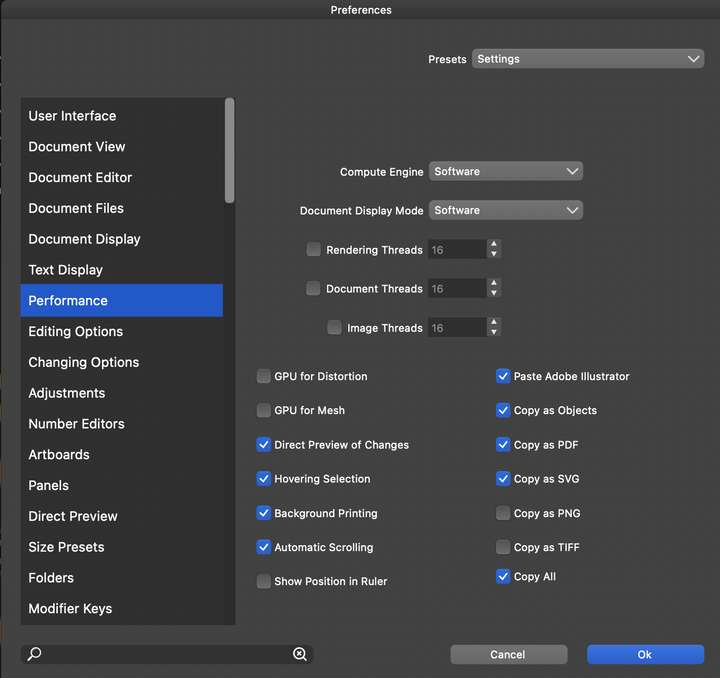
                              0_1643854248425_Screenshot 2022-02-03 at 10.09.52.png
                              I have Copy as PDF, Copy as SVG, Copy as Objects active.
                              If I deactivate Copy as SVG and Copy as PDF, no reset. So it seem that one of the two other checkboxes is causing the freeze of the VS or the combination of that all.
                              Hope that helps you to figure out the freeze. perhaps stupid from my side the check them all, but as long as I can do it :-).

                            2. Example 1 freeze
                              By the way, with the settings from the screenshot, VS still does freeze at the export of Example_1. CPU load maxed out to 1600% for VS and no further reaction. Did kill VS after 3 minutes.

                            VectorStylerV 2 Replies Last reply Reply Quote 0
                            • VectorStylerV Offline
                              VectorStyler @MajorTom
                              last edited by

                              @MajorTom I will try to fix this issue.

                              1 Reply Last reply Reply Quote 0
                              • VectorStylerV Offline
                                VectorStyler @MajorTom
                                last edited by

                                @MajorTom The "Document Display Mode" should be set back to Metal. This does not affect the exporting issue, and the Software mode can be very slow for editing.


                                1 Reply Last reply Reply Quote 0
                                • First post
                                  Last post