New user: Issues or user error?
-
@MajorTom Got it! The problem here is that all these brush types set the fill mode to Winding Fill mode.
Workaround: edit the original shape, and reverse (Object -> Shape -> Reverse Path Direction) the path direction.
Then create a new pattern brush.I open a bug on this one, and try to avoid setting the fill mode automatically to Winding Mode when doing brushes.
-
@vectoradmin
Thanks I will try the Reverse Path Direction, in the mean time I did check but the Winding Fill is not active for that shapes.
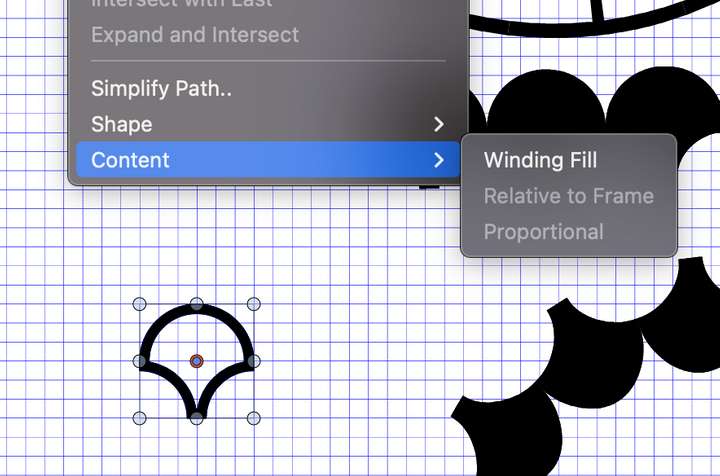
One additional question. For the brush with the arrow.
Should the arrow point to the out side or to the inside on the circle.
I would like to have the arrow to point to the outside.Thanks a lot for the quick response here.
-
@MajorTom said in New user: Issues or user error?:
@vectoradmin in the mean time I did check but the Winding Fill is not active for that shapes.
Yes! And in this case it should be active, to display the shape as it will be displayed in the Pattern Brush, where this option is automatically on.
-
@vectoradmin Got it.
-
@vectoradmin I did send you yesterday two addition files, where I encounter freezes of VS.
- Example_1 file when exporting (Command-E) a PNG or PDF, the application does freeze and somehow even the Finder in macOS does restart. After about 2 minutes computer is back again.
- Example_2 file, when I make a copy Command-C, the application does freeze and same behaviour as above.
Behaviour is 100% reproducible, if after restart of the computer or VS.
-
@MajorTom I did not get these files, will send you an email.
-
@MajorTom Crash issue with Example_1 is replicated. Temporary workaround is to disable GPU compute use when exporting with large resolutions.
GPU compute can be set in Preferences -> Performance -> Compute Engine
-
@vectoradmin
-
Example 2 freeze
I think I found the root cause for the Example_2 reset.
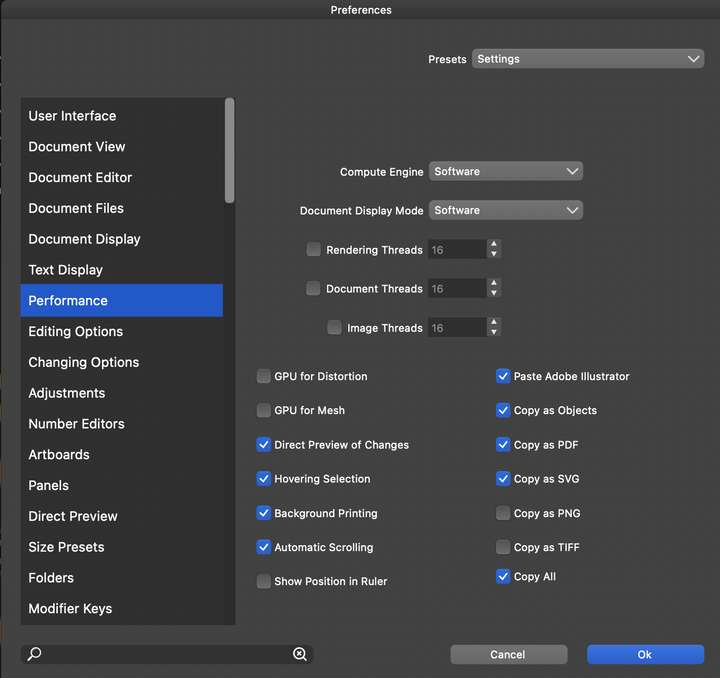
I have Copy as PDF, Copy as SVG, Copy as Objects active.
If I deactivate Copy as SVG and Copy as PDF, no reset. So it seem that one of the two other checkboxes is causing the freeze of the VS or the combination of that all.
Hope that helps you to figure out the freeze. perhaps stupid from my side the check them all, but as long as I can do it :-). -
Example 1 freeze
By the way, with the settings from the screenshot, VS still does freeze at the export of Example_1. CPU load maxed out to 1600% for VS and no further reaction. Did kill VS after 3 minutes.
-
-
@MajorTom I will try to fix this issue.
-
@MajorTom The "Document Display Mode" should be set back to Metal. This does not affect the exporting issue, and the Software mode can be very slow for editing.
