VectorStyler
    • Categories
    • Unread
    • Recent
    • Tags
    • Popular
    • Register
    • Login

    Incremental input option for vertices count in Star panel

    Scheduled Pinned Locked Moved Features and Ideas
    14 Posts 4 Posters 14.6k Views 3 Watching
    Loading More Posts
    • Oldest to Newest
    • Newest to Oldest
    • Most Votes
    Reply
    • Reply as topic
    Log in to reply
    This topic has been deleted. Only users with topic management privileges can see it.
    • BoldlineB Offline
      Boldline
      last edited by

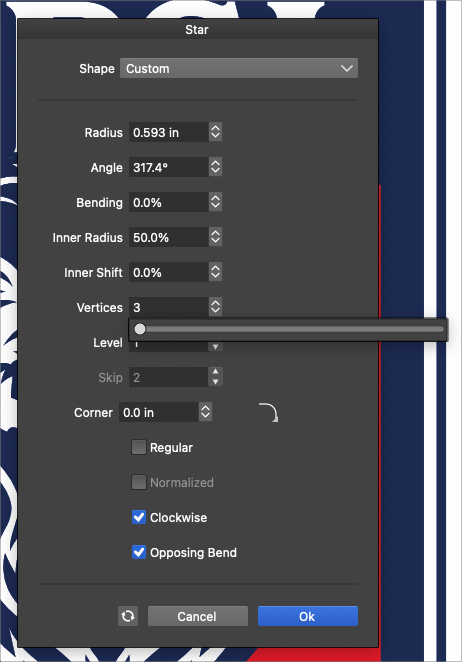
      This is another example where making the arrows for number of vertices work for incremental increases and decreases would be helpful, alongside the slider option -
      usually I'm adjusting the number of vertices by a couple here or there - only occasionally I would be increasing the amount dramatically so having both options would be helpful
      0_1646672891684_dc7d55f1-2b20-456f-afe3-a6aa214173d1-BLD 2022-03-07 at 12.05.44.png

      🍎 macOS Tahoe 26.2, Mac mini (M1, 2020), Chip Apple M1, Memory 16 GB
      Cintiq 27QHD Display and LG Ultra HD Display

      S VectorStylerV 2 Replies Last reply Reply Quote 1
      • S Offline
        Subpath @Boldline
        last edited by

        @Boldline

        Works with the Cursor Keys Up ( increases )
        and Down ( decreases )

        If that's what you mean.

        Win 11
        CPU: AMD Ryzen 5 9600X, 6-core.
        GPU: Nvidia Geforce RTX 5070.

        BoldlineB 1 Reply Last reply Reply Quote 1
        • VectorStylerV Offline
          VectorStyler @Boldline
          last edited by

          @Boldline There is a task to improve how the sliders work.

          One issue here is that having both the up/down scroll (as in the Level field) and the popup slider could be difficult.

          1 Reply Last reply Reply Quote 0
          • BoldlineB Offline
            Boldline @Subpath
            last edited by

            @Subpath said in Incremental input option for vertices count in Star panel:

            Works with the Cursor Keys Up ( increases )
            and Down ( decreases )

            ok I see that now, if I highlight it first, I can use the arrow keys to adjust it incrementally. thanks!

            🍎 macOS Tahoe 26.2, Mac mini (M1, 2020), Chip Apple M1, Memory 16 GB
            Cintiq 27QHD Display and LG Ultra HD Display

            S 1 Reply Last reply Reply Quote 1
            • S Offline
              Subpath @Boldline
              last edited by

              @Boldline said in Incremental input option for vertices count in Star panel:

              @Subpath said in Incremental input option for vertices count in Star panel:

              Works with the Cursor Keys Up ( increases )
              and Down ( decreases )

              ok I see that now, if I highlight it first, I can use the arrow keys to adjust it incrementally. thanks!

              works here for me even without highlighting

              Win 11
              CPU: AMD Ryzen 5 9600X, 6-core.
              GPU: Nvidia Geforce RTX 5070.

              BoldlineB 1 Reply Last reply Reply Quote 0
              • BoldlineB Offline
                Boldline @Subpath
                last edited by

                @Subpath @vectoradmin it does not seem to work that way for me unless I highlight the number first. Tried it a couple different times to see

                🍎 macOS Tahoe 26.2, Mac mini (M1, 2020), Chip Apple M1, Memory 16 GB
                Cintiq 27QHD Display and LG Ultra HD Display

                S VectorStylerV 2 Replies Last reply Reply Quote 0
                • S Offline
                  Subpath @Boldline
                  last edited by Subpath

                  @Boldline

                  works here, i use VS 1.1.020

                  Win 11
                  CPU: AMD Ryzen 5 9600X, 6-core.
                  GPU: Nvidia Geforce RTX 5070.

                  BoldlineB 1 Reply Last reply Reply Quote 0
                  • BoldlineB Offline
                    Boldline @Subpath
                    last edited by

                    @Subpath yeah I use the same build, but you are on windows and I am on mac - so that is potentially the difference

                    🍎 macOS Tahoe 26.2, Mac mini (M1, 2020), Chip Apple M1, Memory 16 GB
                    Cintiq 27QHD Display and LG Ultra HD Display

                    1 Reply Last reply Reply Quote 0
                    • VectorStylerV Offline
                      VectorStyler @Boldline
                      last edited by

                      @Boldline For me the number scrolling with keys works without highlight. Is this in a panel or in a modal view? (send a screenshot).

                      BoldlineB 1 Reply Last reply Reply Quote 0
                      • BoldlineB Offline
                        Boldline @VectorStyler
                        last edited by

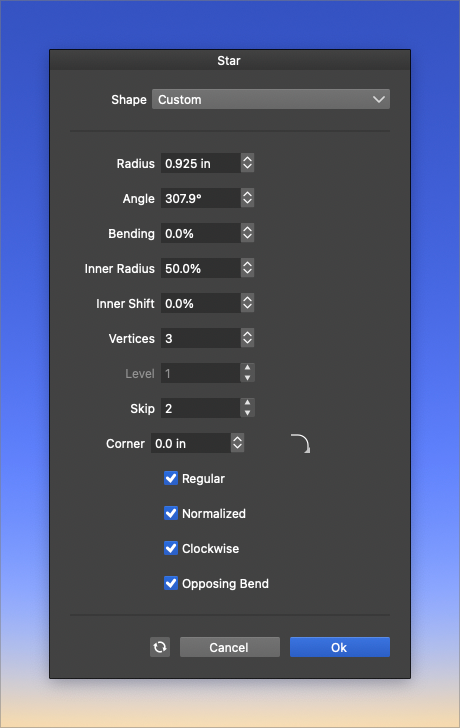
                        @vectoradmin I just figured out the issue - I had the slider active and so it was not letting me use the up and down arrows. When clicked off to hide the slider, I could adjust normally with the arrow keys again with and without the number being highlighted
                        0_1646682381723_aeea2539-332b-4497-a2d9-94b6706396e2-BLD 2022-03-07 at 14.46.12.png

                        🍎 macOS Tahoe 26.2, Mac mini (M1, 2020), Chip Apple M1, Memory 16 GB
                        Cintiq 27QHD Display and LG Ultra HD Display

                        VectorStylerV 1 Reply Last reply Reply Quote 1
                        • VectorStylerV Offline
                          VectorStyler @Boldline
                          last edited by

                          @Boldline yes, if the slider popover is active, it will consume the key input.

                          BoldlineB 1 Reply Last reply Reply Quote 0
                          • BoldlineB Offline
                            Boldline @VectorStyler
                            last edited by

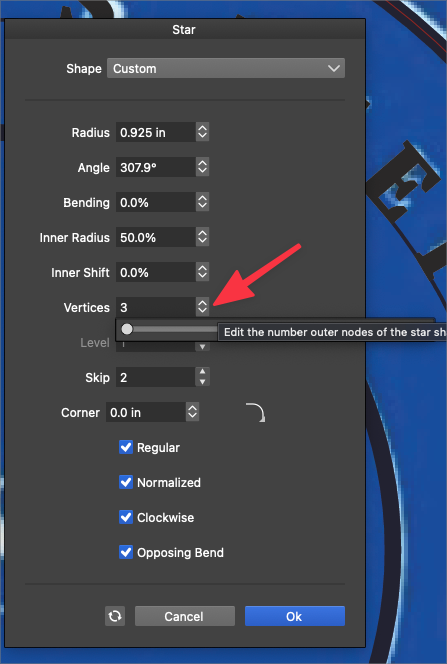
                            @vectoradmin said in Incremental input option for vertices count in Star panel:

                            @Boldline yes, if the slider popover is active, it will consume the key input.

                            I could still access it ok even when it was open
                            0_1646685741695_a217b3e5-022b-4942-bb73-bb9f7daf86ac-BLD 2022-03-07 at 15.41.46.png

                            🍎 macOS Tahoe 26.2, Mac mini (M1, 2020), Chip Apple M1, Memory 16 GB
                            Cintiq 27QHD Display and LG Ultra HD Display

                            1 Reply Last reply Reply Quote 0
                            • Devil DinosaurD Offline
                              Devil Dinosaur
                              last edited by

                              In most of my interface the increase/decrease arrows don't work. When I press it , it immediately shows the slider. Only some of the arrows work.

                              Fred.
                              MacBook Pro (M1) - MacOs Sonoma 14

                              VectorStylerV 1 Reply Last reply Reply Quote 0
                              • VectorStylerV Offline
                                VectorStyler @Devil Dinosaur
                                last edited by

                                @Devil-Dinosaur When pressing the up/down arrow button with the mouse it does open the slider, that is by design.
                                I was referring to pressing up/down arrow keys on the keyboard.

                                The editors where the up/down arrow buttons work as scroll buttons are a bit different:

                                • Vertices field has a popup slider.
                                • Level field has an up/down arrow for scrolling.

                                I will try to find a way to have both of these options, the problem is that I have not yet found a good design, and adding two buttons to each field is not the way to go.


                                1 Reply Last reply Reply Quote 0
                                • First post
                                  Last post